基本的使用者运行数据分析
Overview
This topic demonstrates a basic consumer-run analysis using the clean rooms API. The example shows how a provider can programmatically create and share a clean room with data, and a consumer can run an analysis against the provider's data. The provider defines the SQL queries that can be run against their data. A provider can define queries that query only the provider's data, only the consumer's data, or that join provider and consumer data.
You can download the full code example to upload and run on your Snowflake account.
The following diagram shows the data flow through the main components in a basic consumer-run analysis.
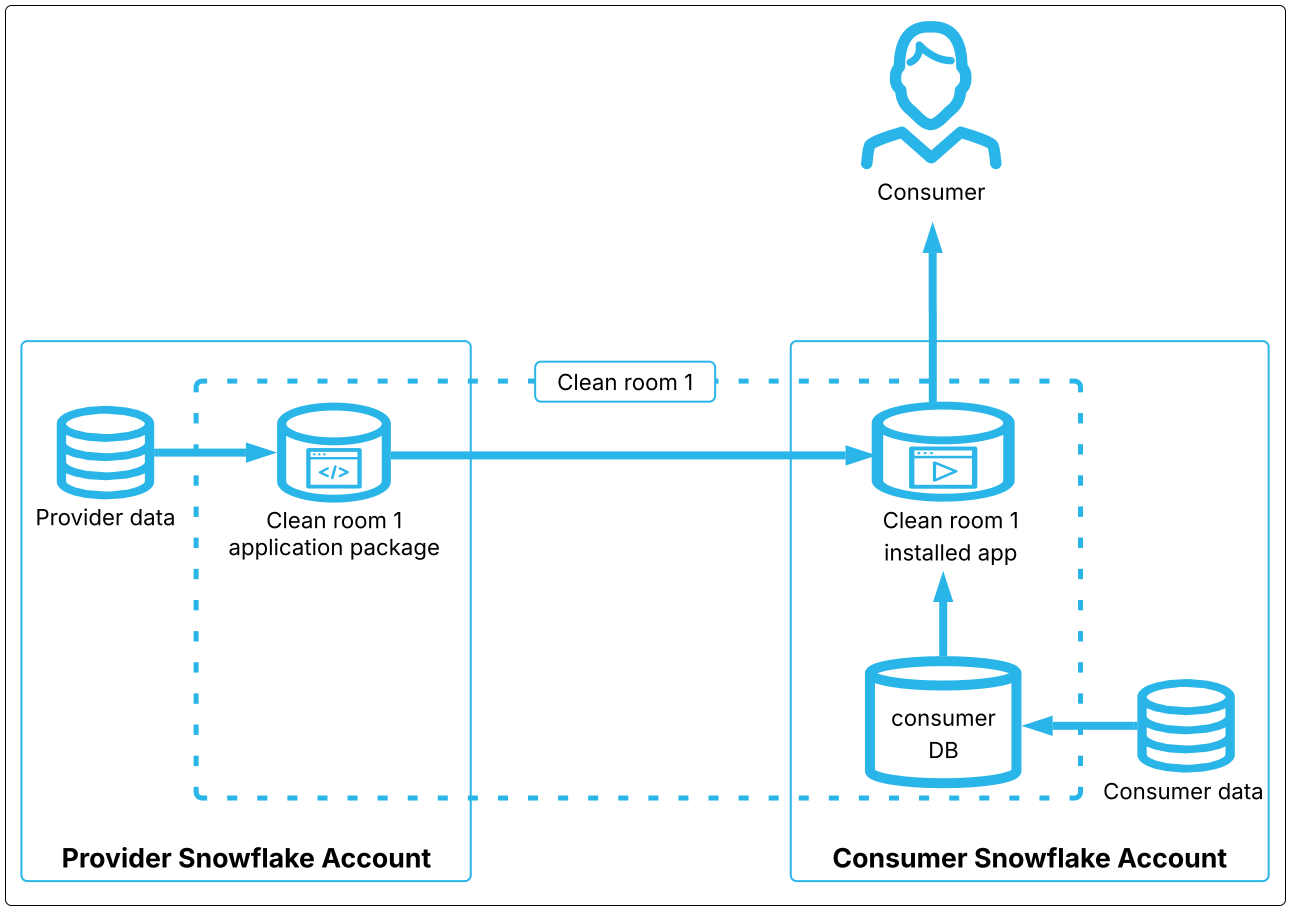
In a basic consumer-run analysis involving two parties, the provider and consumers link data into the clean room. This data is accessed using a secure view stored in the consumer DB in the clean room application package on the consumer's account.
During an analysis, the clean room app on the consumer's account uses the specified consumer and provider secure views, and the results are shared with the consumer.
提供商步骤
The following list shows the main steps to create, publish, and share a clean room with a consumer:
设置环境
To use the API, you must use a warehouse that SAMOOHA_APP_ROLE has privileges in. app_wh is one of a number of warehouses with access to the API. Choose the warehouse that is appropriate for your needs. (You can also use your own warehouse, if you choose.)
The SAMOOHA_APP_ROLE role is required to access the API.
创建 Clean Room
The next step is to create a new clean room. This is done with a single API call that specifies whether the clean room is for internal or external use. Internal clean rooms can be accessed only by consumers within the same organization; external clean rooms can be used by consumers outside the organization. For both clean room types, consumers must be invited to use the clean room to be able to access it.
当对外部 Clean Room 执行某些操作时,会触发额外的安全检查。发生这种情况时,您必须调用 provider.view_cleanroom_scan_status 查看安全扫描完成情况,然后才能继续进行下一步操作。
以下示例演示如何创建内部 Clean Room:
将数据链接到 Clean Room 中
Both the provider and consumer can link (import) tables, views, and other supported data objects into a clean room. When you link data, the API creates a hidden, secure view inside the clean room that is based on the linked source object. You reference the linked object by its source name, not its internal view name, in all clean room procedures.
Data linked into the clean room can't be accessed directly by any clean room collaborators. Linked data is accessed using a template imported into the clean room (unless you enable free-form SQL queries on your data).
Before an object can be linked into a clean room, the object must be registered. Registering an object grants proper access privileges to the SAMOOHA_APP_ROLE on the object. You can either register an object directly, or register a parent object (such as a database or schema) to access child objects. You can register an object in either the UI or the API.
小技巧
Registration is easier to perform and manage in the UI than the API.
Objects are registered at the account level, not the clean room level; you need to register an object only once per account, and it can be linked into any clean room in the account. (You can link only objects registered in your own account.) After you register an object, the object is available for linking by any clean room in the account. Learn more about registration.
下面的示例显示如何链接来自示例数据库 SAMOOHA_SAMPLE_DATABASE 中的 CUSTOMERS 表。当您在账户中安装 Clean Room 环境时,该数据库会自动注册,因此您无需再注册。您可以随时在 Clean Room 中链接或取消链接对象,操作结果会迅速同步给所有协作者。
设置联接策略
If you add a template to the clean room that allows the consumer to join on your data, you should set a clean room join policy on your data. A clean room join policy specifies which columns can be joined on in queries run by collaborators. Your own join policies don't constrain your own queries.
Clean rooms support a few types of data policies that you can set on linked data. These policies are similar to, but not the same as, the equivalent Snowflake policies, and are applied only on the internal view, not on the source data. Any Snowflake policies that are set on the source data are propagated to the views linked into a clean room. Clean room policies are set on the linked data only, not on the source data.
重要
The template is responsible for using JinjaSQL filters to enforce policies. If the template does not use policy filters, the policies will not be respected. Always put policy filters on templates that you write, and examine any templates that you run to confirm that they enforce clean room policies.
您只能对自己链接的数据设置策略;不能对任何其他方的数据设置策略。
以下示例显示如何设置一个联接策略,使已链接表中的两列可用于联接:
向 Clean Room 添加模板
A clean room template is a valid JinjaSQL template that typically evaluates to a SQL query. A template, sometimes called an analysis, can be passed arguments by the caller, and can access any data linked into the clean room. Both providers and consumers can add templates into a clean room and run them.
Snowflake provides a few standard templates, but you will probably write your own custom templates.
Any clean room policies that you set are enforced only if the template includes policy filters in the template, so make sure that the templates you add to a clean room include these filters. For more information about policies, see 了解 Snowflake Data Clean Room 策略.
默认情况下,只有使用者才能运行模板。如果 提供商想要运行模板,则必须征得使用者的许可。同样,如果 使用者想要上传模板,也必须征得提供商的许可。
有关创建自定义模板的更多信息,请阅读 向 Clean Room 添加自定义模板 和 Design custom templates。
以下示例显示如何将 Snowflake 提供的模板添加到 Clean Room 中:
设置列策略
Clean room 列策略指定在协作者运行的查询中,您表中的哪些列可以被投影。列策略同时与列和模板相关联,因此可以针对不同模板定义不同列为可投影。模板必须存在于 Clean Room 中,然后才能为该模板设置列策略。
Column policies, like all policies, are overwrite-only; this means that setting column policies completely overwrites any existing column policies set by that account. Both the provider and the consumer can set column policies on their data. Learn more about column policies.
以下示例显示如何允许从之前链接的 Clean Room 示例数据库中投影四列:
设置默认版本
Clean Room 是版本控制的原生应用程序。某些操作(如向 Clean Room 添加代码)会生成应用程序的新补丁版本。使用者必须在其账户中安装 Clean Room。他们安装的版本基于您指定的默认版本号。如果您稍后发布了 Clean Room 的新版本并增加默认版本号,则使用者安装的所有版本都将自动更新,新安装的版本将默认使用新版本。阅读有关 Clean Room 版本控制的更多信息。
以下示例显示如何将 Clean Room 的默认版本设置为 V1.0.0,这是 Clean Room 的初始版本(如果您尚未上传任何代码):
发布 Clean Room
按照以下示例发布或重新发布 Clean Room。首次调用此过程时,会使 Clean Room 对您已共享的所有使用者可见并可安装。每当您进行重大更改时,例如更新默认版本或对 Clean Room UI 进行特定更改时,都应调用此过程。
现在,使用者即可安装 Clean Room、链接数据、设置策略并运行模板,如下所述。
小技巧
When you no longer need a clean room, you should delete the clean room on the provider and consumer accounts
(provider.drop_cleanroom and consumer.uninstall_cleanroom). There is a limit to the number of clean rooms and
collaborators per account. When you leave many unused clean rooms in your account, you can reach your quota.
使用者步骤
提供商发布 Clean Room 后,所有被添加为协作者的使用者都可以使用 UI 或 API 来查看并安装 Clean Room。本节介绍使用者如何安装 Clean Room 并使用 API 进行分析。
Here is a quick overview of the steps the consumer takes to install a clean room and run an analysis:
设置环境
Like the provider, the consumer must use a warehouse that SAMOOHA_APP_ROLE can access. However, unlike the provider, the consumer can either use the SAMOOHA_APP_ROLE role directly for full API access, or a clean room administrator in that account can grant a more limited role that gives privileges to run a subset of the API for consumers. This limited role, sometimes generically called a "run role," is granted by a user with full clean room privileges. Learn how to grant limited API access.
运行角色不允许安装 Clean Room,因此您必须使用 SAMOOHA_APP_ROLE,如以下示例所示:
安装 Clean Room
以下代码片段显示了如何列出您已被邀请安装的所有 Clean Room:
安装提供商与您共享的 Clean Room,如以下示例所示。安装 Clean Room 时,必须指定提供商的账户定位器。
小技巧
Clean Room 既有名称也有 ID。对于通过使用 API 创建的 Clean Room,在任何需要 Clean Room 名称 的 API 过程中,请使用 Clean Room 名称。对于通过 UI 创建的 Clean Room,在任何需要 Clean Room 名称的 API 过程中,请使用 Clean Room ID 而不是名称。
在 Clean Room UI 中,会将使用 API 创建的 Clean Room 标记为 Supported with Developer APIs。
添加数据并设置策略
If the clean room templates allow the consumer to include their own data in a query, the consumer registers data, links data, and sets
policies like the provider does. Be sure to use the consumer versions of the procedures, as shown in the following example:
提供商的联接策略显示了哪些提供商列可以用于联接。此示例显示如何检查您可以联接的提供商列:
A provider needs the consumer's approval to run a template in the clean room. As a result, most consumers don't bother setting policies on the tables that they link in. Nevertheless, we recommend that you consider adding policies in case a provider asks to run a template later, because you might forget to add appropriate policies at that time.
If you do set policies, they are enforced only if the template includes a join_policy or column_policy
filter to the column in the template, so make sure that the templates you add to a clean room include these filters to enforce your
policies. To examine the templates in a clean room, call consumer.view_added_templates. For more information about policies,
see 了解 Snowflake Data Clean Room 策略.
运行分析
在运行模板之前,您通常需要检查模板以查看其功能以及可接受的变量,然后检查 Clean Room 中有哪些提供商的表可用。
检查模板
您可以列出 Clean Room 中的模板,并查看每个模板的代码(除非提供商明确:ref:混淆了代码 <dcr_provider_add_custom_sql_template>)。这有助于您更好地理解查询。您也可以请求 Clean Room 解析模板,并显示在运行代码时可传入哪些变量。
您可以传入要在查询中使用的表列表,这取决于模板的设计。任何链接到 Clean Room 的表都可以传入模板。
Many templates also support variables that you can specify at run time; for example, to match a particular value or to specify which columns to show. Ideally, the provider should let you know what the template does and what arguments it accepts. But typically, you also want to examine a template to see the code. The following snippet lists the templates added to the clean room by any collaborator, and gets the arguments supported for a specific template:
小技巧
如果您看到模板中使用的 my_table 数组变量,则其中包含您在运行模板时传入的使用者表名称列表。如果您看到 source_table 数组变量,则其中包含您在运行模板时传入的提供商表名称列表。
查看可用数据
您可以列出您和提供商在 Clean Room 中已链接的数据集,如以下示例所示:
传入表名时,使用这些过程结果中的表名,而不是 视图名称。
运行模板
在前两个步骤中,您已了解自己拥有哪些数据以及可以传入哪些变量。现在,您可以开始运行分析了。
根据查询和数据大小,您可能需要将仓库大小更改为 更合适的级别。
The following example shows how a user might call a template that takes both consumer and provider tables, and two variables:
dimensions, which is used as a grouping column, and an optional where_clause, which is used in a WHERE clause in the query.
该模板针对单个提供商表运行查询,因此该请求将省略使用者表。
在以下示例中,请注意 dimensions 值是一个以 p 为前缀的列名。p 表示该列来自您传入的提供商表。列名通常需要加上 p 或 c,分别表示列来源于提供商表或使用者表,以避免列名歧义。但是,此要求非常依赖于具体模板。您需要与模板提供商沟通,或检查模板代码,以了解何时需要这些前缀。
示例代码
The following worksheet files demonstrate how to create, share, and run a clean room analysis.
Download the following examples, and then upload them as worksheet files in your Snowflake account. You need separate accounts for the provider and consumer, each with the clean rooms API installed. See instructions to upload a SQL worksheet into your Snowflake account.