关于 Openflow
Snowflake Openflow 是一项集成服务,可将任何数据源和任何目的地与数百个支持结构化和非结构化文本、图像、音频、视频和传感器数据的处理器连接起来。Openflow 基于 Apache NiFi (https://nifi.apache.org/) 构建,可让您在自己的云中运行完全托管的服务,实现完全控制。
备注
Openflow 平台目前可供部署在客户自有的 AWS 和 Snowpark Container Services VPCs 中。
本主题介绍了 Openflow 的主要功能、其优点、架构和工作流程以及用例。
主要功能和优点
- 开放且可扩展
Openflow 是一个由 Apache NiFi 驱动的可扩展托管服务,支持从任意数据源到任意目的地的处理器构建与扩展。
- 统一的数据集成平台
Openflow 使数据工程师能够通过完全托管的服务处理复杂的双向数据提取和加载,该服务可以在您自己的 VPC 内部或在 Snowflake 部署内进行部署。
- 企业级特性
Openflow 为数据集成提供开箱即用的安全性、合规性、可观察性和可维护性 hook。
- 支持各种类型数据的高速引入
无论是批处理还是流式模式,Openflow 都能在统一的平台上高速引入并传输到 Snowflake,几乎无限扩展。
- 持续引入多模态数据,助力 AI 处理
Near real-time unstructured data ingestion, so you can immediately chat with your data coming from sources such as Sharepoint, Google Drive, and so on.
Openflow deployment types
自带云 (BYOC) 和 Snowpark Container Services (SPCS) 版本同时支持 Openflow。
- Openflow - Snowflake Deployment
 Feature --- Generally Available
Snowflake Openflow – Snowflake 部署适用于 AWS 和 Azure 商业区域 中的所有账户。
Openflow - Snowflake Deployment, using Snowpark Container Services (SPCS), provides a streamlined and integrated solution for connectivity. Because SPCS is a self-contained service within Snowflake, it's easy to deploy and manage. SPCS offers a convenient and cost-effective environment for running your data flows. A key advantage of Openflow - Snowflake Deployment is its native integration with Snowflake's security model, which allows for seamless authentication, authorization, network security and simplified operations.
When configuring Openflow - Snowflake Deployments, follow the process as outlined in Setup Openflow - Snowflake Deployment.
- Openflow - Bring Your Own Cloud
- Feature --- Generally Available
Snowflake Openflow BYOC deployments are available to all accounts in AWS 商业区域.
Openflow - Bring Your Own Cloud (BYOC) provides a connectivity solution that you can use to connect public and private systems securely and handle sensitive data preprocessing locally, within the secure bounds of your organization's cloud environment. BYOC refers to a deployment option where the Openflow data processing engine, or data plane, runs within your own cloud environment while Snowflake manages the overall Openflow service and control plane.
When configuring BYOC deployments, follow the process as outlined in 设置 Openflow - BYOC.
用例
如果您想以最少的管理工作,从任意源提取数据并将其传输到任意目的地,同时借助 Snowflake 内建的数据安全与治理能力,那么 Openflow 是您的理想选择。
Openflow 用例包括:
安全
Openflow 使用行业领先的安全功能,有助于确保您可以为您的账户和用户以及您在 Snowflake 中存储的所有数据配置最高级别的安全性。一些关键方面包括:
- 身份验证
Runtimes use Snowflake Managed Token as the default and recommended authentication method.
Snowflake Managed Token works consistently across SPCS and BYOC deployment types.
BYOC deployments can alternatively use key-pair authentication for explicit credential management.
- 授权
Openflow supports fine-grained roles for RBAC.
ACCOUNTADMIN to grant privileges to be able to create deployments and runtimes.
- 传输中加密
Openflow 连接器支持 TLS 协议,可通过标准 Snowflake 客户端进行数据引入。
Openflow 部署和 Openflow 控制平面之间的所有通信均使用 TLS 协议进行加密。
- 密钥管理 (BYOC)
与 AWS 密钥管理器或 Hashicorp Vault 集成。有关更多信息,请参阅 配置文件中的加密密码 (https://nifi.apache.org/docs/nifi-docs/html/administration-guide.html#encrypt-config_tool)。
- 专用链接支持
Openflow 连接器兼容使用入站 AWS PrivateLink 向 Snowflake 读取和写入数据。
- Tri-Secret Secure 支持
Openflow 连接器与 Tri-Secret Secure 兼容,可用于向 Snowflake 写入数据。
Snowflake Managed Token authentication
Snowflake Managed Token is the recommended and default authentication method for Openflow runtimes to connect to Snowflake. This authentication method works consistently across both Openflow - Snowflake Deployments and BYOC deployments. Snowflake Managed Token provides a unified and simplified experience for configuring Snowflake connectivity.
Key benefits
- Simplified configuration
Snowflake Managed Token eliminates the need to generate, store, and rotate long-lived credentials such as key pairs. The token is automatically managed by Snowflake, reducing operational overhead.
- Unified across deployment types
Whether you deploy Openflow in Snowpark Container Services (SPCS) or Bring Your Own Cloud (BYOC), you configure authentication the same way using the
SNOWFLAKE_MANAGEDauthentication strategy.- Enhanced security
Tokens are short-lived and automatically refreshed, minimizing the risk associated with credential exposure.
How it works
When you configure a connector or processor to connect to Snowflake, select SNOWFLAKE_MANAGED
as the Snowflake Authentication Strategy. The runtime automatically obtains and manages
the token used to authenticate to Snowflake on your behalf.
The behavior of Snowflake Managed Token varies based on your deployment type:
- Openflow - Snowflake Deployments
When running in a Snowflake-managed deployment, the runtime uses SPCS session tokens provided natively by the SPCS environment. These tokens are available at runtime and require no additional configuration.
- BYOC deployments
When running in a BYOC deployment, the runtime uses workload identity federation to authenticate to Snowflake. The runtime automatically exchanges its cloud provider identity (for example, an AWS IAM role) for a Snowflake token.
备注
To use Snowflake Managed Token in BYOC deployments, you must first configure runtime roles for your deployment.
When to use Snowflake Managed Token
Use Snowflake Managed Token for:
All new connector configurations in both SPCS and BYOC deployments.
Migrations from key-pair authentication to the simplified, managed authentication model.
Scenarios where you want to avoid managing key pairs or other long-lived credentials.
Alternative authentication methods
While Snowflake Managed Token is recommended, BYOC deployments also support key-pair authentication
(KEY_PAIR) for cases where you require explicit credential management.
For more information about key-pair authentication, see 密钥对身份验证和密钥对轮换.
For information about the underlying authentication mechanisms, see the following:
Workload identity federation: Information about the authentication mechanism used in BYOC deployments.
Snowpark Container Services:使用服务: Information about how SPCS services authenticate to Snowflake.
架构
下图说明了 Openflow 的架构:
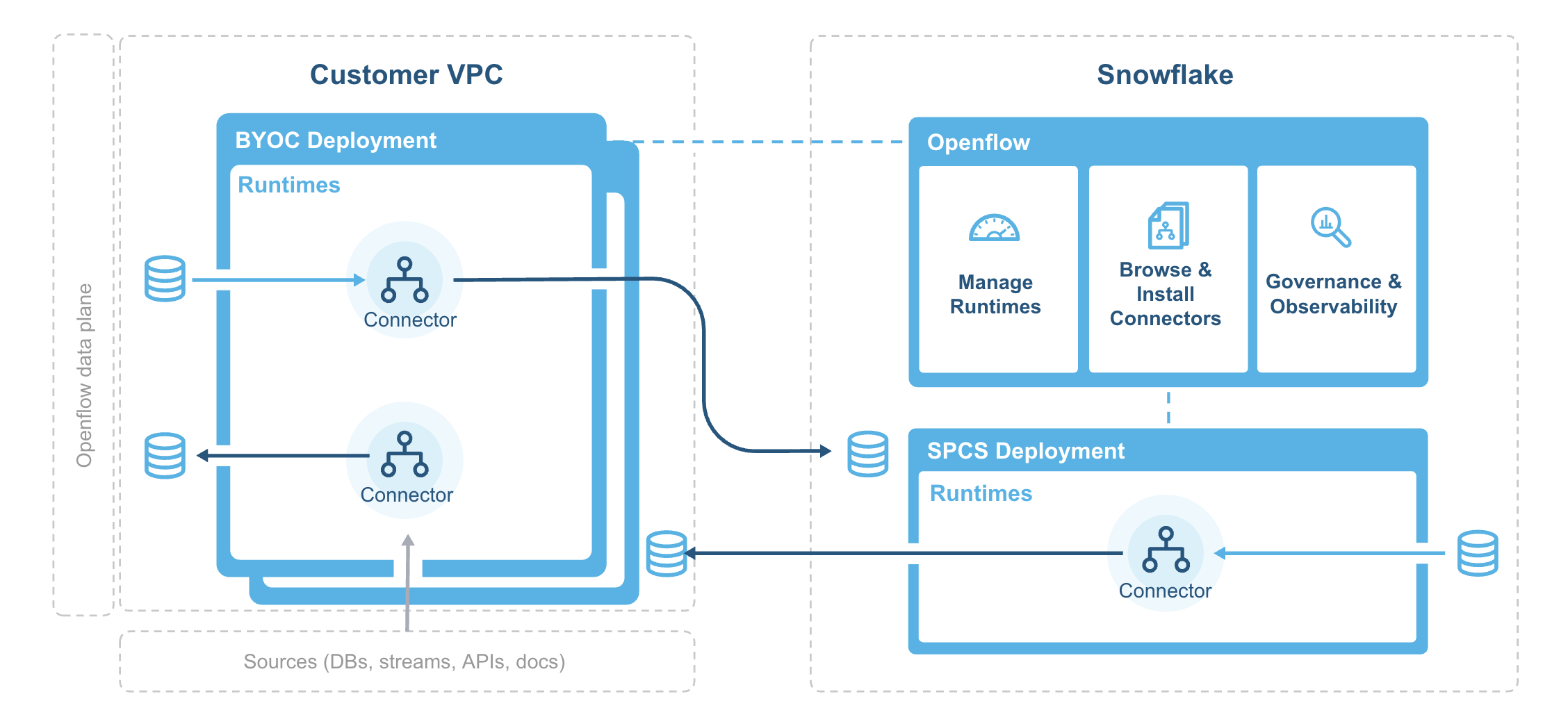
部署代理负责在您的 VPC 中安装并引导 Openflow 的部署基础架构,并定期从 Snowflake 的系统镜像注册中心同步容器镜像。
Openflow 组件包括:
- Deployments
A deployment is where your data flows execute, within individual runtimes. You will often have multiple runtimes to isolate different projects, teams, or for SDLC reasons, all associated with a single deployment. Deployments come in two types Bring Your Own Cloud (BYOC) and Openflow - Snowflake.
- 控制平面
The control plane is a layer containing all components used to manage and observe Openflow runtimes. This includes the Openflow service and API, which users interact with via the Openflow canvas or through interaction with Openflow APIs. On Openflow - Snowflake Deployments, the Control Plane consists of Snowflake-owned public cloud infrastructure and services as well as the control plane application itself.
- BYOC deployments
BYOC deployments are deployments acting as containers for runtimes that are deployed in your cloud environment. They incur charges based on their compute, infrastructure, and storage use. See Openflow BYOC 成本和扩展注意事项 for more information.
- Openflow - Snowflake Deployments
Openflow - Snowflake Deployments are containers for runtimes and are deployed using a compute pool. They incur utilization charges based on their uptime and usage of compute. See Openflow Snowflake 部署成本和扩展注意事项 for more information.
- 运行时
Runtimes host data pipelines, with the framework providing security, simplicity, and scalability. You can deploy Openflow runtimes in your VPC using Openflow. You can deploy Openflow connectors to your runtimes, and also build completely new pipelines using Openflow processors and controller services.
- Openflow - Snowflake Deployment 运行时
Openflow - Snowflake Deployment Runtimes are deployed as Snowpark Container Services service to an Openflow - Snowflake Deployment deployment, which is represented by an underlying compute pool. Customers request a Runtime through the deployment, which executes a request on behalf of the user to service. Once created, customers access it via a web browser at the URL generated for that underlying service.