Snowpipe Streaming high-performance architecture
Snowpipe Streaming 的高性能架构专为数据密集型的现代组织打造,能够实现近实时见解。这种下一代架构显著提高了实时引入 Snowflake 的吞吐量、效率和灵活性。
有关经典架构的信息,请参阅 Snowpipe Streaming classic architecture。有关经典 SDK 和高性能 SDK 之间的区别,请参阅 Comparison between Snowpipe Streaming high-performance and classic SDKs。
软件要求
Java
需要 Java 11 或更高版本。
SDK maven 存储库:snowpipe-streaming Java SDK (https://central.sonatype.com/artifact/com.snowflake/snowpipe-streaming)
API 参考:Java SDK 参考
Python
需要 Python 版本 3.9 或更高版本。
SDK PyPI 存储库:snowpipe-streaming Python SDK (https://pypi.org/project/snowpipe-streaming/)
API 参考:Python SDK 参考
主要功能
吞吐量和延迟:
高吞吐量:每张表支持高达 10 GB/s 的引入速度。
近实时见解:实现端到端引入,查询延迟在 5 到 10 秒内。
计费:
简单、透明、基于吞吐量的计费。有关更多信息,请参阅 Snowpipe Streaming high-performance architecture: Understand your costs。
灵活引入:
Java SDK 和 Python SDK:将新型
snowpipe-streamingSDK 与基于 Rust 的客户端核心结合使用,以提高客户端性能,降低资源使用量。REST API:提供直接引入路径,简化轻量级工作负载、IoT 设备数据和边缘部署的集成。
备注
我们建议您优先选择 Snowpipe Streaming SDK 而非 REST API,以获得更优的性能和更顺畅的入门体验。
数据优化处理:
传输中的数据转换:支持在引入期间使用 PIPE 对象内的 COPY 命令语法清理和重塑数据。
增强的通道可见性:主要通过 Snowsight 中的 通道历史 视图和新增的
GET_CHANNEL_STATUSAPI 增强对引入状态的了解。
Apache Iceberg™ table support:
Stream data into Snowflake-managed Iceberg tables, including both Iceberg v2 and Iceberg v3 tables.
For more information, see Apache Iceberg™ 表的 Snowpipe Streaming 高性能架构.
此架构推荐用于:
持续引入大容量的流式工作负载。
为时间敏感的决策提供实时分析和仪表板。
高效集成来自 IoT 设备和边缘部署的数据。
寻求透明、可预测且基于吞吐量计费的流式引入方案的组织。
新概念:PIPE 对象
该架构继承了 Snowpipe Streaming Classic 中的核心概念(如通道和偏移令牌),同时引入了一个核心组件:PIPE 对象。
PIPE 对象是一个在 Snowflake 中具有名称的对象,用作所有流式引入数据的入口点和定义层。它提供以下功能:
数据处理定义:定义流式数据在写入目标表之前的处理方式,包括用于转换或架构映射的服务端缓冲机制。
允许数据转换:通过结合 COPY 命令的转换语法,支持数据在传输中的实时处理(例如:筛选、列重排、简单表达式等)。
表功能支持:支持将定义的群集密钥、DEFAULT 值列和 AUTOINCREMENT 列(或 IDENTITY 列)引入到表中。
架构管理:帮助定义传入流数据的预期架构,并将其映射到目标表列,从而实现服务器端架构验证。
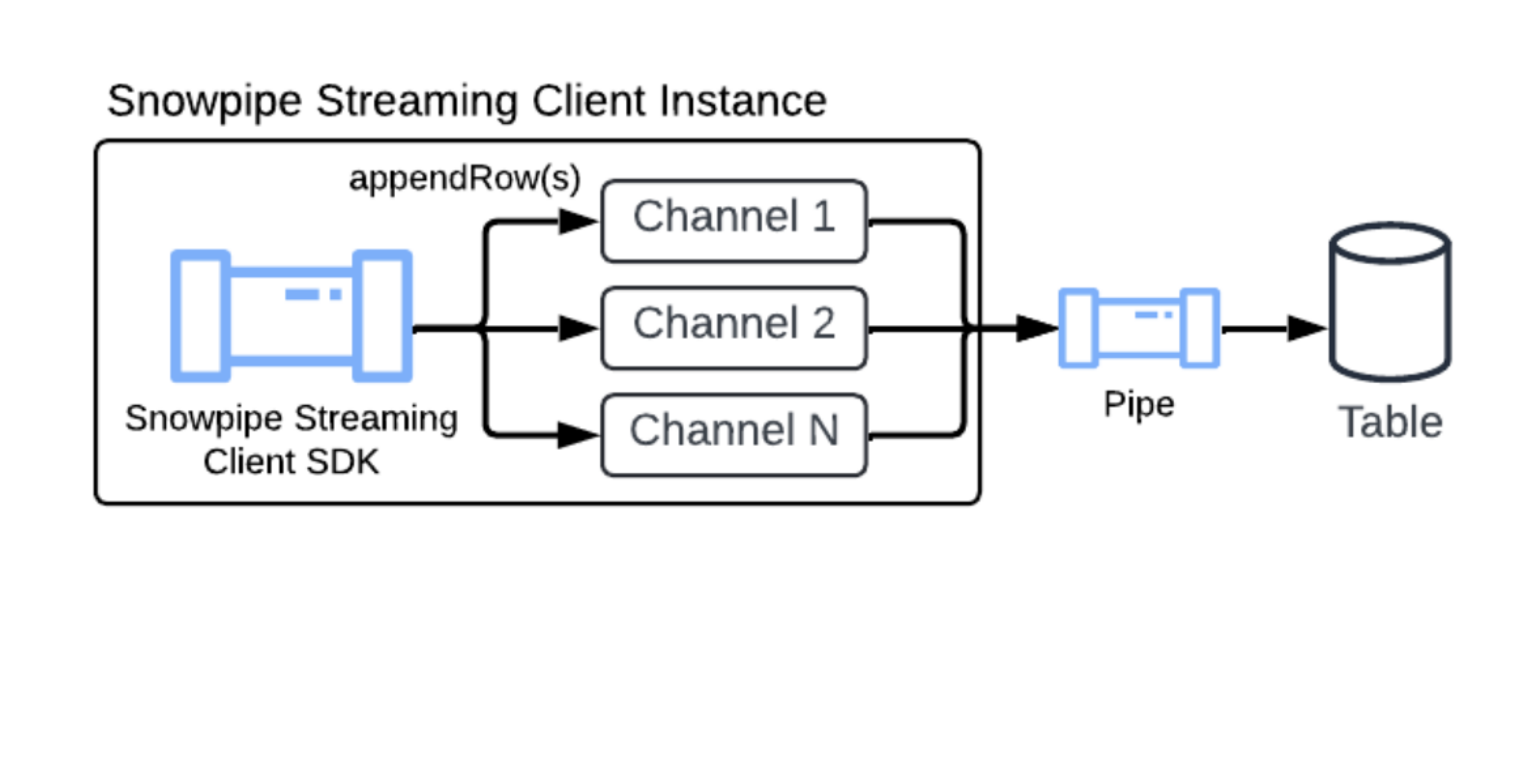
Default pipe
To simplify the setup process for Snowpipe Streaming, Snowflake provides a default pipe for every target table. This lets you start streaming data immediately without needing to manually execute CREATE PIPE DDL statements.
The default pipe is implicitly available for any table and offers a simplified, fully managed experience:
On-demand creation: The default pipe is created on demand only after the first successful pipe-info or open-channel call is made against the target table. Customers can only view or describe the pipe (using SHOW PIPES or DESCRIBE PIPE) after it has been instantiated by one of these calls.
Naming convention: The default pipe follows a specific, predictable naming convention:
Format:
<TABLE_NAME>-STREAMINGExample: If your target table is named
MY_TABLE, the default pipe is namedMY_TABLE-STREAMING.
Fully Snowflake managed: This default pipe is fully managed by Snowflake. Customers can't perform any changes to it, such as CREATE, ALTER, or DROP the default pipe.
Visibility: Despite being automatically managed, customers can inspect the default pipe as they would a normal pipe. Customers can view it by using the SHOW PIPES, DESCRIBE PIPE, SHOW CHANNELS commands, and is also included in the Account Usage metadata views: ACCOUNT_USAGE.PIPES, ACCOUNT_USAGE.METERING_HISTORY, or ORGANIZATION_USAGE.PIPES.
The default pipe is designed for simplicity and has certain limitations:
No transformations: The internal mechanism for the default pipe uses
MATCH_BY_COLUMN_NAMEin the underlying copy statement. It doesn't support specific data transformations.No pre-clustering: The default pipe doesn't support pre-clustering for the target table.
If your streaming workflow requires specific transformations --- for example, casting, filtering, or complex logic --- or you need to utilize pre-clustering, you must manually create your own named pipe. For more information, see CREATE PIPE.
When you configure the Snowpipe Streaming SDK or REST API, you can reference the default pipe name in your client configuration to begin streaming. For more information, see Tutorial: Get started with Snowpipe Streaming high-performance architecture SDK and Tutorial: Get started with Snowpipe Streaming REST API using cURL and a JWT.
在引入期间对数据进行预群集
Snowpipe Streaming 可以在引入期间对动态数据进行群集,从而提高目标表的查询性能。在提交数据之前,此功能直接在引入期间对数据进行排序。以这种方式对数据进行排序可以优化组织方式,加快查询速度。
要利用预群集,必须为您的目标表定义群集密钥。然后,在创建或替换 Snowpipe Streaming 管道时,您可以通过在 COPY INTO 语句中将将参数 CLUSTER_AT_INGEST_TIME 设置为 TRUE,来启用此功能。
有关更多信息,请参阅 CLUSTER_AT_INGEST_TIME。此功能仅在高性能架构上可用。
重要
When you use the pre-clustering feature, ensure that you don't disable the auto-clustering feature on the destination table. Disabling auto-clustering can lead to degraded query performance over time.
Schema evolution support
Snowpipe Streaming supports automatic table schema evolution. With this feature, your data pipelines can adapt seamlessly to changing data structures. When enabled, Snowflake can automatically expand the destination table by adding new columns that are detected in the incoming stream and dropping NOT NULL constraints to accommodate new data patterns. For more information, see Table schema evolution.
Limitations
Native tables only: Schema evolution is supported exclusively for standard Snowflake tables. External tables and Iceberg tables aren't supported. For information about streaming into Iceberg tables, see Apache Iceberg™ 表的 Snowpipe Streaming 高性能架构.
No column widening: The precision, scale, or length of existing columns can't be increased automatically.
No structured type support: Schema evolution isn't supported for structured data types; for example, structured OBJECT or ARRAY columns. However, new columns that contain structured types are inferred as VARIANT, which enables JSON objects and arrays to be supported.
与 Snowpipe Streaming Classic 的区别
对于熟悉经典架构的用户,高性能架构引入了以下更改:
新的 SDK 和 APIs:需要使用新的
snowpipe-streamingSDK(Java SDK 和 REST API),因此迁移时必须更新客户端代码。PIPE 对象要求:所有数据引入、配置(如转换)和架构定义均通过服务器端 PIPE 对象进行管理,这与 Classic 架构中以客户端配置为主的方式不同。
通道关联:客户端应用程序针对特定 PIPE 对象打开通道,而非直接基于目标表。
架构验证:由原先主要在客户端 (Classic SDK) 执行的架构验证,转为 Snowflake 在服务端基于 PIPE 对象执行。
迁移要求:需要修改客户端应用程序代码以适配新 SDK,并在 Snowflake 中定义 PIPE 对象。