Snowflake Postgres point-in-time recovery
Overview
Snowflake Postgres supports creating forks of an instance using point-in-time recovery (PITR). A fork is a new instance that reflects the state of an existing instance at a specific time. A fork is similar to a CLONE operation in Snowflake. However, unlike the CLONE operation, a fork performs a full copy of all of the origin data.
Because a fork is isolated from the origin instance, any changes you make to the fork (schema or data) do not affect the origin instance.
Point-in-time recovery is useful when you need to:
- Recover from accidental changes, such as dropped tables or incorrect data updates.
- Inspect the historical state of your data for debugging or auditing.
- Test application changes against a realistic copy of production data without impacting the origin instance.
Forks are created from the most recent base backup of the origin instance that exists before a specified time. Write-ahead log (WAL) records from the origin instance are replayed up to the selected point in time so that the forked instance is transactionally consistent with the origin instance at that moment in time.
What is copied to the fork
When you create a fork, the following characteristics are copied from the origin instance:
- The Postgres version. The version is copied for binary compatibility.
- The high availability setting (enabled or disabled).
- Credentials for accessing the instance.
You can customize some properties for the new instance during creation, such as the storage and instance size (plan). Pricing for the fork is based on the configuration of the fork (plan, storage, and high availability), just like any other instance.
Creating a Fork
To create a fork of a Snowflake Postgres instance, you must use a role that has been granted the OWNERSHIP privilege on that instance.
-
In the navigation menu, select Postgres.
-
Select the instance you want to fork.
-
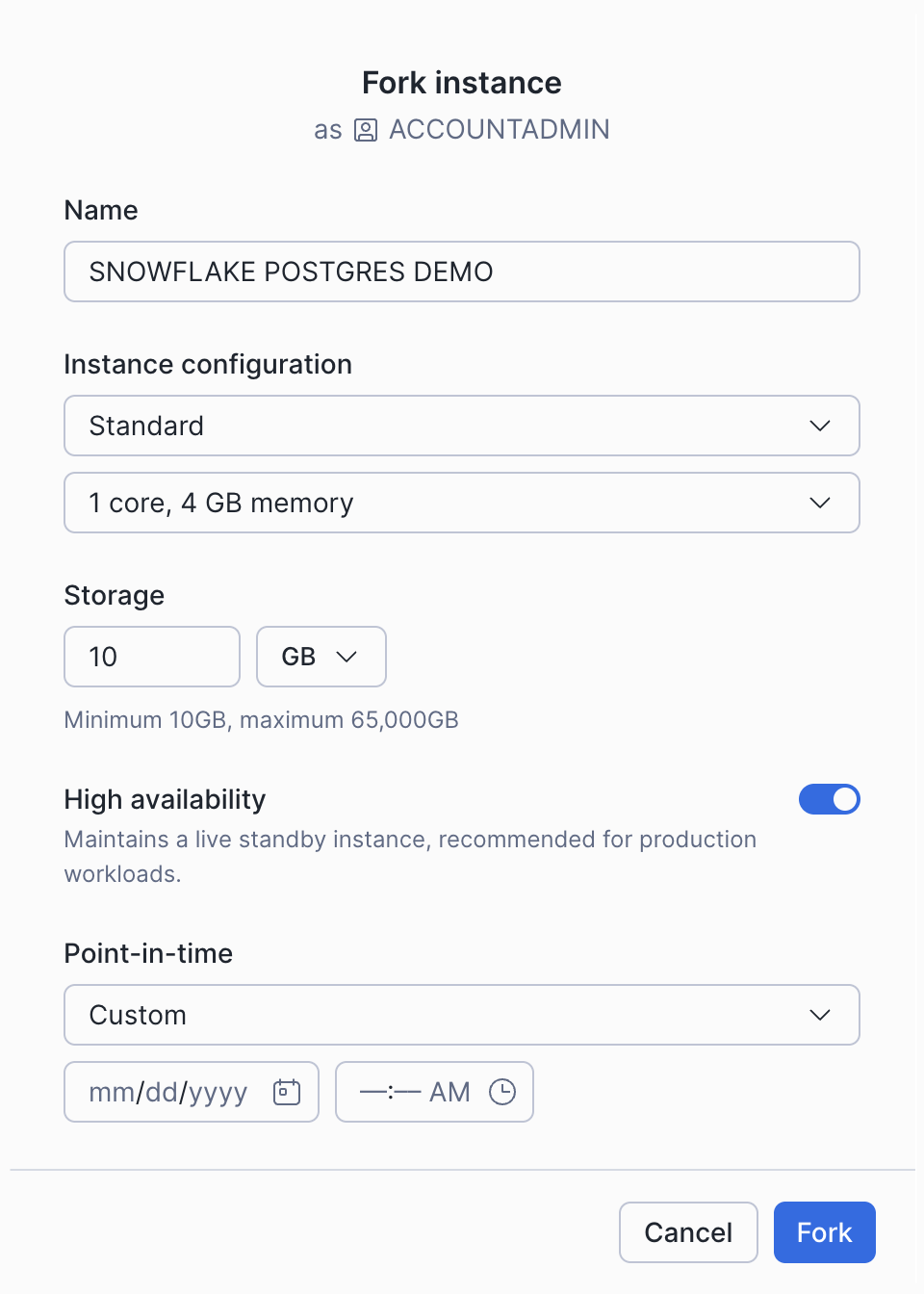
Under Manage on the Postgres Instance page, select the Fork item and enter the configuration options.
-
Select Fork to create the fork.
To create a Postgres instance as a fork of an origin instance, execute the CREATE POSTGRES INSTANCE command and specify the FORK clause. The command creates the fork from the origin instance at the point in time specified by the AT or BEFORE clause. If you omit this clause, the fork is based on the origin instance at the current point in time.
For the command parameters:
FORK orig_nameSpecifies the origin of the fork.
{ AT | BEFORE } ( { TIMESTAMP => timestamp | OFFSET => time_difference } )Specifies the point in time to fork from. The timestamp or offset must fall within the 10 day postgres data retention time.
Default: Uses current time.
The AT | BEFORE clause accepts one of the following parameters:
TIMESTAMP => timestampSpecifies an exact date and time to use for Time Travel. The value must be explicitly cast to a TIMESTAMP, TIMESTAMP_LTZ, TIMESTAMP_NTZ, or TIMESTAMP_TZ data type.
If no explicit cast is specified, the timestamp in the AT clause is treated as a timestamp with the UTC time zone (equivalent to TIMESTAMP_NTZ). Using the TIMESTAMP data type for an explicit cast may also result in the value being treated as a TIMESTAMP_NTZ value. For details, see Date & time data types.
OFFSET => time_differenceSpecifies the difference in seconds from the current time to use for Time Travel, in the form
-NwhereNcan be an integer or arithmetic expression (e.g.-120is 120 seconds,-30*60is 1800 seconds or 30 minutes).
Default: Copied from the origin.
COMPUTE_FAMILY = compute_familySpecifies the name of an instance size from the Snowflake Postgres Instance Sizes tables.
Default: Copied from the origin.
STORAGE_SIZE_GB = storage_gbSpecifies storage size in GB. Must be between 10 and 65,535.
Default: Copied from the origin.
HIGH_AVAILABILITY = { TRUE | FALSE }Specifies the high availability setting to be used for the fork.
Default: Copied from the origin.
POSTGRES_SETTINGS = 'json_string'Allows you to optionally set Postgres configuration parameters on your instance in JSON format. See Snowflake Postgres Server Settings for a list of available Postgres parameters.
Default: Copied from the origin.
COMMENT = 'string_literal'Specifies a comment for the user.
Default:
NULL
TAG ( tag_name = 'tag_value' [ , tag_name = 'tag_value' , ... ] )Specifies the tag name and the tag string value.
The tag value is always a string, and the maximum number of characters for the tag value is 256.
For information about specifying tags in a statement, see Tag quotas.
One row with the following columns will be returned:
statushost
CREATE FORK SQL Examples
Create a fork
my_forkfrom the origin instancemy_origin_instanceat the timestamp2025-01-01 12:00:00.Create a fork
my_forkfrom the origin instancemy_origin_instanceas it was120seconds ago.Create a fork
my_forkfrom the origin instancemy_origin_instanceas of the current time, using theSTANDARD_Minstance size and no high availability.
When you create a fork, no credentials will be displayed. Credentials for the fork are the same as the origin instance. You can regenerate credentials later if needed.
The time needed to create a fork is dependent on the size of the origin instance.