Configure authentication for Snowflake Postgres
Each Snowflake Postgres instance uses one authentication authority:
- Postgres authentication (default): A Postgres login role and its password.
- Snowflake token authentication: A short-lived token from Snowflake, used as the password. Password login still works. In Snowsight, this authority is labeled Snowflake.
- External OAuth: An access token from your identity provider.
Configure the authentication authority
To use the Configure authentication dialog, you need the OWNERSHIP or MODIFY privilege on the
instance. Without it, Update is unavailable.
- In the navigation menu, select Postgres.
- Select your instance.
- Next to Authentication, select the edit control.
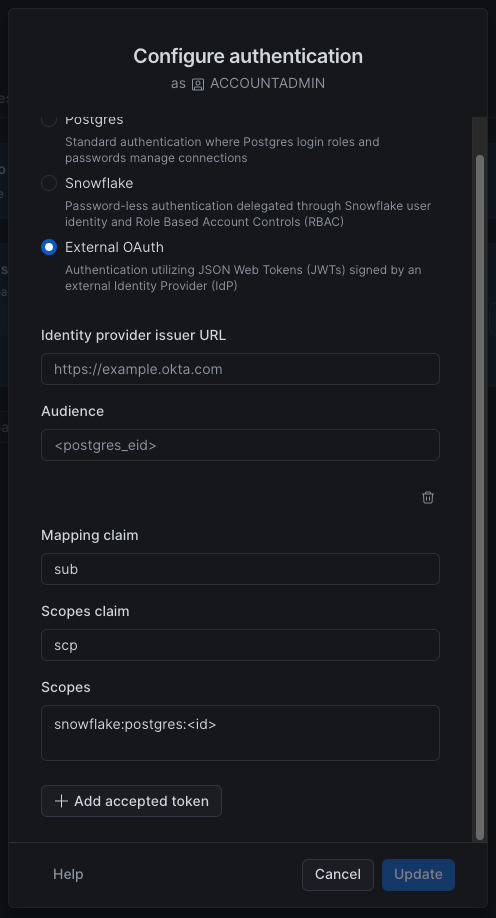
- In the Configure authentication dialog, select the authentication authority:
- Postgres
- Snowflake
- External OAuth. See External OAuth.
- Select Update.
Set the authentication authority with CREATE POSTGRES INSTANCE when you create an instance, or with ALTER POSTGRES INSTANCE for an existing instance.
To return an instance to Postgres authentication:
To set Snowflake token authentication, use POSTGRES_OR_SNOWFLAKE:
Set AUTHENTICATION_PROPERTIES to NULL when you leave External OAuth. That removes the stored
issuer and accepted tokens. On any other authority, NULL changes nothing.
After you set Snowflake token authentication, choose how to authorize the Postgres user:
- For shared access through Snowflake roles, use access roles.
- For a one-to-one Snowflake user mapping, use individual user mappings.
Then generate a token and use it as the client password.
For External OAuth, set AUTHENTICATION_AUTHORITY to EXTERNAL_OAUTH and provide
AUTHENTICATION_PROPERTIES, then set oauth_identifier on each role that will sign in. See
External OAuth.
Snowflake token authentication
A Snowflake token authenticates to the Postgres instance. Snowflake OAuth and programmatic access tokens authenticate to Snowflake.
Important
Changing the authentication authority away from Snowflake token authentication stops new tokens from being created. An issued token can still authenticate until expiry if its target Postgres user remains eligible for that token type.
Token types
GENERATE_POSTGRES_ACCESS_TOKEN_FOR_USER evaluates permissions from your primary role and active secondary roles, including their inherited roles. It checks the following in order and returns the first token that applies:
| Token | Who gets it | Signs in as |
|---|---|---|
| Owner token | An active role hierarchy with the OWNERSHIP privilege on the instance | Any Postgres login role, except superusers, replication users, and protected system users |
| Access role token | A role that holds the access role for the requested Postgres user, directly or through the role hierarchy | The Postgres user whose access role is enabled |
| User token | An active role hierarchy with the USAGE privilege on the instance, when neither earlier token type applies | The Postgres user mapped to that Snowflake user |
Except for snowflake_admin, an owner-token target must have a usable password or be configured
for Snowflake token authentication or External OAuth.
Every token expires 15 minutes after it is issued. An access-role holder inherits USAGE on the
instance through the access role; you don’t need a separate USAGE grant for that path.
Grant access with access roles
A Postgres access role is a Snowflake role scoped to one Postgres instance. Grant it to authorize a Snowflake role, application role, or user to generate a token for the Postgres user. Privileges on databases and objects inside Postgres come from the Postgres role.
The following example uses the Postgres database postgres, a new Postgres login role app_user,
and an existing Snowflake role analyst assigned to the user who will generate the token.
For this example, analyst doesn’t hold OWNERSHIP on the instance.
The instance must use POSTGRES_OR_SNOWFLAKE. Configure
network access for the client before connecting.
-
Connect to the Postgres instance as
snowflake_adminwith its password or an owner token. Create the Postgres user, grant its database privileges, and enable access-role authentication:The table grant applies to existing tables in
public. Grant access to future tables separately as needed. For an existing Postgres user, omitCREATE ROLEand grant the privileges it needs.Snowflake creates an access role with the Postgres user’s name. The name can’t be set separately. In Snowflake, list the access roles on the instance:
-
In Snowflake, grant the access role to
analyst. Name it<instance>!<access_role>. The grant requiresOWNERSHIPon the instance orMANAGE GRANTSon the account:You can also grant the access role to an application role or directly to a user:
-
As the user assigned
analyst, activate the role and generate a token forapp_user: -
Use the hostname shown for
my_instanceto connect to Postgres asapp_user:At the password prompt, paste the token. Don’t use the Snowflake role name as the Postgres username. For server certificate verification, see Snowflake Postgres SSL certificates. Obtain a new token before opening a connection after the current token expires.
Access-role requirements and names
- The Postgres role needs the
LOGINattribute to connect. - Postgres login roles created for use with access roles must follow Snowflake’s unquoted identifier rules, even for a quoted Postgres role name.
- Two enrolled Postgres roles on the same instance can’t have names that differ only in case.
- A Postgres user can use an individual Snowflake user mapping, an access role, or an External
OAuth mapping. These methods can’t coexist on the same user. Remove
snowflake_useroroauth_identifierbefore enablingSNOWFLAKE_ACCESS_ROLE. Disable the access role before adding either mapping. - You can’t enable an access role for
snowflake_adminor another privileged Postgres role. An enrolled role that becomes privileged can no longer authenticate with an access-role token. - An enrolled user authenticates with tokens and can’t change its Postgres password until access-role authentication is disabled.
If you turn Snowflake token authentication back on, Snowflake discovers access roles created in Postgres while token authentication was off. Discovery is asynchronous and normally takes 5 to 10 minutes.
Inspect access-role grants
As the instance owner, inspect the access roles and their grantees before changing access:
SHOW GRANTS OF POSTGRES ACCESS ROLE lists the grantees of that access role.
SHOW GRANTS TO ROLE includes access-role grants received by the specified Snowflake role.
Postgres access roles are instance-scoped and aren’t listed in the SNOWFLAKE.ACCOUNT_USAGE.ROLES
view. Use the qualified name with the access-role commands.
Rename or remove an access role
Rename the Postgres user to change the corresponding Postgres access-role name. The existing Snowflake grants remain attached to the renamed access role. Update references to the old name and generate new tokens for the new Postgres username.
To remove one Snowflake role’s grant, first inspect the grants, then revoke that grant:
To disable access-role authentication for the Postgres user, inspect the grants to identify affected users and roles, then reset the setting in Postgres:
Setting SNOWFLAKE_ACCESS_ROLE to false has the same effect. Either action drops the Postgres
access role and its grants in Snowflake while keeping the Postgres user and its database privileges.
Dropping the Postgres user also removes its access role. Re-enabling access-role authentication
creates a new access role; grant access to it again.
When revoked access takes effect
Revoking a Snowflake grant prevents that grant from authorizing new access-role tokens. It doesn’t invalidate issued tokens or affect other grants.
- An issued access-role token can open a connection until it expires only while the target Postgres user still exists, remains enrolled, and is eligible for access-role authentication.
- Resetting
SNOWFLAKE_ACCESS_ROLEor dropping the Postgres user prevents new connections with that user’s access-role tokens, including tokens issued before the change. - A name change beyond letter case prevents new connections with previous access-role tokens. A case-only rename preserves the token’s role binding. Dropping and recreating a user with the same name doesn’t make its old access-role tokens valid for the new user.
- Changing the authentication authority, token expiry, Snowflake grant revocation, and disabling access-role authentication don’t close established connections. Manage existing sessions separately if you need to end their access.
Owner tokens use the instance owner’s authorization and aren’t revoked by removing an access-role grant or disabling access-role authentication for a user. The target must still be an eligible Postgres login role. For client token refresh guidance, see Short-lived tokens and client connections.
Map a Postgres user to a Snowflake user
Sign in to the Postgres instance as the snowflake_admin user and run:
Postgres folds unquoted role names to lowercase, and Snowflake folds unquoted user names to
uppercase. Preserve the spelling of names created with double quotes. For example, to map a
Postgres user named Casey to a Snowflake user of the same name:
To remove a mapping and restore password login:
A mapped Postgres user can sign in only with a token and can’t change their Postgres password. For shared access, see Grant access with access roles.
Generate a token
- In the navigation menu, select Postgres.
- Select your instance.
- In the Manage menu, select Regenerate token.
- Enter a Postgres user that this token can sign in as, then select Acknowledge & continue.
- Copy the token or Postgres URI.
Use the GENERATE_POSTGRES_ACCESS_TOKEN_FOR_USER function.
Access roles on replicas and forks
A new replica or fork inherits the source instance’s authentication authority. Postgres users and their access-role settings are copied, but each target instance has its own Postgres access roles. Snowflake grants on the source instance’s access roles aren’t copied. Grant access separately using the target instance’s qualified name:
A user assigned analyst generates a token for the instance it will connect to:
Use the target instance’s hostname. A token generated for the source instance can’t authenticate to a replica or fork.
For read replicas, enable, rename, disable, or drop the Postgres user on the leader. These Postgres changes and the corresponding access-role lifecycle propagate to its replicas. Manage Snowflake grants separately on each instance. A fork is independent after creation: later Postgres role changes on the source don’t propagate to the fork.
For the creation procedures and other limitations, see Snowflake Postgres Read Replicas and Snowflake Postgres point-in-time recovery.
SNOWFLAKE_
Query this view from a session on the Postgres instance. It lists mappings between Postgres users and Snowflake users.
Columns
| Column name | Data type | Description |
|---|---|---|
| postgres_role | name | The name of the mapped Postgres user |
| snowflake_identity | text | The Snowflake user identity in USER:# form, where # is the mapped Snowflake user’s user_id in USERS view |
External OAuth
External OAuth uses access tokens from your identity provider. It is a different feature from Snowflake OAuth.
In the Configure authentication dialog, Add accepted token adds a group, prefilled with
sub, scp, and snowflake:postgres:<id>.
Set AUTHENTICATION_AUTHORITY to EXTERNAL_OAUTH and set AUTHENTICATION_PROPERTIES. To accept
more than one token, add an entry for each:
DESCRIBE POSTGRES INSTANCE prints SCOPES as a parenthesized list.
Map a role for External OAuth
Sign in to the Postgres instance as the snowflake_admin user and set oauth_identifier to the
value of that role’s mapping claim:
When MAPPING_CLAIM is email, use the role’s email address. That role can then sign in only with
an access token.
Statement rules
ISSUERis required. It must be anhttpsURL with no query or fragment. The statement fails if the issuer is invalid.- If you omit
AUDIENCE, Snowflake storessnowflake:postgres:<instance_id>. The identity provider must put that value in theaudclaim. - If you omit
SCOPES_CLAIM, Postgres reads scopes from thescopeclaim, or fromscpwhen the token has noscopeclaim. - A claim name matches one top-level claim.
email.verifiedis one claim name. - Each accepted token requires
MAPPING_CLAIMandSCOPES. - A token is accepted when it matches one entry. Every scope listed in that entry must be present.
To accept a token that has only
app.read, and a token that has onlyapp.write, add an entry for each scope. ACCEPTED_TOKENSis required. Include at least one entry, and no more than 10.- Snowflake rejects two entries that use the same mapping claim and scopes claim when one set of scopes contains the other.
AUTHENTICATION_PROPERTIESis required for External OAuth. A properties object is an error when the authority isPOSTGRESorPOSTGRES_OR_SNOWFLAKE.NULLclears the stored OAuth settings.- Each statement replaces
AUTHENTICATION_PROPERTIEScompletely. Include every accepted token you want to keep.
Switch an existing instance to External OAuth
When you switch from Snowflake token authentication, Snowflake stops generating tokens for the instance. A token that was already generated works until it expires, 15 minutes after it was generated. Before you switch, move any client that connects with a Snowflake token to External OAuth or a Postgres password.
snowflake_admin and roles without oauth_identifier can still sign in with a password. Switching
revokes the application role’s password. You can’t regenerate it while the instance uses External
OAuth.
If you switch back to POSTGRES_OR_SNOWFLAKE, Snowflake generates tokens again, and you can
regenerate the application role’s credentials.
Read replicas and forks
A new read replica or fork copies the source instance’s authentication settings. Passwords work as
soon as the replica or fork is ready. External OAuth sign-in starts working within about an hour.
To start it sooner, run ALTER POSTGRES INSTANCE … SET AUTHENTICATION_PROPERTIES on the new
instance with the source instance’s values.
A later authentication change on the leader stays on the leader. Repeat it on each read replica.