Configure authentication for Snowflake Postgres
Each Snowflake Postgres instance uses one authentication authority:
- Postgres authentication (default): A Postgres login role and its password.
- Snowflake token authentication: A short-lived token from Snowflake, used as the password. Password login still works. In Snowsight, this authority is labeled Snowflake.
- External OAuth: An access token from your identity provider.
Configure the authentication authority
To use the Configure authentication dialog, you need the OWNERSHIP or MODIFY privilege on the
instance. Without it, Update is unavailable.
- In the navigation menu, select Postgres.
- Select your instance.
- Next to Authentication, select the edit control.
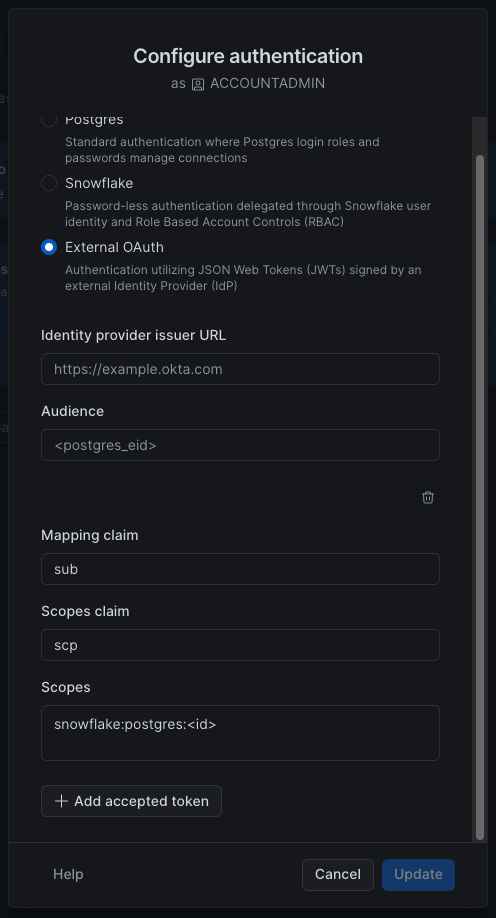
- In the Configure authentication dialog, select the authentication authority:
- Postgres
- Snowflake
- External OAuth. See External OAuth.
- Select Update.
Set the authentication authority with CREATE POSTGRES INSTANCE when you create an instance, or with ALTER POSTGRES INSTANCE for an existing instance.
To return an instance to Postgres authentication:
To set Snowflake token authentication, use POSTGRES_OR_SNOWFLAKE:
Set AUTHENTICATION_PROPERTIES to NULL when you leave External OAuth. That removes the stored
issuer and accepted tokens. On any other authority, NULL changes nothing.
After you set Snowflake token authentication, map Postgres users to Snowflake users and generate tokens. See Map a Postgres user to a Snowflake user.
For External OAuth, set AUTHENTICATION_AUTHORITY to EXTERNAL_OAUTH and provide
AUTHENTICATION_PROPERTIES, then set oauth_identifier on each role that will sign in. See
External OAuth.
Snowflake token authentication
A Snowflake token authenticates to the Postgres instance. Snowflake OAuth and programmatic access tokens authenticate to Snowflake.
Important
Disabling Snowflake token authentication stops new tokens from being created. Existing tokens and connections stay usable until the tokens expire.
Mapped users can’t use Postgres authentication until their mappings are removed.
Map a Postgres user to a Snowflake user
Sign in to the Postgres instance as the snowflake_admin user and run:
The identifiers are case-insensitive unless you place them in double quotes. For example, to map a Postgres user named Casey to a Snowflake user of the same name:
To remove a mapping and restore password login:
A mapped Postgres user can sign in only with a token and can’t change their Postgres password.
Generate a token
Instance owners and Snowflake users with the USAGE privilege on the instance can generate a
short-lived access token for themselves.
- In the navigation menu, select Postgres.
- Select your instance.
- In the Manage menu, select Regenerate token.
- Enter a Postgres user that is mapped to your Snowflake user, then select Acknowledge & continue.
- Copy the token or Postgres URI. The token is valid for 15 minutes.
Use the GENERATE_POSTGRES_ACCESS_TOKEN_FOR_USER function.
SNOWFLAKE_
Query this view from a session on the Postgres instance. It lists mappings between Postgres users and Snowflake users.
Columns
| Column name | Data type | Description |
|---|---|---|
| postgres_role | name | The name of the mapped Postgres user |
| snowflake_identity | text | The Snowflake user identity in USER:# form, where # is the mapped Snowflake user’s user_id in USERS view |
External OAuth
External OAuth uses access tokens from your identity provider. It is a different feature from Snowflake OAuth.
In the Configure authentication dialog, Add accepted token adds a group, prefilled with
sub, scp, and snowflake:postgres:<id>.
Set AUTHENTICATION_AUTHORITY to EXTERNAL_OAUTH and set AUTHENTICATION_PROPERTIES. To accept
more than one token, add an entry for each:
DESCRIBE POSTGRES INSTANCE prints SCOPES as a parenthesized list.
Map a role for External OAuth
Sign in to the Postgres instance as the snowflake_admin user and set oauth_identifier to the
value of that role’s mapping claim:
When MAPPING_CLAIM is email, use the role’s email address. That role can then sign in only with
an access token.
Statement rules
ISSUERis required. It must be anhttpsURL with no query or fragment. The statement fails if the issuer is invalid.- If you omit
AUDIENCE, Snowflake storessnowflake:postgres:<instance_id>. The identity provider must put that value in theaudclaim. - If you omit
SCOPES_CLAIM, Postgres reads scopes from thescopeclaim, or fromscpwhen the token has noscopeclaim. - A claim name matches one top-level claim.
email.verifiedis one claim name. - Each accepted token requires
MAPPING_CLAIMandSCOPES. - A token is accepted when it matches one entry. Every scope listed in that entry must be present.
To accept a token that has only
app.read, and a token that has onlyapp.write, add an entry for each scope. ACCEPTED_TOKENSis required. Include at least one entry, and no more than 10.- Snowflake rejects two entries that use the same mapping claim and scopes claim when one set of scopes contains the other.
AUTHENTICATION_PROPERTIESis required for External OAuth. A properties object is an error when the authority isPOSTGRESorPOSTGRES_OR_SNOWFLAKE.NULLclears the stored OAuth settings.- Each statement replaces
AUTHENTICATION_PROPERTIEScompletely. Include every accepted token you want to keep.
Switch an existing instance to External OAuth
When you switch from Snowflake token authentication, Snowflake stops generating tokens for the instance. A token that was already generated works until it expires, 15 minutes after it was generated. Before you switch, move any client that connects with a Snowflake token to External OAuth or a Postgres password.
snowflake_admin and roles without oauth_identifier can still sign in with a password. Switching
revokes the application role’s password. You can’t regenerate it while the instance uses External
OAuth.
If you switch back to POSTGRES_OR_SNOWFLAKE, Snowflake generates tokens again, and you can
regenerate the application role’s credentials.
Read replicas and forks
A new read replica or fork copies the source instance’s authentication settings. Passwords work as
soon as the replica or fork is ready. External OAuth sign-in starts working within about an hour.
To start it sooner, run ALTER POSTGRES INSTANCE … SET AUTHENTICATION_PROPERTIES on the new
instance with the source instance’s values.
A later authentication change on the leader stays on the leader. Repeat it on each read replica.