Snowflake Postgres Maintenance
Overview
Maintenance is the process by which a Postgres instance can be updated or have its configuration changed. In some cases maintenance will be scheduled automatically by the platform, such as when low disk space triggers a resize operation. Snowflake may also schedule maintenance for an instance when needed to keep it secure. When maintenance is performed, a Postgres instance will always receive the latest Postgres minor version, operating system updates, and new features and functionality.
How maintenance works
Some maintenance operations can be performed directly on a Postgres instance, such as a simple restart of the service. Other maintenance operations require a failover to a new instance.
Restarts
Restarting the Postgres service or the underlying server can be done directly on the Postgres instance through the Manage menu.
- In the navigation menu, select Postgres.
- Select your instance from the list to view its details page.
- In the Manage menu at the top right, hover over Restart and then choose the type of restart needed.
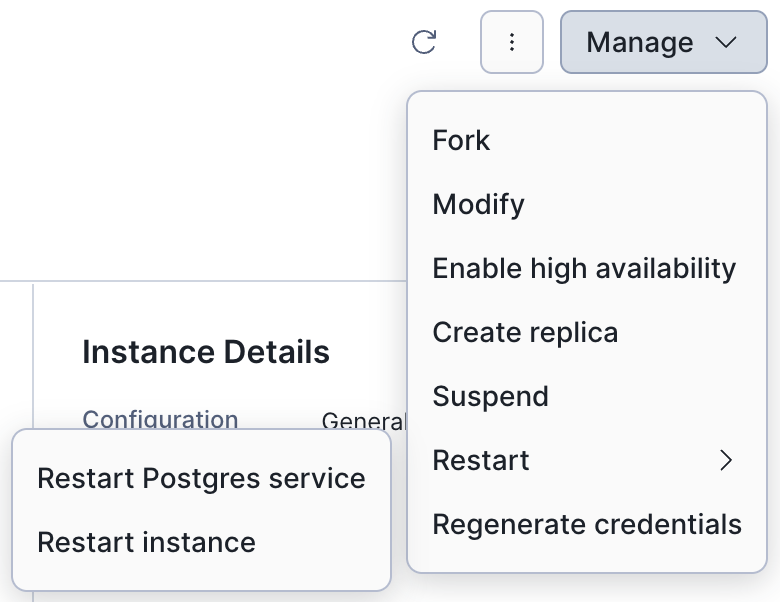
To restart the Postgres service or the underlying server, run the ALTER POSTGRES INSTANCE command with the RESTART option. For example:
Tip
Restarting the Postgres service is generally faster than restarting the entire instance.
Failovers
Modifying the configuration of a Postgres instance requires a failover to apply the changes. You can modify your instance type, size, storage, and/or upgrade to a newer Postgres major version.
Note
When maintenance operations require a failover, the new instance will always receive the latest Postgres minor version, operating system updates, and new features and functionality.
When you initiate changes to your Postgres instance, a fresh instance is created in the background with the new configuration. During this time, your original instance continues operating in its original state. As the new instance comes online, it will be synchronized with the source instance. Failover will not happen until the new instance is ready.
Note
There is a brief service interruption when a failover occurs, typically lasting from seconds to a few minutes.
If a maintenance window has been set, the new instance will be kept in sync via replication until the maintenance window arrives, and then the failover will happen. If no maintenance window was set, the platform will begin the failover to the new instance as soon as it is ready.
Tip
Failover can be delayed when clients are holding on to connections and performing writes on the source instance. The complete write-ahead log (WAL) must be written and archived before a failover can happen. For faster failovers, set your maintenance window to occur during a quiet period for your application.
Assuming the failover is successful, the original instance will be removed automatically since it is no longer needed. If the failover does not succeed for some reason (which can occur, for example, during a major version upgrade), the operation will be aborted and the original instance will remain in place.
Automatic maintenance
The platform will automatically run maintenance to increase the storage on your instance when the available disk space becomes critically low. Maintenance may also be scheduled to run when a Postgres major version has been deprecated and an instance has not been upgraded to a newer major version by the published deadline.
Automatic disk resizes
Overutilizing storage on a Postgres instance can be operationally dangerous because there might not be enough disk space for the server to recover in case of an emergency. An instance will be put into read-only mode when disk usage becomes critical to protect your data while the instance is automatically resized.
An automatic resize operation will be initiated when the following conditions are met:
- 85% disk usage with less than 50GB remaining
- 90% disk usage
The new storage size is calculated based on the original size:
- 100GB disks will be increased by 50% (for example, 10 GB becomes 15 GB).
- 100GB to 999GB disks will be increased by 25% (for example, 100 GB becomes 125 GB).
- Disks larger than 1000 GB will be increased by 15% (for example, 1000 GB becomes 1150 GB).
Tip
Ensure your application is set up to automatically reconnect to the database, given that there will be a brief service interruption when the failover occurs.
Checking maintenance status
You can schedule maintenance for your instance by choosing Modify under the Manage menu. When there is a maintenance operation pending, you can see a banner on the instance details page:

Click the View details button to view more information about the maintenance, such as the old and new configurations.