Snowflake Postgres Read Replicas
Overview
Snowflake Postgres supports creating replicas. Replicas are read-only copies of a leader instance that are continually kept synchronized with changes from that instance. This synchronization is done automatically and transparently to the user.
Replicas are useful for read scaling and offloading certain workloads that could impact production (such as reporting workloads). Replicas are required to have the same storage size as their leader but can have a different compute size.
Replicas are provisioned in the same network as their leader instance and, as a result, inherit all ingress and egress network rules from their leader instance.
Postgres credentials, along with all other data on replicas, are copied and kept synchronized with the leader instance.
Creating a Read Replica
-
In the navigation menu, select Postgres.
-
Select the instance you want to create a replica of to load its detail page.
-
In the Manage menu at the top right of the detail page, select the Create replica option.
-
Make your choices for your new replica’s configuration options.
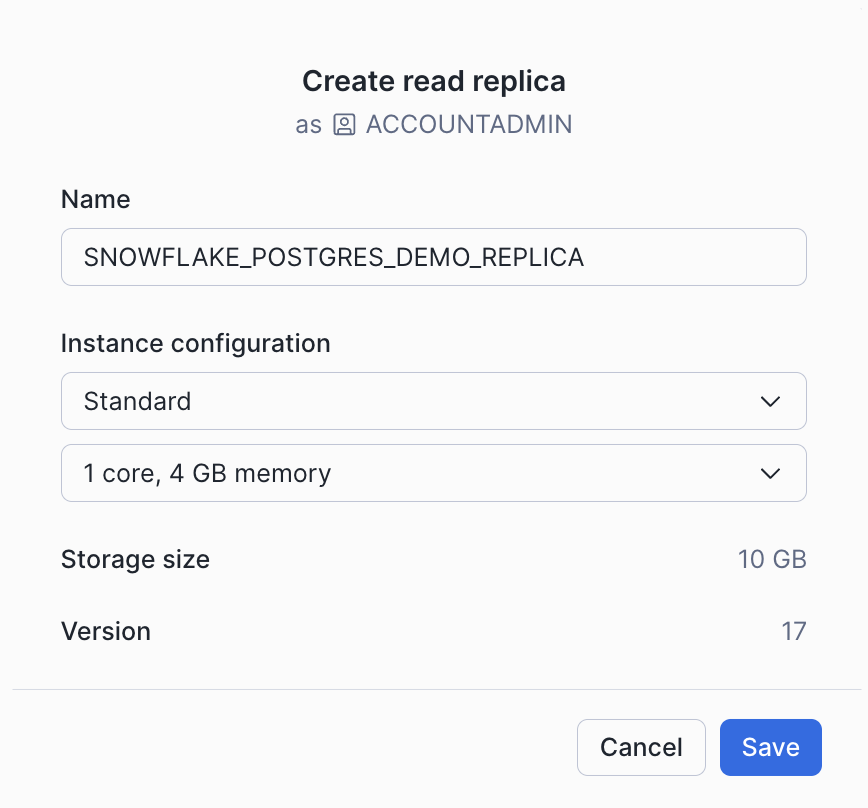
-
Select Save to create the replica.
To create a Postgres instance as a replica of an origin instance, specify the AS REPLICA OF clause in the CREATE POSTGRES INSTANCE command. By default, the COMPUTE_FAMILY and POSTGRES_SETTINGS properties are copied from the original Postgres instance. You can override those settings, and also specify COMMENT and TAG properties for the new instance.
One row with the following columns will be returned:
statushost
CREATE REPLICA SQL Examples
Create a replica my_replica of the instance my_origin_instance.
Create a replica my_replica of the instance my_origin_instance with a different compute family.
The time needed to create a replica depends on the size of its origin instance. The replica will display its current state as it is building. See the list of instance states for details about the states the replica will pass through as it builds.
Replica behavior and limitations
- Only 10 replicas can stream changes from a leader instance by default. To allow additional replicas to stream, increase the Postgres
max_wal_senderssetting (see Snowflake Postgres Server Settings). - Leader Postgres instances cannot be dropped while they have replicas. All replicas must be removed before the leader can be dropped.
- Postgres server settings applied to a leader instance are copied to all replicas.