Cortex Knowledge Extension
Overview
Cortex Knowledge Extensions (CKEs) 是 :doc:` Cortex Search Service </user-guide/snowflake-cortex/cortex-search/cortex-search-overview>`,可以在 Snowflake Marketplace 上共享,也可以通过 专用列表 或 组织列表 共享。它们可用于检索增强生成 (RAG) 架构,以将授权内容和专有内容集成到 Cortex AI 应用程序中。例如,CKEs 可用于将来自非结构化内容(例如文章、市场研究、书籍或论坛帖子)的知识集成到 Cortex AI 应用程序(例如聊天机器人和代理系统)中。
CKE 的工作原理
以下是它的工作原理:
提供商将其文本数据上传到其账户中的表中,并在表上创建 Cortex Search Service。然后,Cortex Search Service 将在 Snowflake Marketplace 上共享。在 Snowflake Marketplace 上共享的 Cortex Search Service 称为 Cortex Knowledge Extension (CKE)。
A Consumer builds an application leveraging Cortex AI, such as a chatbot, using Cortex AI Functions or the Cortex Agent API with the CKE.
当向集成了 CKE 的 Cortex AI 应用程序提供提示时,该提示将传递给 CKE,以通过执行语义搜索来获取相关知识。相关知识将返回给 Cortex AI 应用程序的 LLM 并进行推理,然后再向用户返回带有引用来源和归因的答案。
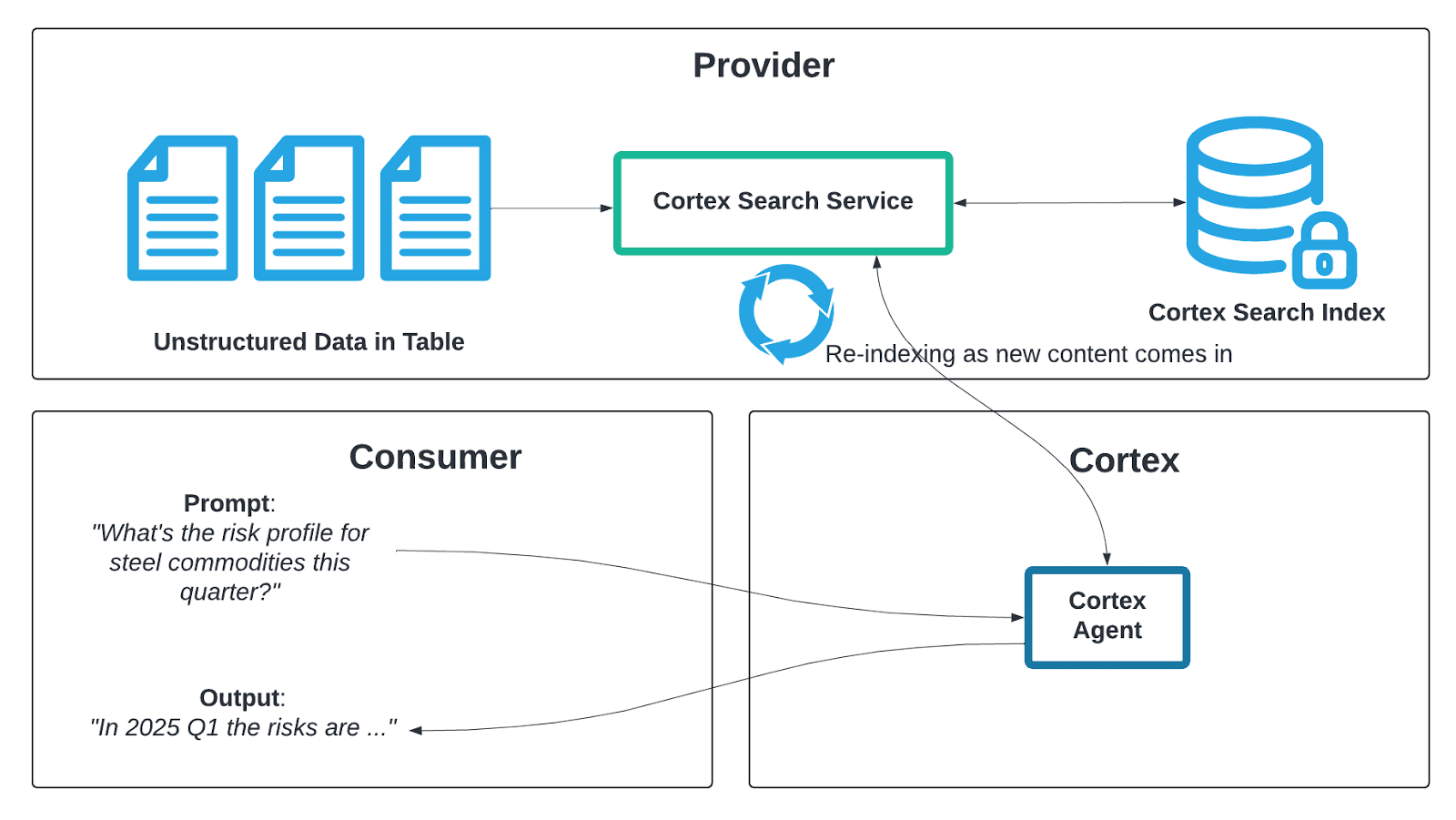
CKE 功能
Cortex Knowledge Extensions 的一些主要功能包括:
下文将对这些功能进行更详细的描述。
内容保护
提供商可以限制其 CKE 中在 24 小时内可返回给使用者的索引内容的百分比。这可以通过使用以下命令设置阈值来实现。该阈值并非应用于单个文档级别,而是应用于整个索引内容库。使用者只能访问 CKE 中阈值百分比的索引内容。
有关 cke_content_protection 字段的更多信息,请参阅 列表清单参考。
当使用者达到阈值时,对 CKE 的查询将被阻止执行,并且使用者会收到以下错误:
阈值刷新后,使用者可以重新查询数据。
管理
To see the number of queries that the CKE executed, sign in to Snowsight. In the navigation menu, select Marketplace » Provider Studio » Home. The Analytics section shows the number of queries executed.
试用支持
作为提供商,您可以为客户提供 CKE 的 有限试用,以便他们在决定购买之前试用您的产品。
获利
Cortex Knowledge Extensions 有两种获利方式:通过 订阅 使用平台上 Snowflake Marketplace Monetization 功能获利,或者通过:ref:平台外 <label-listings_free_private_create> 获利。
区域可用性
Cortex Knowledge Extensions 可在任何提供 Cortex Search 的区域使用。
主要注意事项
当客户使用您的 Cortex Knowledge Extensions 时,在禁用 Cortex Search Service 时要小心,因为此操作会破坏客户的应用程序。
有关 Cortex Knowledge Extensions 的高级调整,请参阅 Cortex Search 文档。
CKE 的费用
Providers:
Providers pay to host the Cortex Search Service in their account, including indexing, servicing, and replication to other regions. For more information about costs associated with Cortex Search Services, providers can refer to 了解 Cortex Search 服务的成本.
Consumers:
If the CKE isn't free, consumers pay the provider to access the CKE.
If the CKE leverages a Cortex Agent, consumers pay for the Cortex Agent. For more information, see 成本注意事项 for Cortex Agents.
引用来源
为确保 CKE 提供引用来源,在配置 Cortex Search Service 时,请确保在索引列中包含指向文档来源的 SOURCE_URL 列。LLMs 或 Snowflake Intelligence 可以使用它来提供明确的归属信息以及指向源材料的超链接。
将 CKE 发布到 Snowflake Marketplace
创建要发布到 Marketplace 的 Cortex Search Service 后,创建列表。确保将您创建的 Cortex Search Service 对象指向要发布的对象。
与 CKE 对话
您可以使用以下方法来向 CKE 提问。
使用 Cortex Search Playground:
在 Snowsight 中的导航菜单内,选择 AI & ML » Cortex Search。
从 Database/Schema 下拉菜单中选择 CKE。
点击右上角的 Playground。
输入搜索查询并查看结果
使用 Snowflake Intelligence:
按照 教程 3:将 CKE 添加到 Snowflake Intelligence 中概述的步骤进行操作。
使用 Cortex Agent API:
使用 Cortex Agent API,并在 CREATE CORTEX SEARCH 参数中指定共享的 CKE。有关更多信息,请参阅 :doc:` Cortex Agent API</user-guide/snowflake-cortex/cortex-agents>` 文档。
更新 CKE
对于定期推出新内容或更新内容的提供商来说,让 CKE 保持最新状态是一个常见用例。为确保您的 Cortex Knowledge Extension 保持最新状态,请执行以下操作:
确保已通过将新的/更新的文档插入 Snowflake 账户的某些独立过程更新了包含内容的基础表。
查看 Cortex Search Service 目标延迟。Cortex Search Service 配置为刷新数据并让数据新鲜度保持在特定
target_lag水平。有关target_lag的更多信息,请参阅 Cortex Search 使用 SQL 主题。运行以下命令,确保 Cortex Search Service 正在编制索引。
CKE 和自动履行
使用者只能访问其所在区域提供的 Cortex Knowledge Extension。提供商可以通过在 Provider Studio 中为其 Cortex Knowledge Extension 列表启用 自动履行,自动将其 Cortex Search Service 复制到远程使用者区域。
限制
CKEs 不支持 基于使用情况 计费。
CKEs are not supported in listings that have Egress Cost Optimizer (ECO) enabled.
Providers should be aware of the cost implications for replication with listings that have a CKE.
Adding a CKE to a listing that has ECO enabled will automatically turn off ECO. With ECO turned off, costs associated with the listing can increase. An email notification will also be sent to the provider indicating that ECO was turned off.
Similarly, if a CKE is added to a listing that's part of a replication group, then ECO will be turned off for all listings within that replication group. An email notification will be sent to the provider indicating that the ECO was turned off.