Openflow BYOC cost and scaling considerations
Snowflake Openflow BYOC has cost considerations in multiple areas, including infrastructure, compute, data ingestion and others. Scaling Openflow involves understanding these costs. The following sections describe Openflow BYOC costs in general, and provide a number of examples of scaling Openflow BYOC runtimes and associated costs.
Openflow BYOC costs
When using Openflow, you can incur the following types of costs:
| Cost category | Description |
|---|---|
| Openflow (shown as Openflow Compute BYOC on your Snowflake bill) | Cost based on the number of virtual CPU cores (vCPU) used by connector runtimes within your “bring your own cloud (BYOC)” environment. You are charged for active runtimes only. The compute used for Openflow management processes is excluded from this specific charge. Credits are billed per-second with a 60-second minimum. For an example of using vCPU and the impacts of scaling, see Openflow BYOC scaling. For information on the rate per vCPU per hour, refer to Table 1(g) in the Snowflake Service Consumption Table. Additionally, the METERING_DAILY_HISTORY and METERING_HISTORY views in the Account Usage schema can provide additional details on Openflow compute costs using queries for SERVICE_TYPE=OPENFLOW_COMPUTE_BYOC. See Exploring compute cost for more information on exploring compute costs in Snowflake. |
| Infrastructure (only for BYOC configuration) | For BYOC deployments, you directly pay your cloud provider, for example, AWS, for the underlying infrastructure provisioned in your environment to run Openflow. This primarily includes compute (for runtimes you provision to run the connectors and for managing the runtimes), networking, and storage costs, and appears on your CSP bill. The EC2 compute requirements are illustrated in the following image: 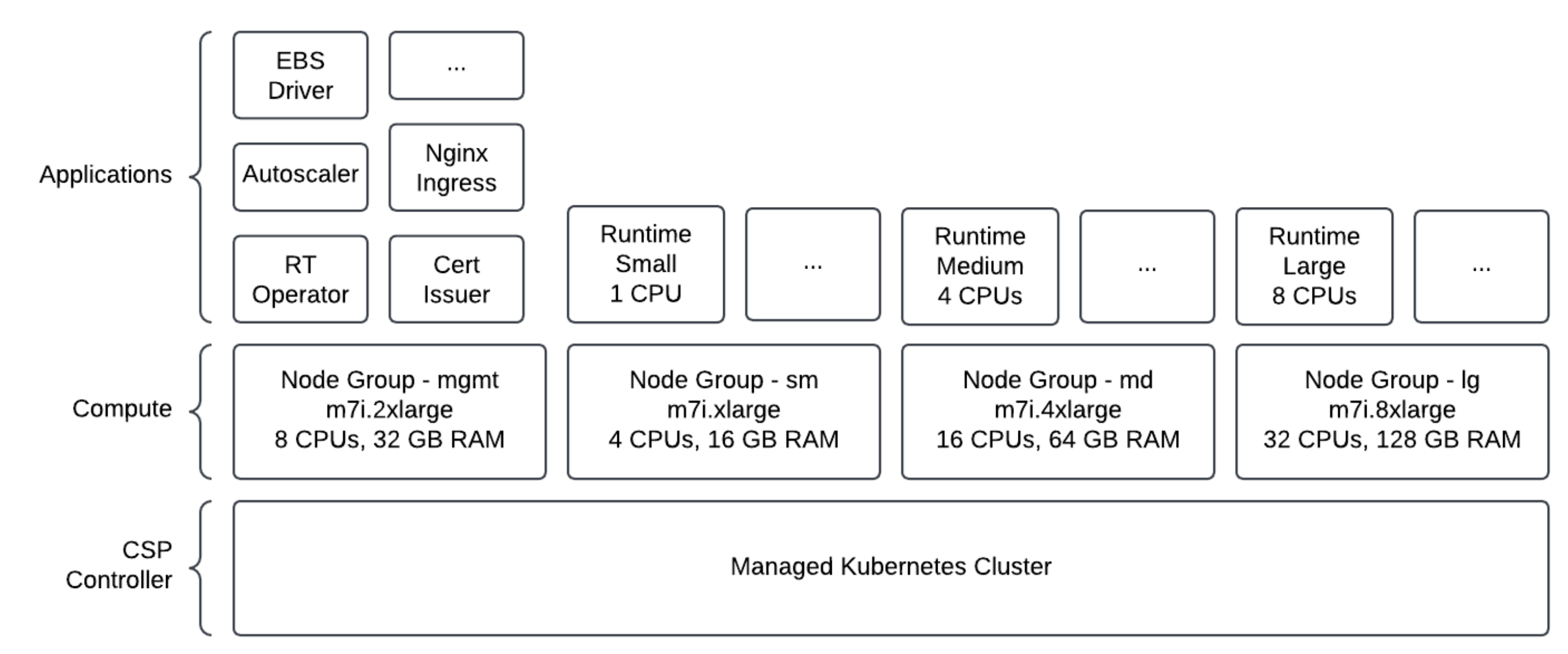 For information about monitoring costs with AWS resource tags for BYOC deployments, see BYOC deployment customization and tagging behavior. |
| Ingestion | Cost for loading data into Snowflake using services such as Snowpipe or Snowpipe Streaming, based on data volume. Appears on your Snowflake bill under respective ingestion services line items. Certain connectors may require a standard Snowflake warehouse, incurring additional warehouse costs. For example, database CDC connectors require a Snowflake warehouse for both initial snapshot and incremental Change Data Capture (CDC). You can schedule MERGE operations to manage the compute cost. |
| Telemetry Data Ingest | Standard Snowflake charges for sending logs and metrics to Openflow deployments and sending runtime logs to your event table within Snowflake. The rate for credits per GB of telemetry data can be found in Table 5 in the Snowflake Service Consumption Table. |
Openflow BYOC scaling
The runtimes and scaling behavior you choose are crucial for managing costs effectively. Openflow supports different runtime types, each with its own scaling characteristics.
Runtime types and the associated costs
The following table illustrates the scaling behavior of various runtimes and their associated costs:
| Runtimes | Activity | Snowflake costs | Cloud costs |
|---|---|---|---|
| No runtimes | None | No cost | Compute and storage of Dataplane |
| 1 small runtime (1 vCPU) (min 1 max 2) | Active for 1 hour Runtime does not scale to 2. | 1 runtime x 1 node x 1 vCPU x 1 hour = 1 Total = 1 vCPU-hour | Compute and storage of Dataplane |
| 2 small runtimes (1 vCPU) (min/max=2) 1 large runtime (8 vCPU) (min/max=10) | Small: 2 nodes active for 1 hour Large: 10 nodes active for 1 hour | 2 runtimes x 2 nodes x 1 vCPU x 1 hour = 4 vCPU 1 runtime x 10 nodes x 8 vCPU x 1 hour = 80 vCPU Total = 84 vCPU-hours | Compute and storage of Dataplane |
| 1 medium (4 vCPU) (min =1 max=2) | First 20 minutes, 1 node is running Scales to 2 nodes for the remaining 40 minutes of the hour Total 1 hour | 20 minutes = 1/3 hour 1 runtime x 1 node x 4 vCPU x 1/3 hour = 4/3 1 runtime x 2 nodes x 4 vCPU x 2/3 hour = 16/3 Total = 6 2/3 vCPU-hours | Compute and storage of Dataplane |
| 1 medium (4 vCPU) (min/max=2) | First 30 minutes, 2 nodes running Suspends after first 30 minutes. | 30 minutes = 1/2 hour 1 runtime x 2 nodes x 4 vCPU x 1/2 hour = 4 Total = 4 vCPU-hours | Compute and storage of Dataplane |
Mapping runtimes to EC2 instance types
Choosing a runtime type (t-shirt size) results in the runtime pods being scheduled on the associated EC2 node group {key}-sm-group, {key}-md-group, or {key}-lg-group with resources described in the following table:
| Runtime type | vCPUs | Available memory (GB) | EC2 instance type | EC2 node group | EC2 node - CPUs | EC2 node - memory (GB) |
|---|---|---|---|---|---|---|
| Small | 1 | 2 | m7i.xlarge | {key}-sm-group | 4 | 16 |
| Medium | 4 | 10 | m7i.4xlarge | {key}-md-group | 16 | 64 |
| Large | 8 | 20 | m7i.8xlarge | {key}-lg-group | 32 | 128 |
The type of runtime that you choose impacts the number of cores (vCPUs) consumed each second. Openflow scales the underlying EC2 node group when additional pods need to be scheduled, based on CPU consumption, and up to the maximum node setting set during runtime creation.
EKS node groups are configured with a minimum size of 0 nodes and a maximum of 50 nodes. The desired size is dynamically adjusted depending on the runtime required CPU and memory.
Customers are charged by their cloud service provider for the underlying nodes that host their runtime. The underlying EC2 instances are created when the first runtime of a respective size is scheduled.
Examples for calculating Openflow BYOC runtime consumption
- A user requests a BYOC deployment from Openflow and then installs the Openflow agent and deployment
- The user has not created any runtimes. 0 vCPUs are allocated, so there is no Openflow software cost.
- The user is charged by their cloud service provider for the provisioned compute and storage of the Openflow BYOC deployment.
- Total Openflow consumption = 0 vCPU-hours
- A user creates one small runtime with Min Nodes = 1 and Max Nodes = 2. Runtime stays at 1 node for 1 hour.
- 1 small runtime = 1 vCPU
- Total Openflow consumption = 1 vCPU-hour
- A user creates 2 small runtimes with min/max of 2 nodes each, and one large runtime with min/max of 10 nodes. These runtimes are active for 1 hour
- 2 small runtimes at 2 nodes = 2 runtimes x 2 nodes x 1 vCPU = 4 vCPUs
- 1 large runtime at 10 nodes = 1 runtime x 10 nodes x 8 vCPU = 80 vCPUs
- Total Openflow consumption = (4 vCPU + 80 vCPU) x 1 hour = 84 vCPU-hours
- A user creates 1 medium runtime with 1 node. After 20 minutes, it scales to 2 nodes and remains at 2 nodes for the rest of the hour.
-
1 medium runtime = 4 vCPUs
-
20 minutes = 1/3 hour; 40 minutes = 2/3 hour
-
(1 node x 4 vCPU x 1/3 hour) + (2 nodes x 4 vCPU x 2/3 hour)
- 4/3 vCPU-hours + 16/3 vCPU-hours
-
Total Openflow consumption = 20/3 vCPU-hours, so approximately 6.67 vCPU-hours
-
- A user creates 1 medium runtime with 2 nodes, then suspends it after 30 minutes
- 1 medium runtime = 4 vCPU
- 30 minutes = 1/2 hour
- Total Openflow consumption = (2 nodes x 4 vCPU x 1/2 hour) = 4 vCPU-hours