通过 Snowflake Horizon 目录使用外部引擎查询 Apache Iceberg™ 表
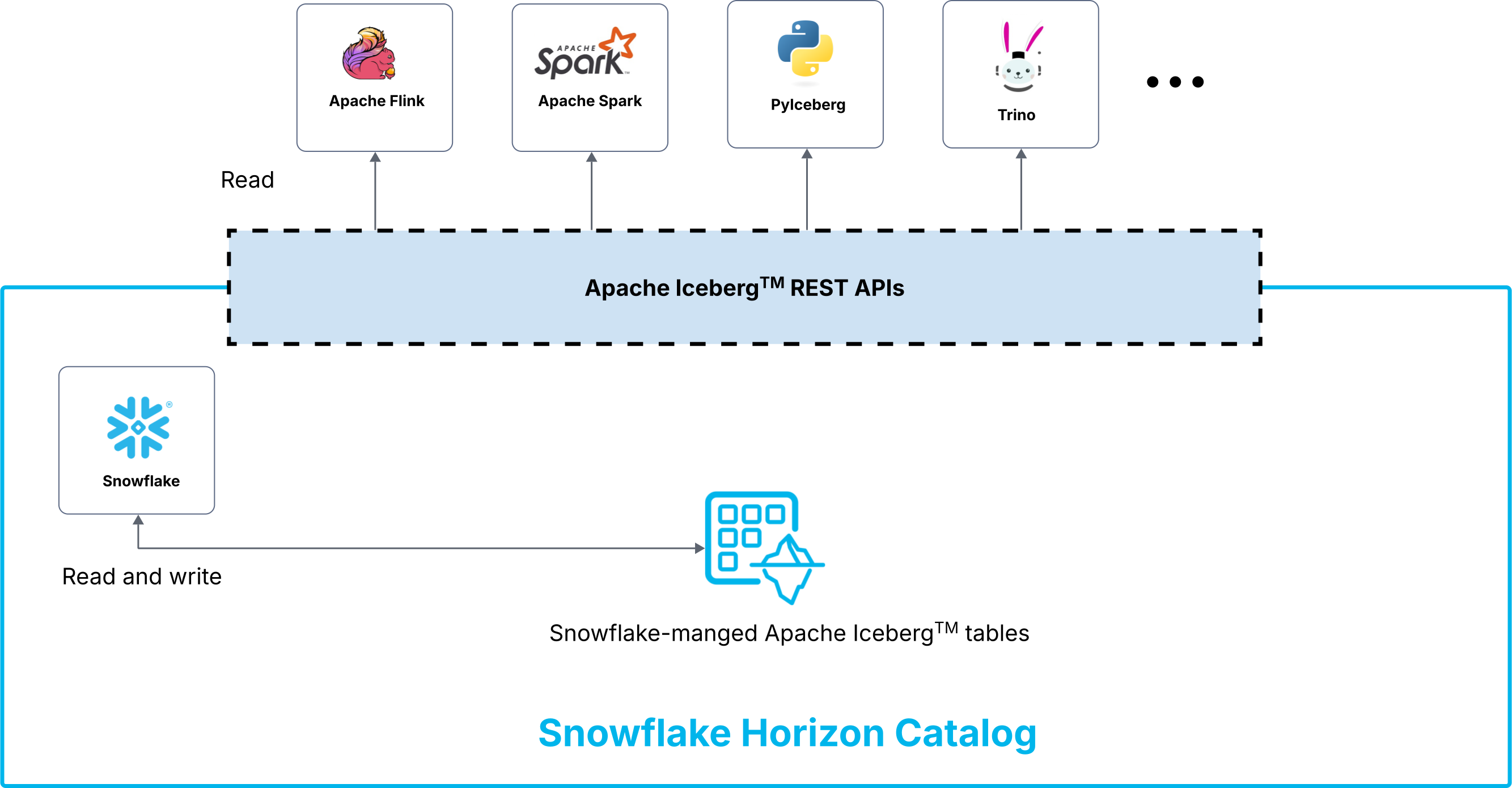
通过 Snowflake Horizon 目录使用外部查询引擎,查询 Snowflake 管理的 Apache Iceberg™ 表。为了确保与外部引擎的互操作性,`_Apache Polaris™(孵化中)`<https://github.com/apache/polaris (https://github.com/apache/polaris)> 已集成到 Horizon 目录中。此外,Horizon 目录还提供了 Apache Iceberg™ REST API(Horizon Iceberg REST 目录 API)。此 API 允许您使用外部查询引擎读取表。
要使用外部查询引擎查询 Snowflake 托管的 Iceberg 表,您可以使用此功能,而不是 将 Sguowflake 托管的 Iceberg 表与 Snowflake Open Catalog 同步。有关 Open Catalog 的更多信息,请参阅 Snowflake Open Catalog 概述。
通过 Horizon 目录将外部查询引擎连接到 Iceberg 表,您可以执行以下任务:
使用任何支持开放 Iceberg REST 协议的外部查询引擎(例如 Apache Spark™)查询这些表。
使用单个 Horizon 目录端点,查询新的或现有的 Snowflake 账户中任何现有和新的 Snowflake 托管的 Iceberg 表。
使用 Snowflake 中的现有用户、角色、策略和身份验证来查询表。
使用分发的凭据。
有关 Snowflake Horizon 目录的更多信息,请参阅 Snowflake Horizon 目录。
下图显示了外部查询引擎通过 Horizon 目录读取 Snowflake 托管的 Iceberg 表,以及 Snowflake 对这些表的读取和写入:
计费
Horizon Iceberg REST 目录 API 适用于所有 Snowflake 版本。
API 请求按每百万次调用 0.5 Credit 计费,并作为云服务进行收费。
对于跨区域数据访问,将适用 Snowflake 服务消耗表 中的标准跨区域数据出口费。
备注
此功能计划于 2026 年年中开始计费,具体情况可能会有变。
支持的外部引擎和目录
下表虽然并不详尽,但显示了与 Horizon Iceberg REST 目录 API 集成的外部引擎和目录。此集成使外部系统能够访问 Snowflake 管理的 Iceberg 表。
支持的外部引擎
以下外部查询引擎可与 Horizon Iceberg REST 目录 API 集成:
产品 |
通过 Horizon 目录访问 Snowflake 管理的 Iceberg 表 |
|---|---|
Apache Doris™ |
✔ |
Apache Flink™ |
✔ |
Apache Spark |
✔ |
Dremio |
✔ |
DuckDB |
✔ |
PyIceberg |
✔ |
StarRocks |
✔ |
Trino |
✔ |
支持的外部目录
以下外部目录可与 Horizon Iceberg REST 目录 API 集成:
产品 |
通过 Horizon 目录访问 Snowflake 管理的 Iceberg 表 |
注释 |
|---|---|---|
Apache Polaris™ |
✔ |
|
AWS Glue |
✔ |
有关如何配置此集成的说明,请参阅 AWS 大数据博客中的 使用目录联合通过 AWS Glue Data Catalog 访问 Snowflake Horizon 目录数据 (https://aws.amazon.com/blogs/big-data/access-snowflake-horizon-catalog-data-using-catalog-federation-in-the-aws-glue-data-catalog/)。 |
Palantir Foundry |
✔ |
有关如何配置此集成的说明,请参阅 Palantir 文档中的 `Iceberg 表(仅限虚拟表)<https://www.palantir.com/docs/foundry/available-connectors/snowflake#iceberg-tables-virtual-tables-only>`_。 |
Databricks Unity 目录 |
未公布 |
|
Google BigLake Metastore |
开发中 |
|
Microsoft Fabric / Synapse |
开发中 |
先决条件
检索包含要查询的 Iceberg 表的 Snowflake 的账户账户标识符。有关说明,请参阅 账户标识符。您可以在 将外部查询引擎连接到 Iceberg 表 时指定此标识符。
小技巧
要获取您的账户标识符,请使用 SQL,您可以运行以下命令:
SELECT CURRENT_ORGANIZATION_NAME() || '-' || CURRENT_ACCOUNT_NAME();
(可选)专用连接
为确保安全连接,建议在访问 Horizon Catalog 端点时,为您的 Snowflake 账户配置 入站 和 出站 专用连接。
备注
专用连接仅支持存储在 Amazon S3 或 Azure 存储 (ADLS) 中的由 Snowflake 管理的 Iceberg 表。
使用外部查询引擎查询 Iceberg 表的工作流程
要使用外部查询引擎查询 Iceberg 表,请完成以下步骤:
第 1 步:创建 Iceberg 表
重要
如果您已经拥有要查询的 Snowflake 托管的 Iceberg 表,则可以跳过此步骤。
在此步骤中,您将创建 Snowflake 托管的 Iceberg 表,这些表使用 Snowflake 作为目录,从而支持通过外部查询引擎对这些表进行查询。有关说明,请参阅以下主题:
教程:创建第一个 Apache Iceberg™ 表:选择使用 时默认使用的角色和仓库。本教程展示了如何创建数据库、创建 Snowflake 托管的 Iceberg 表以及将数据加载到表中。
创建 Snowflake 托管的 Iceberg 表:Snowflake 托管的 Iceberg 表的创建示例代码。
第 2 步:配置访问控制
重要
如果您已经配置具备访问目标 Iceberg 表权限的角色,则可以跳过此步骤。
在此步骤中,您将为要使用外部查询引擎查询的 Snowflake 托管的 Iceberg 表配置访问控制。例如,您可以在 Snowflake 中设置以下角色:
data_engineer 角色,该角色有权访问数据库中的所有架构和所有 Snowflake 托管的 Iceberg 表。
data_analyst 角色,该角色可以访问数据库中的一个架构,但只能访问该架构内的两个 Snowflake 托管的 Iceberg 表。
配置对 Iceberg 表的访问权限
要查询 Iceberg 表,执行操作的角色必须对用于连接外部云存储的外部卷拥有 USAGE 权限。
以下示例将名 my_ext_vol 的外部卷的 USAGE 权限授予名为 data_engineer 的角色。
GRANT USAGE ON EXTERNAL VOLUME my_ext_vol TO ROLE data_engineer;
有关外部卷的 USAGE 权限的更多信息,请参阅 外部卷权限。
备注
要查询 Iceberg 表,执行该操作的角色必须同时拥有对 Iceberg 表的 SELECT 权限,以及对父数据库和架构的 USAGE 和 MONITOR 权限。有关如何向角色授予这些权限的示例,请参阅 示例:设置服务账户用户。
示例:设置服务账户用户
以下示例在 Snowflake 中设置了一个服务账户用户,该用户对 Iceberg 表具有只读访问权限,如下所示:
创建一个
data_engineer角色。授予
data_engineer角色对my_ext_vol外部卷的 USAGE 权限。授予
data_engineer角色对iceberg_test_db数据库及其public架构的 USAGE 和 MONITOR 权限。授权对
test_tableIceberg 表的 SELECT 权限。创建名为
horizon_rest_srv_account_user的服务用户并为该用户分配data_engineer角色。
CREATE OR REPLACE ROLE data_engineer;

GRANT USAGE ON EXTERNAL VOLUME my_ext_vol TO ROLE data_engineer;

GRANT USAGE,MONITOR ON DATABASE iceberg_test_db TO ROLE data_engineer;
GRANT USAGE,MONITOR ON SCHEMA iceberg_test_db.public TO ROLE data_engineer;

GRANT SELECT ON TABLE iceberg_test_db.public.test_table TO ROLE data_engineer;

CREATE OR REPLACE USER horizon_rest_srv_account_user TYPE=SERVICE DEFAULT_ROLE=data_engineer;

GRANT ROLE data_engineer TO USER horizon_rest_srv_account_user;
(可选)在 Iceberg 表上应用未来授权
为了确保能够访问架构中创建的任何新 Iceberg 表,请使用 GRANT … ON FUTURE ICEBERG TABLES 语法。
以下示例授予 data_engineer 角色对在名为 my_schema 的模式下创建的任何 Iceberg 表的访问权限。
GRANT SELECT, REFERENCES ON FUTURE ICEBERG TABLES IN SCHEMA my_db.my_schema TO ROLE data_engineer;
有关 Snowflake 中访问控制的更多信息,请参阅以下主题:
第 3 步:获取用于身份验证的访问令牌
在此步骤中,您将获得一个访问令牌,您必须使用该令牌对 Snowflake 账户的 Horizon 目录端点进行身份验证。您需要为配置为可以访问 Snowflake 托管的 Iceberg 表的每个用户(服务或人员)和角色获取访问令牌。例如,您需要为具有 DATA_ENGINEER 角色的用户获取一个访问令牌,并为具有另一个 DATA_ANALYST 角色的用户再获取一个访问令牌。
稍后,当您 通过 Horizon 目录将外部查询引擎连接到 Iceberg 表 时,需要指定该访问令牌。
您可以使用以下身份验证选项之一获取访问令牌:
External OAuth
如果您使用的是外部 OAuth,请为身份提供商生成访问令牌。有关说明,请参阅 External OAuth 概览。
备注
对于外部 OAuth,您还可以使用自动令牌刷新配置与引擎的连接,而不是指定访问令牌。
密钥对身份验证
如果您使用密钥对身份验证,且要获取访问令牌,您需要使用私钥签署 JSON 网络令牌 (JWT)。
以下步骤介绍如何生成用于密钥对身份验证的访问令牌:
第 1 步:配置密钥对身份验证
在此步骤中,您需要执行以下任务:
生成私钥
生成公钥
安全地存储私钥和公钥
授予向 Snowflake 用户分配公钥的权限
将公钥分配给 Snowflake 用户
验证用户的公钥指纹
有关说明,请参阅 配置密钥对身份验证。
第 2 步:向用户授予角色
运行 GRANT ROLE 命令,将具有查询目标表权限的 Snowflake 角色授予密钥对身份验证用户。例如,要向 my_service_user 用户授予 ENGINEER 角色,请运行以下命令:
GRANT ROLE ENGINEER to user my_service_user;
第 3 步:生成 JSON Web 令牌 (JWT)
在此步骤中,您将使用 SnowSQL 生成用于密钥对身份验证的 JSON Web 令牌 (JWT)。
备注
您必须在计算机上安装 SnowSQL。
或者,您也可以使用 Python、Snowflake CLI、Java 或 Node.js 生成 JWT。有关示例,请参阅以下部分:
使用 SnowSQL 生成 JWT:
snowsql --private-key-path "<private_key_file>" \
  --generate-jwt \
  -h "<account_identifier>.snowflakecomputing.cn" \
  -a "<account_locator>" \
  -u "<user_name>"
其中:
<private_key_file>is the path to your private key file that corresponds to the public key assigned to your Snowflake user.For example:/Users/jsmith/.ssh/rsa_key.p8.<account_identifier>是您的 Snowflake 账户的账户标识符,格式为<organization_name>-<account_name>。要查找账户标识符,请参阅 支持的外部引擎和目录。账户标识符示例:myorg-myaccount。<account_locator>是 Snowflake 账户的账户定位器。要查找您的账户定位器,请参阅 在 Snowsight 中查找您的 Snowflake 账户信息,并并在 Account Details 对话框中查看 账户定位器。
<user_name>是 Snowflake 用户的用户名,且该用户已获分配公钥。
第 4 步:生成访问令牌
重要
要生成访问令牌,您必须先 生成一个 JWT。之所以需要先生成 JWT,是因为访问令牌正是基于 JWT 生成的。
使用命令 curl 生成访问令牌:
curl -i --fail -X POST "https://<account_identifier>.snowflakecomputing.cn/polaris/api/catalog/v1/oauth/tokens" \
 --header 'Content-Type: application/x-www-form-urlencoded' \
 --data-urlencode 'grant_type=client_credentials' \
 --data-urlencode 'scope=session:role:<role>' \
 --data-urlencode 'client_secret=<JWT_token>'
其中:
<account_identifier>是您的 Snowflake 账户的账户标识符,格式为<organization_name>-<account_name>。要查找账户标识符,请参阅 支持的外部引擎和目录。账户标识符示例:myorg-myaccount。<role>是授予访问 Iceberg 表权限的 Snowflake 角色,例如 ENGINEER。<JWT_token>是您在上一步中生成的 JWT。
编程访问令牌 (PAT)
如果您使用 PATs,则生成用于身份验证的 PAT。
首先,生成一个 PAT,用于 将外部查询引擎连接到 Iceberg 表。然后生成访问令牌,仅用于验证您的 PAT 的权限。
第 1 步:生成 PAT
有关如何配置和生成 PAT,请参阅 用于身份验证的编程访问令牌。
以下示例将为上一步骤中创建的服务账户用户生成程序化访问令牌 (PAT),使用 ALTER USER ... ADD PROGRAMMATIC ACCESS TOKEN (PAT) 命令:
ALTER USER IF EXISTS HORIZON_REST_SRV_ACCOUNT_USER
ADD PAT HORIZON_REST_SRV_ACCOUNT_USER_PAT
  DAYS_TO_EXPIRY = 7
  ROLE_RESTRICTION = 'DATA_ENGINEER'
  COMMENT = 'HORIZON REST API PAT FOR SERVICE ACCOUNT';
第 2 步:为 PAT 生成访问令牌
在此步骤中,将为 PAT 生成访问令牌。
注意
仅在为 PAT 验证权限 时,需提供本步骤生成的访问令牌。将外部查询引擎连接至 Iceberg 表 时,必须指定上一步骤生成的 PAT,而非本步骤生成的访问令牌。
使用 curl 命令为 PAT 生成访问令牌:
curl -i --fail -X POST "https://<account_identifier>.snowflakecomputing.cn/polaris/api/catalog/v1/oauth/tokens" \
 --header 'Content-Type: application/x-www-form-urlencoded' \
 --data-urlencode 'grant_type=client_credentials' \
 --data-urlencode 'scope=session:role:<role>' \
 --data-urlencode 'client_secret=<PAT_token>'
其中:
<account_identifier>是您的 Snowflake 账户的账户标识符,格式为<organization_name>-<account_name>。要查找账户标识符,请参阅 支持的外部引擎和目录。账户标识符示例:myorg-myaccount。<role>是授予您 PAT 的 Snowflake 角色,该角色可访问您要查询的 Iceberg 表,例如 ENGINEER。<PAT_token>是您在上一步骤生成的 PAT 值。
第 4 步:验证访问令牌权限
在此步骤中,您将验证在上一步中获取的访问令牌的权限。
验证对 Horizon IRC 端点的访问权限
使用 curl 命令验证您是否具有访问 Horizon IRC 端点的权限:
curl -i --fail -X GET "https://<account_identifier>.snowflakecomputing.cn/polaris/api/catalog/v1/config?warehouse=<database_name>" \
-H "Authorization: Bearer <access_token>" \
-H "Content-Type: application/json"
其中:
<account_identifier>是您的 Snowflake 账户的账户标识符,格式为<organization_name>-<account_name>。要查找账户标识符,请参阅 支持的外部引擎和目录。账户标识符示例:myorg-myaccount。<access_token>是您生成的访问令牌。若使用 PAT,此值应为 生成的访问令牌,而非您生成的 个人访问令牌 (PAT) 。<database_name>是要查询的数据库的名称。重要
您必须以 全部大写字母 指定数据库名称,即使它是使用小写字母创建的。
返回值示例:
{
  "defaults": {
    "default-base-location": ""
  },
  "overrides": {
    "prefix": "MY-DATABASE"
  }
}
检索表的元数据
您还可以通过 GET 请求检索表的元数据。Snowflake 使用 loadTable (https://github.com/apache/iceberg/blob/apache-iceberg-1.6.1/open-api/rest-catalog-open-api.yaml#L616) 操作从您的 REST 目录加载表元数据。
curl -i --fail -X GET "https://<account_identifier>.snowflakecomputing.cn/polaris/api/catalog/v1/<database_name>/namespaces/<namespace_name>/tables/<table_name>" \
 -H "Authorization: Bearer <access_token>" \
 -H "Content-Type: application/json"
其中:
<account_identifier>是您的 Snowflake 账户的账户标识符,格式为<organization_name>-<account_name>。要查找账户标识符,请参阅 支持的外部引擎和目录。账户标识符示例:myorg-myaccount。<database_name>是要检索其元数据的表的数据库。<namespace_name>是要检索其元数据的表的命名空间。<table_name>是要检索其元数据的表。<access_token>是您生成的访问令牌。若使用 PAT,此值应为 生成的访问令牌,而非您生成的 个人访问令牌 (PAT) 。
重要
您必须使用 全部大写字母 指定数据库、命名空间和表名称,即使对象是使用小写字母创建的。
(可选)第 5 步:配置数据保护策略
在此步骤中,为 Iceberg 表配置数据保护策略。如果没有需要使用 Snowflake 数据策略保护的表,可以继续执行下一步。
备注
受数据保护策略保护的表可通过 Horizon Iceberg RESTAPI 或使用 Apache Spark™ 访问。
有关配置数据保护策略的说明,请参阅 在通过 Horizon Iceberg REST API 访问的 Iceberg 表上配置数据保护策略并使用 Apache Spark™。
第 6 步:通过 Horizon 目录将外部查询引擎连接到 Iceberg 表
在此步骤中,您将通过 Horizon 目录将外部查询引擎连接到 Iceberg 表。通过此连接,您可以使用外部查询引擎对表进行查询。
外部引擎使用 Snowflake 公开的 Apache Iceberg™ REST 端点。对于您的 Snowflake 账户,此端点采用以下格式:
https://<account_identifier>.snowflakecomputing.cn/polaris/api/catalog
此步骤中的示例代码展示了如何在 Spark 中设置连接,示例代码则位于 PySpark。有关更多信息,请参阅以下部分:
使用外部 OAuth 或密钥对身份验证进行连接
使用以下配置之一进行连接:
要访问 未 配置 Snowflake 数据保护策略的 Iceberg 表,在不强制执行数据策略的情况下连接外部查询引擎。
要访问配置了 Snowflake 行访问和掩码策略的 Iceberg 表,连接已强制执行数据策略的外部查询引擎。
在不强制执行数据策略的情况下连接外部查询引擎
使用以下示例代码将外部查询引擎连接到 Iceberg 表,可通过外部 OAuth 或密钥对身份验证:
此代码不强制执行数据保护策略:
# Snowflake Horizon Catalog Configuration, change as per your environment

CATALOG_URI = "https://<account_identifier>.snowflakecomputing.cn/polaris/api/catalog"
HORIZON_SESSION_ROLE = f"session:role:<role>"
CATALOG_NAME = "<database_name>" #provide in UPPER CASE

# Cloud Service Provider Region Configuration (where the Iceberg data is stored)
REGION = "eastus2"

# Paste the External Oauth Access token that you generated in Snowflake here
ACCESS_TOKEN = "<your_access_token>"

# Iceberg Version
ICEBERG_VERSION = "1.9.1"

def create_spark_session():
  """Create and configure Spark session for Snowflake Iceberg access."""
  spark = (
      SparkSession.builder
      .appName("SnowflakeIcebergReader")
      .master("local[*]")

# JAR Dependencies for Iceberg and Azure
      .config(
          "spark.jars.packages",
          f"org.apache.iceberg:iceberg-spark-runtime-3.5_2.12:{ICEBERG_VERSION},"
          f"org.apache.iceberg:iceberg-aws-bundle:{ICEBERG_VERSION}"
          # for Azure storage, use the below package and comment above azure bundle
          # f"org.apache.iceberg:iceberg-azure-bundle:{ICEBERG_VERSION}"
      )

      # Iceberg SQL Extensions
      .config("spark.sql.extensions", "org.apache.iceberg.spark.extensions.IcebergSparkSessionExtensions")
      .config("spark.sql.defaultCatalog", CATALOG_NAME)

      # Horizon REST Catalog Configuration
      .config(f"spark.sql.catalog.{CATALOG_NAME}", "org.apache.iceberg.spark.SparkCatalog")
      .config(f"spark.sql.catalog.{CATALOG_NAME}.type", "rest")
      .config(f"spark.sql.catalog.{CATALOG_NAME}.uri", CATALOG_URI)
      .config(f"spark.sql.catalog.{CATALOG_NAME}.warehouse", CATALOG_NAME)
      .config(f"spark.sql.catalog.{CATALOG_NAME}.token", ACCESS_TOKEN)
      .config(f"spark.sql.catalog.{CATALOG_NAME}.scope", HORIZON_SESSION_ROLE)
      .config(f"spark.sql.catalog.{CATALOG_NAME}.client.region", REGION)

      # Required for vended credentials
      .config(f"spark.sql.catalog.{CATALOG_NAME}.header.X-Iceberg-Access-Delegation", "vended-credentials")
      .config("spark.sql.iceberg.vectorization.enabled", "false")
      .getOrCreate()
  )
  spark.sparkContext.setLogLevel("ERROR")
  return spark
其中:
<account_identifier>是包含要查询的 Iceberg 表的 Snowflake 账户的 Snowflake 账户标识符。要查找此标识符,请参阅 支持的外部引擎和目录。<your_access_token>是您获得的访问令牌。要获取该令牌,请参阅 第 3 步:获取用于身份验证的访问令牌。备注
对于外部 OAuth,您还可以使用自动令牌刷新配置与引擎的连接,而不是指定访问令牌。
<database_name>是 Snowflake 账户中数据库的名称,该数据库包含您要查询的 Snowflake 托管的 Iceberg 表。备注
Spark 中的
.warehouse属性需要 Snowflake 数据库 名称,而不是 Snowflake 仓库名称。<role>是 Snowflake 中配置为对要查询的 Iceberg 表具有访问权限的角色。例如:DATA_ENGINEER。
重要
默认情况下,代码示例是针对存储在 Amazon S3 上的 Apache Iceberg™ 表进行设置的。如果您的 Iceberg 表存储在 Azure 存储 (ADLS) 中,请执行以下步骤:
注释以下行:
f"org.apache.iceberg:iceberg-aws-bundle:{ICEBERG_VERSION}"取消注释以下行:
# f"org.apache.iceberg:iceberg-azure-bundle:{ICEBERG_VERSION}"
连接外部查询引擎并强制执行数据策略
要连接已强制执行的数据保护策略,请参阅 将 Spark 连接到 Iceberg 表。
使用编程访问令牌 (PAT) 进行连接
使用以下配置之一进行连接:
如果您对要查询的 Iceberg 表 不使用 数据保护策略,请使用配置 在不强制执行数据策略的情况下连接外部查询引擎。
如果您对要查询的 Iceberg 表 使用 数据保护策略,请使用配置 连接外部查询引擎并强制执行数据策略。
在不强制执行数据策略的情况下连接外部查询引擎
使用以下示例代码,通过编程访问令牌 (PAT) 将外部查询引擎连接到 Iceberg 表:
此代码不强制执行数据保护策略:
# Snowflake Horizon Catalog Configuration, change as per your environment

CATALOG_URI = "https://<account_identifier>.snowflakecomputing.cn/polaris/api/catalog"
HORIZON_SESSION_ROLE = f"session:role:<role>"
CATALOG_NAME = "<database_name>" #provide in UPPER CASE

# Cloud Service Provider Region Configuration (where the Iceberg data is stored)
REGION = "eastus2"

# Paste the PAT you generated in Snowflake here
PAT_TOKEN = "<your_PAT_token>"

# Iceberg Version
ICEBERG_VERSION = "1.9.1"

def create_spark_session():
  """Create and configure Spark session for Snowflake Iceberg access."""
  spark = (
      SparkSession.builder
      .appName("SnowflakeIcebergReader")
      .master("local[*]")

# JAR Dependencies for Iceberg and Azure
      .config(
          "spark.jars.packages",
          f"org.apache.iceberg:iceberg-spark-runtime-3.5_2.12:{ICEBERG_VERSION},"
          f"org.apache.iceberg:iceberg-aws-bundle:{ICEBERG_VERSION}"
          # for Azure storage, use the below package and comment above azure bundle
          # f"org.apache.iceberg:iceberg-azure-bundle:{ICEBERG_VERSION}"
      )

      # Iceberg SQL Extensions
      .config("spark.sql.extensions", "org.apache.iceberg.spark.extensions.IcebergSparkSessionExtensions")
      .config("spark.sql.defaultCatalog", CATALOG_NAME)

      # Horizon REST Catalog Configuration
      .config(f"spark.sql.catalog.{CATALOG_NAME}", "org.apache.iceberg.spark.SparkCatalog")
      .config(f"spark.sql.catalog.{CATALOG_NAME}.type", "rest")
      .config(f"spark.sql.catalog.{CATALOG_NAME}.uri", CATALOG_URI)
      .config(f"spark.sql.catalog.{CATALOG_NAME}.warehouse", CATALOG_NAME)
      .config(f"spark.sql.catalog.{CATALOG_NAME}.credential", PAT_TOKEN)
      .config(f"spark.sql.catalog.{CATALOG_NAME}.scope", HORIZON_SESSION_ROLE)
      .config(f"spark.sql.catalog.{CATALOG_NAME}.client.region", REGION)

      # Required for vended credentials
      .config(f"spark.sql.catalog.{CATALOG_NAME}.header.X-Iceberg-Access-Delegation", "vended-credentials")
      .config("spark.sql.iceberg.vectorization.enabled", "false")
      .getOrCreate()
  )
  spark.sparkContext.setLogLevel("ERROR")
  return spark
其中:
<account_identifier>是包含要查询的 Iceberg 表的 Snowflake 账户的 Snowflake 账户标识符。要查找此标识符,请参阅 支持的外部引擎和目录。<your_PAT_token>是您获取的 PAT。要获取该令牌,请参阅 第 3 步:获取用于身份验证的访问令牌。<role>是 Snowflake 中配置为对要查询的 Iceberg 表具有访问权限的角色。例如:DATA_ENGINEER。<database_name>是 Snowflake 账户中数据库的名称,该数据库包含您要查询的 Snowflake 托管的 Iceberg 表。备注
Spark 中的
.warehouse属性需要 Snowflake 数据库 名称,而不是 Snowflake 仓库名称。
重要
默认情况下,代码示例是针对存储在 Amazon S3 上的 Apache Iceberg™ 表进行设置的。如果您的 Iceberg 表存储在 Azure 存储 (ADLS) 中,请执行以下步骤:
注释以下行:
f"org.apache.iceberg:iceberg-aws-bundle:{ICEBERG_VERSION}"取消注释以下行:
# f"org.apache.iceberg:iceberg-azure-bundle:{ICEBERG_VERSION}"
连接外部查询引擎并强制执行数据策略
要连接已强制执行的数据保护策略,请参阅 将 Spark 连接到 Iceberg 表。
第 7 步:查询 Iceberg 表
此步骤提供了使用 Apache Spark™ 查询 Iceberg 表的以下代码示例:
显示命名空间
使用命名空间
显示表
查询表
显示命名空间
spark.sql("show namespaces").show()
使用命名空间
spark.sql("use namespace <your_schema_name_in_snowflake>")
显示表
spark.sql("show tables").show()
查询表
spark.sql("use namespace spark_demo")
spark.sql("select * from <your_table_name_in_snowflake>").show()
使用外部查询引擎查询 Iceberg 表的注意事项
使用外部查询引擎查询 Iceberg 表时,请考虑以下事项:
Iceberg
对于 Snowflake 中的表:
仅支持 Snowflake 托管的 Iceberg 表。
不支持查询以下表:
远程表
Snowflake 原生表
外部管理的 Iceberg 表,包括基于 Delta 的 Iceberg 表和由 Snowflake 管理的 Iceberg 表,这些表是通过使用 COPY INTO 表命令从兼容 Iceberg 的 Parquet 数据文件中加载数据生成的。
您可以查询,但不能写入 Iceberg 表。
仅 Iceberg 版本 2 或更早版本支持外部读取。
访问控制:
受以下细粒度数据策略保护的表可以通过 Snowflake Horizon 目录在 Apache Spark™ 中访问:
掩码策略
基于标签的掩码策略
行访问策略
有关更多信息,请参阅 从 Apache Spark™ 查询 Apache Iceberg™ 表时强制执行数据保护策略。
网络和专用连接:
此功能不支持使用在用户级别设置的网络策略。
对于 Snowflake 管理的网络规则,静态出口 IP 地址不受支持。
不支持显式授予 Horizon 目录端点对存储账户的访问权限。我们建议使用专用连接,以确保从外部引擎到 Horizon 目录,以及从 Horizon 目录到存储账户的连接安全。
列表:
通过 列表的自动履行 共享的 Iceberg 表无法通过使用者账户的 Horizon Iceberg REST 目录 API 访问。
云:
此功能仅支持存储在 Amazon S3、Google Cloud 或 Microsoft Azure 上,由 Snowflake 托管的 Iceberg 表,并适用于所有商业云区域。与 S3 兼容的非 AWS 存储尚不受支持。
对于存储在 Amazon S3 上的 Iceberg 表:
如果您想使用 SSE-KMS 加密,请联系客户支持或您的客户团队,以获取有关启用访问权限的帮助。
对于存储在 Azure 上的 Iceberg 表:
Azure 虚拟网络 (VNet) 不受支持。
身份验证:
对于密钥对身份验证,密钥对轮换不受支持。
此功能不支持工作负载身份联合。