DOCUMENTATION
/
语言
English
中文
开始使用
指南
开发者
参考
版本说明
教程
状态
前往 https://china-status.snowflake.com 查看状态详细信息
  1. 概述
    • Snowflake Horizon 目录
      • 连接到 Snowflake 的应用程序和工具
      • 虚拟仓库
      • 数据库、表和视图
      • Data types
        • 数据集成
          1. Snowflake Openflow
          2. Apache Iceberg™
            1. Apache Iceberg™ 表
            2. Snowflake Open Catalog
                1. 开始使用
                  1. Tutorial: Get Started
                    • 免费试用 Snowflake Open Catalog
                      • 创建 Snowflake Open Catalog 账户
                        • 登录
                          • 访问控制
                          • 确保 Snowflake Open Catalog 的安全
                            1. 注册 MFA
                              • 使用网络策略限制对 Snowflake Open Catalog 的访问
                                • SSO
                                • External OAuth
                                • Key pair authentication
                                • 入站专用连接
                                    1. AWS PrivateLink and Snowflake Open Catalog
                                      • Azure Private Link and Snowflake Open Catalog
                                        • Configure UI private connectivity
                                      • 出站专用连接
                                    2. 账户
                                      1. 管理用户
                                        • 查找账户名称
                                        • 设置目录
                                          1. 为目录创建外部云存储
                                            • 创建目录
                                              • 为外部目录启用凭据交易
                                                • 创建目录角色
                                                  • 创建主体角色
                                                    • 配置和移除服务连接
                                                      • 注册服务连接
                                                        • Connect with External OAuth
                                                          • Connect with key pair authentication
                                                          • 管理目录
                                                            1. 组织目录内容
                                                              • 安全目录
                                                                • 查看 Snowflake Open Catalog 中表的架构
                                                                • 查询目录中的数据
                                                                  1. 使用 Snowflake 在 Snowflake Open Catalog 中查询表
                                                                    • 将 Snowflake 管理的表与 Snowflake Open Catalog 同步
                                                                      • 使用第三方引擎在 Snowflake Open Catalog 中查询表
                                                                      • Code examples: Apache Spark
                                                                        • 版本说明
                                                                  2. Data engineering
                                                                    1. 数据加载
                                                                    2. 动态表
                                                                    3. Streams and tasks
                                                                    4. Row timestamps
                                                                      • dbt Projects on Snowflake
                                                                      • 数据卸载
                                                                    5. Storage lifecycle policies
                                                                    6. Migrations
                                                                    7. 查询
                                                                    8. 列表
                                                                    9. Collaboration
                                                                    10. Snowflake AI 和 ML
                                                                    11. Snowflake Postgres
                                                                    12. 警报和通知
                                                                    13. 安全
                                                                    14. 数据治理
                                                                    15. 隐私
                                                                    16. 组织和账户
                                                                    17. 业务连续性和数据恢复
                                                                    18. Performance optimization
                                                                    19. 成本和计费
                                                                    指南数据集成Apache Iceberg™Snowflake Open Catalog确保 Snowflake Open Catalog 的安全入站专用连接Azure Private Link and Snowflake Open Catalog

                                                                    Azure Private Link and Snowflake Open Catalog

                                                                    Business Critical Feature

                                                                    此功能需要 Business Critical(或更高版本)。

                                                                    To ask about upgrading, contact Snowflake Support.

                                                                    功能 – 正式发布

                                                                    在政府区域不可用。

                                                                    功能支持的区域

                                                                    此功能在中华人民共和国不可用。

                                                                    This topic describes how to configure Azure Private Link to directly connect your Snowflake Open Catalog account to your query engine by using inbound private connectivity.

                                                                    先决条件

                                                                    • Your Snowflake Open Catalog account is hosted on Azure.

                                                                    • You have the necessary permissions to configure your DNS service with the private connectivity URL for your Open Catalog account.

                                                                    Step 1: Retrieve your Open Catalog account settings

                                                                    Retrieve the following settings for configuring access to Open Catalog with Azure Private Link.

                                                                    1. Sign in to Snowflake Open Catalog.

                                                                    2. In the navigation menu, select Settings.

                                                                    3. On the Settings page, copy the values for the following settings into a text editor:

                                                                      • PrivateLink Account URL

                                                                      • Regionless PrivateLink Account URL

                                                                      • PrivateLink OCSP URL

                                                                      • Regionless PrivateLink OCSP URL

                                                                      • Private Link Service ID

                                                                    You paste these values when you Configure access to Open Catalog with Azure Private Link and Connect to Open Catalog through Azure Private Link.

                                                                    For descriptions of each setting, see Return values for the SYSTEM$GET_PRIVATELINK_CONFIG system function in the Snowflake documentation. In this topic, the names of the account settings are in JSON format.

                                                                    备注

                                                                    Remember that, where applicable, the description refers to a Snowflake account but your value is actually for your Snowflake Open Catalog account. For example, the privatelink-account-url is the URL for your Snowflake Open Catalog account.

                                                                    • Optional: To retrieve these values in JSON format, Create a Snowflake CLI connection for Open Catalog, and then call the SYSTEM$GET_PRIVATELINK_CONFIG system function.

                                                                    Step 2: Configure access to Open Catalog with Azure Private Link

                                                                    注意

                                                                    This section only covers the Open Catalog--specific details for configuring your VNet environment. Also, note that Snowflake is not responsible for the actual configuration of the required firewall updates and DNS records. If you have issues with any of these configuration tasks, contact Microsoft Support directly.

                                                                    This section describes how to connect your VNet to the Open Catalog VNet using Azure Private Link.

                                                                    To complete the instructions, you need to use the Azure CLI or Azure PowerShell. For installation help, see the Microsoft documentation for the Azure CLI (https://learn.microsoft.com/en-us/cli/azure/install-azure-cli?view=azure-cli-latest) or Azure PowerShell (https://learn.microsoft.com/en-us/powershell/azure/install-azure-powershell?view=azps-13.4.0&viewFallbackFrom=azps-2.6.0).

                                                                    After initiating the connection to Snowflake Open Catalog using Azure Private Link, you can determine the approval state of the connection in the Azure portal.

                                                                    Create a private endpoint

                                                                    备注

                                                                    If you already created a private endpoint for your Snowflake account, and the account is in the same deployment as your Open Catalog account, creating a new private endpoint for your Open Catalog account isn't required. You can optionally skip this step.

                                                                    1. Retrieve your Azure account details. The following example uses the Azure CLI's az account list command.

                                                                      Name     CloudName   SubscriptionId                        State    IsDefault
                                                                      -------  ----------  ------------------------------------  -------  ----------
                                                                      MyCloud  AzureCloud  13c...                                Enabled  True
                                                                      
                                                                      Copy
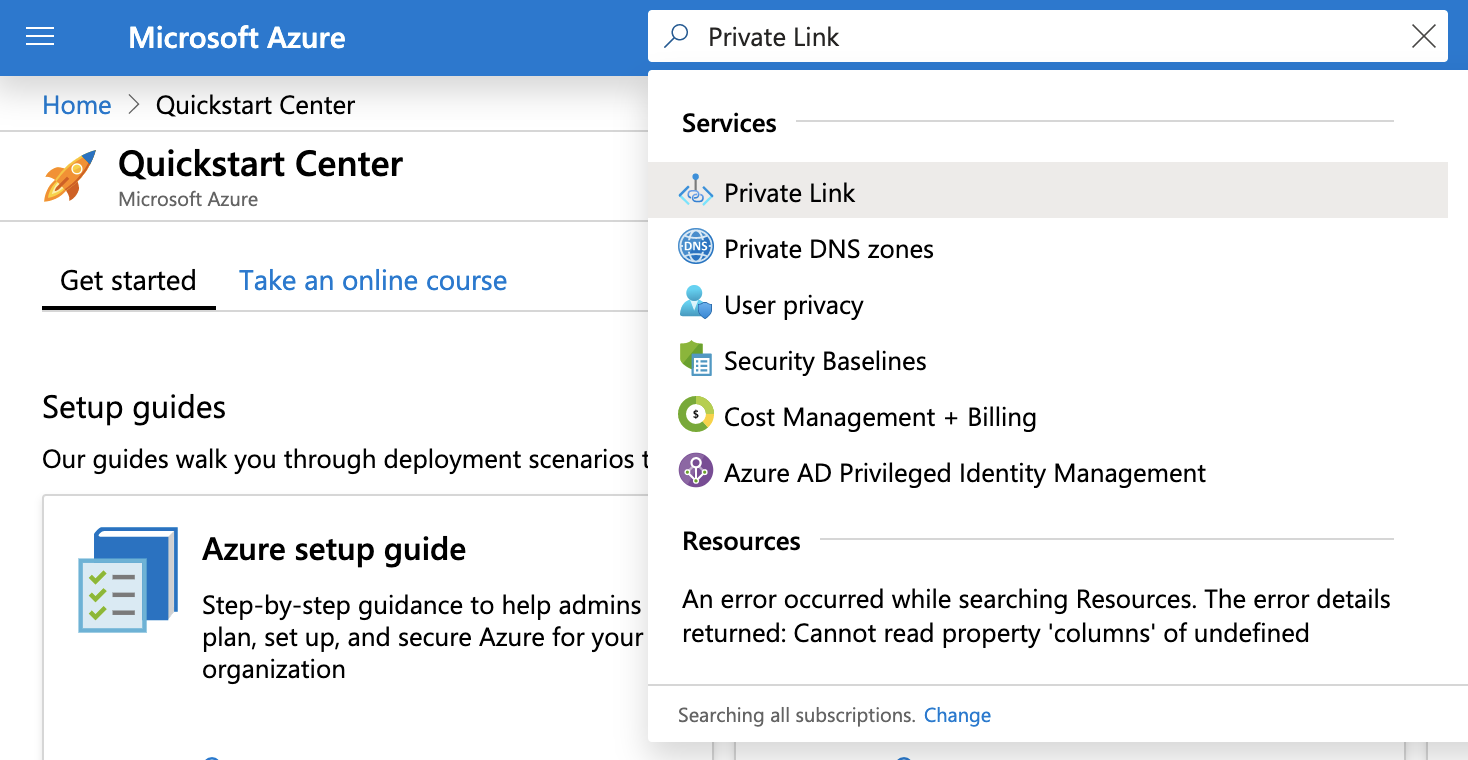
                                                                    2. In the Azure portal, search for Private Link, and then select Private Link in the results.
                                                                      Conceptual diagram of Open Catalog.

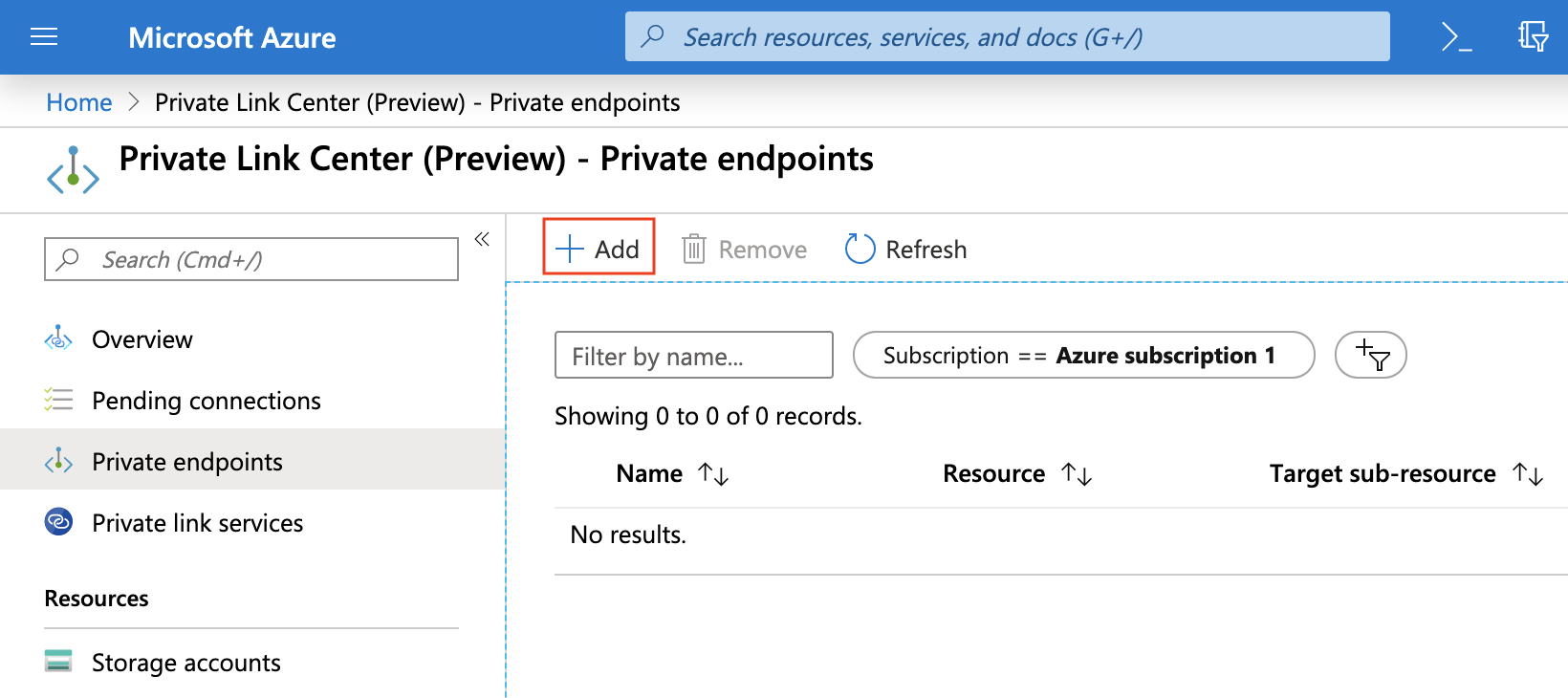
                                                                    3. Click Private endpoints, and then click Add.
                                                                      Conceptual diagram of Open Catalog.

                                                                    4. On the Basics tab, complete the Subscription, Resource group, Name, and Region fields for your environment and then click Next: Resource.

                                                                    5. On the Resource tab, for Connection Method, select Connect to an Azure resource by resource ID or alias.

                                                                    6. For Resource ID or alias, enter the value for Private Link Service ID that you obtained when you
                                                                      retrieved your Open Catalog account settings for private connectivity.

                                                                      If you receive an error message regarding the alias value, contact Snowflake Support for the resource ID value, and then repeat this step using that value.

                                                                    When the private endpoint is approved, the CONNECTION STATE in the Private endpoints section on the Private Link Center page displays the value Pending. This value changes to Approved when you complete the authorization in the next procedure.

                                                                    Enable inbound private connectivity

                                                                    In this procedure, you enable Azure Private Link for your Open Catalog account. This configuration allows the query engine to connect to Open Catalog through private connectivity. You will need your private endpoint resource ID, a subscription ID, and the federated token value that contains access credentials for a federated user.

                                                                    1. To obtain these values, execute the following commands in the Azure CLI:

                                                                      1. To obtain your private endpoint resource ID, execute the following command, and copy the value into a text editor:

                                                                        az network private-endpoint show
                                                                        
                                                                        Copy
                                                                      2. To obtain the subscription ID, execute the following command, and note the value in the SubscriptionID column in the output:

                                                                        az account list --output table
                                                                        
                                                                        Copy
                                                                      3. To obtain the federated token value, execute the following command, and copy the accessToken value into a text editor:

                                                                        az account get-access-token --subscription <SubscriptionID>
                                                                        
                                                                        Copy
                                                                        • Where: SubscriptionID is the unique identifier you obtained in the previous step.

                                                                        重要

                                                                        The user generating the Azure access Token must have Read permissions on the Subscription. The least privilege permission is Microsoft.Subscription/subscriptions/acceptOwnershipStatus/read (https://docs.microsoft.com/en-us/azure/role-based-access-control/resource-provider-operations#microsoftsubscription). Alternatively, the default role Reader grants more coarse-grained permissions.

                                                                        The accessToken value is sensitive information and should be treated like a password value — do not share this value.

                                                                        如果需要,请联系 Snowflake 支持部门,在创建支持工单之前编辑任何命令和 URLs 中的访问令牌。

                                                                    2. Sign in to Snowflake Open Catalog.

                                                                    3. In the navigation menu, select Settings.

                                                                    4. Select Authorize.

                                                                    5. In the Authorize Private Link dialog, enable private connectivity for your account:

                                                                      1. For ID, enter the private endpoint resource ID that you copied to a text editor.

                                                                      2. For Federated token, enter the federated token value that you copied to a text editor.

                                                                      3. Select Save.

                                                                    Verify that your account is authorized

                                                                    Follow these steps to verify whether your Open Catalog account is authorized for private connectivity to the Snowflake Open Catalog service.

                                                                    1. Sign in to Snowflake Open Catalog.

                                                                    2. In the navigation menu, select Settings.

                                                                    3. Select Get.

                                                                    4. In the Get Private Link authorization dialog, verify your account:

                                                                      1. In the ID field, enter your private endpoint resource ID. You retrieved this value when you enabled inbound private connectivity.

                                                                      2. In the Federated token field, enter the federated token value. You retrieved this value when you enabled inbound private connectivity.

                                                                      3. Select Save. A message appears, which states whether your account is authorized.

                                                                    Set up DNS

                                                                    All requests to Open Catalog must be routed through the private endpoint. To resolve the Open Catalog account and OCSP URLs to the private IP address of your private endpoint, update your DNS.

                                                                    1. To get the endpoint IP address, in the Azure portal search bar, enter the name of the private endpoint you created.

                                                                    2. Select the Network Interface result.

                                                                      Conceptual diagram of Open Catalog.

                                                                    3. Copy the value for the Private IP address.
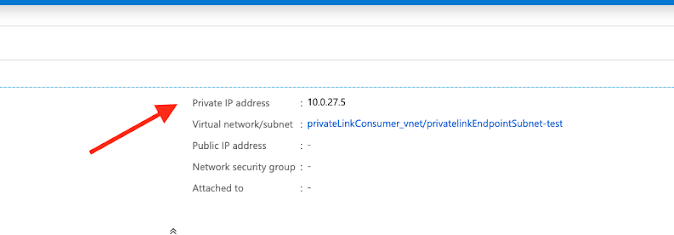
                                                                      Conceptual diagram of Open Catalog.

                                                                    4. Configure your DNS to have the appropriate endpoint values from your Open Catalog account settings for private connectivity resolve to the private IP address.

                                                                    Step 3: Connect to Open Catalog through Azure Private Link

                                                                    • To register a service connection and connect your query engine to Open Catalog through Azure Private Link, use the following code:

                                                                      import pyspark
                                                                      from pyspark.sql import SparkSession
                                                                      
                                                                      spark = SparkSession.builder.appName('iceberg_lab') \
                                                                        .config('spark.jars.packages', 'org.apache.iceberg:iceberg-spark-runtime-3.5_2.12:1.4.1,<maven_coordinate>') \
                                                                        .config('spark.sql.extensions', 'org.apache.iceberg.spark.extensions.IcebergSparkSessionExtensions') \
                                                                        .config('spark.sql.defaultCatalog', 'opencatalog') \
                                                                        .config('spark.sql.catalog.opencatalog', 'org.apache.iceberg.spark.SparkCatalog') \
                                                                        .config('spark.sql.catalog.opencatalog.type', 'rest') \
                                                                        .config('spark.sql.catalog.opencatalog.uri','https://<open_catalog_privatelink_account_url>/polaris/api/catalog') \
                                                                        .config('spark.sql.catalog.opencatalog.header.X-Iceberg-Access-Delegation','vended-credentials') \
                                                                        .config('spark.sql.catalog.opencatalog.credential','<client_id>:<client_secret>') \
                                                                        .config('spark.sql.catalog.opencatalog.warehouse','<catalog_name>') \
                                                                        .config('spark.sql.catalog.opencatalog.scope','PRINCIPAL_ROLE:<principal_role_name>') \
                                                                        .getOrCreate()
                                                                      
                                                                      Copy

                                                                    参数

                                                                    备注

                                                                    Ensure that you set up your DNS service to match the value you specify for <open_catalog_account_identifier>.

                                                                    参数

                                                                    描述

                                                                    <catalog_name>

                                                                    Specifies the name of the catalog to connect to.

                                                                    Important:
                                                                    <catalog_name> is case sensitive.

                                                                    <maven_coordinate>

                                                                    Specifies the Maven coordinate for your external cloud storage provider:

                                                                    • S3: software.amazon.awssdk:bundle:2.20.160
                                                                    • Cloud Storage (from Google): org.apache.iceberg:iceberg-gcp-bundle:1.5.2
                                                                    • Azure: org.apache.iceberg:iceberg-azure-bundle:1.5.2
                                                                    If you don't see this parameter, the correct value is already specified in the code sample.

                                                                    <client_id>

                                                                    Specifies the client ID for the service principal to use.

                                                                    Enter the Client ID that you copied when you configured a new service connection.

                                                                    <client_secret>

                                                                    Specifies the client secret for the service principal to use.

                                                                    Enter the Secret that you copied when you configured a new service connection.

                                                                    <open_catalog_privatelink_account_url>

                                                                    Specifies the URL to connect to your Snowflake account using AWS PrivateLink or Azure Private Link.

                                                                    Enter one of the following values, which you copied when you retrieved your Open Catalog account settings:

                                                                    • PrivateLink Account URL
                                                                    • Regionless PrivateLink Account URL
                                                                    For details on retrieving your Open Catalog account settings, see the instructions for the cloud platform where your Open Catalog account is hosted:

                                                                    • AWS
                                                                    • Azure

                                                                    <principal_role_name>

                                                                    Specifies the principal role that is granted to the service principal.

                                                                    To view this principal role, in Open Catalog, select the Connections page, select your service connection, and in the Principal Details dialog, refer to Principal Roles.

                                                                    Step 4 (Optional): Create a catalog integration for Snowflake

                                                                    If you're using Snowflake to query Open Catalog-managed tables, create a catalog for Snowflake that uses a private IP address. To create this catalog integration, your Snowflake account must be in the same deployment as your Open Catalog account.

                                                                    For an example, see 示例:使用专有 IP 地址的目录集成 in the Snowflake documentation.

                                                                    备注

                                                                    You can also configure private connectivity for the Snowflake Open Catalog UI. This configuration, combined with configuring private connectivity for your Open Catalog account, allows you to access the Open Catalog UI through private connectivity instead of over the public internet.

                                                                    To configure this access, see Configure private connectivity for the Snowflake Open Catalog UI.

                                                                    此页面是否有帮助?

                                                                    访问 Snowflake
                                                                    分享您的反馈
                                                                    隐私策略服务条款
                                                                    © 2026 Snowflake 保留所有权利.@北京神州数码云计算有限公司版权所有.
                                                                    1. 先决条件
                                                                    2. Step 1: Retrieve your Open Catalog account settings
                                                                    3. Step 2: Configure access to Open Catalog with Azure Private Link
                                                                    4. Step 3: Connect to Open Catalog through Azure Private Link
                                                                    5. Step 4 (Optional): Create a catalog integration for Snowflake
