配置客户端、驱动程序、库或第三方应用程序以连接到 Snowflake
要配置客户端、驱动程序、库或第三方应用程序以连接到 Snowflake,您必须指定 Snowflake 账户标识符。此外,您可能还需要指定应使用的仓库、数据库、架构和角色。
您可以在 Snowsight 或执行 SQL 命令来查找这些信息:
使用 Snowsight 获取连接设置
要获取可用于配置客户端、驱动程序、库或第三方应用程序的设置,请执行以下操作:
登录 Snowsight。
选择用户名,打开用户菜单。
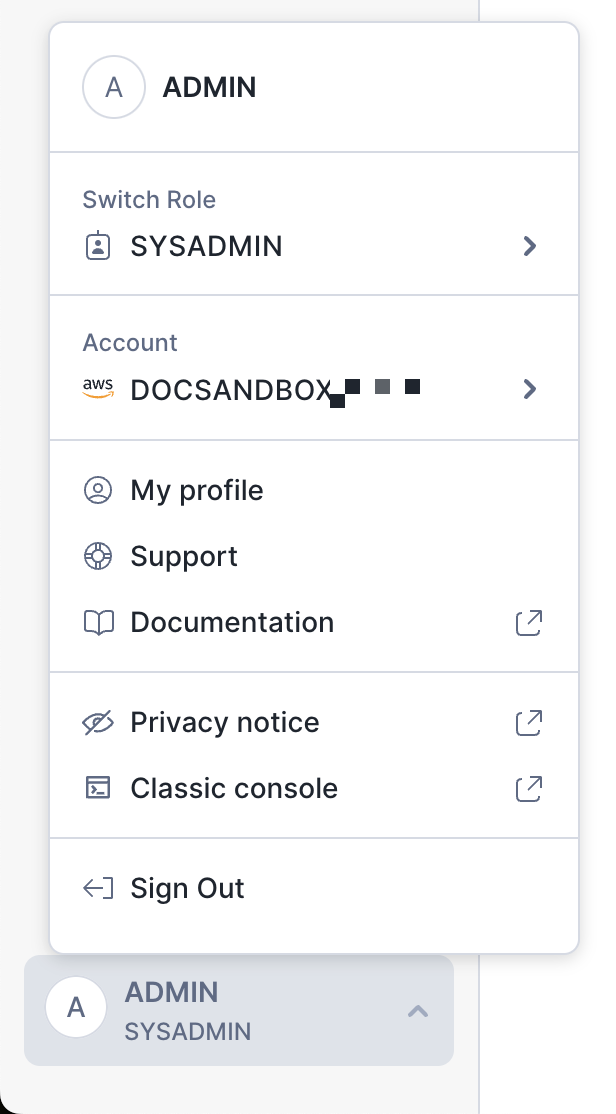
在用户菜单中,选择 Connect a tool to Snowflake,以显示 Account Details 对话框。
小技巧
您还可以通过 账户选择器 显示账户详细信息。
选择以下选项卡之一:
如果您的客户端、驱动程序、库或第三方应用程序支持使用 TOML 配置文件(例如,Snowflake CLI、Snowflake Python APIs 或 Snowflake Connector for Python:
选择 Config file 选项卡。
要在配置文件中指定仓库,请从 Warehouse 菜单中选择仓库。
要在配置文件中指定数据库和架构,请使用 Database 菜单选择数据库和架构。
在 Connection Method 菜单中,选择计划用于身份验证的方法:
要使用 基于浏览器的单点登录 (SSO),请选择 Web Browser。
要使用密码,请选择 Password。
备注
客户端、驱动程序、库和第三方应用程序支持菜单中未列出的其他身份验证方法。有关信息,请参阅 保护 Snowflake。
选择复制图标 (
 ) 复制配置文件的内容。
备注
For the Snowflake Python APIs, underscores are not supported in the
accountsetting. If the account identifier includes underscores, replace them with dashes.如果您的客户端、驱动程序、库或第三方应用程序支持指定连接字符串(例如,ODBC 驱动程序、JDBC 驱动程序、Go Snowflake 驱动程序 (https://pkg.go.dev/github.com/snowflakedb/gosnowflake#hdr-Connection_String) 或 .NET驱动程序 (https://github.com/snowflakedb/snowflake-connector-net/blob/master/doc/Connecting.md)):
选择 Connectors/Drivers 选项卡。
在 Select Connector or Driver 菜单中,选择要使用的驱动程序。
要在连接字符串中指定仓库,请从 Warehouse 菜单中选择仓库。(请注意,ODBC 和 .NET. 中没有此菜单)
要在连接字符串中指定数据库和架构,请使用 Database 菜单选择数据库和架构。
在 Connection Method 菜单中,选择计划用于身份验证的方法:
要使用 基于浏览器的单点登录 (SSO),请选择 Web Browser。
要使用密码,请选择 Password。
备注
客户端、驱动程序、库和第三方应用程序支持菜单中未列出的其他身份验证方法。有关信息,请参阅 保护 Snowflake。
选择复制图标 (
),复制生成的连接字符串。
执行 SQL 命令,获取配置信息:
选择 SQL Commands 选项卡。
选择提供所需信息的命令旁边的复制图标 (
),将命令粘贴到工作表中,然后执行命令。
使用 SQL 命令,获取连接设置
您可以执行 SQL 命令,获取配置客户端、驱动程序、库或应用程序所需的以下信息:
设置 |
SQL 命令 |
|---|---|
当前账户的账户标识符 |
|
当前用户名 |
|
当前角色 |
|
当前区域 |
|
当前仓库 |
|
当前数据库 |
|
当前架构 |
客户端和驱动程序使用的账户格式
对于不同的客户端和驱动程序,可以使用不同的语法来指定账户。
一般来说,应该使用包含组织名称 (orgname) 和账户名称 (account_name) 的变体。
使用 Client Redirect 功能时是此规则的例外。如果使用此功能,请将账户名称 (account_name) 替换为连接名称 (connection_name)。有关此语法的示例,请参阅 使用连接 URL。
要配置与 Snowflake 服务的专用连接,请在账户名称或账户定位器语法中添加 .privatelink。要确定在使用专用连接时,应使用哪个值连接到 Snowflake,请调用 Snowflake 账户中的 SYSTEM$GET_PRIVATELINK_CONFIG 功能。
如果您需要使用账户定位器,您可能还需要指定云区域 ID、云和政府合规级别,作为账户定位器之后的额外分段。有关要使用的格式,请参阅 格式 2:区域中的账户定位器。在下面的示例中,account_locator_with_additional_segments 表示账户位置,其中包含所需的任何额外分段。
- Snowflake CLI:
账户名称:
snow sql --account orgname-account_name账户定位器:
snow sql --account account_locator_with_additional_segments
您还可以在 Snowflake CLI
config.toml配置文件的连接account参数中指定此信息。有关更多信息,请参阅 配置 Snowflake CLI 和连接到 Snowflake。
- SnowSQL:
账户名称:
snowsql -a orgname-account_name账户定位器:
snowsql -a account_locator_with_additional_segments
有关更多信息,请参阅 连接语法。
- JDBC:
账户名称:
jdbc:snowflake://orgname>-<account_name.snowflakecomputing.cn/?connection_paramsr账户定位器:
jdbc:snowflake://account_locator_with_additional_segments.snowflakecomputing.cn/?connection_params
有关更多信息,请参阅 JDBC 驱动程序连接字符串。
- ODBC:
账户名称:
服务器:
orgname-account_name.snowflakecomputing.cn
账户定位器:
服务器:
account_locator_with_additional_segments.snowflakecomputing.cn}
有关更多信息,请参阅 ODBC 配置和连接参数。
- Python:
账户名称:
将
ACCOUNT参数值设置为orgname-account_name。
账户定位器:
将
ACCOUNT参数值设置为account_locator_with_additional_segments。
有关更多信息,请参阅 使用 Python Connector 连接到 Snowflake。
- .Net:
账户名称:
将
ACCOUNT参数值设置为orgname-account_name。将
HOST参数值设置为默认值 (.snowflakecomputing.cn)。
账户定位器:
将
ACCOUNT参数值设置为account_locator_with_additional_segments。将
HOST参数值设置为默认值.snowflakecomputing.cn。指定 Snowflake 账户是否不在us-west区域。
有关更多信息,请参阅 连接 (https://github.com/snowflakedb/snowflake-connector-net/blob/master/doc/Connecting.md)。
- Golang:
账户名称:
db, err := sql.Open("snowflake", "jsmith:mypassword@orgname-account_name/mydb/testschema?warehouse=mywh")账户定位器:
sql.Open("snowflake", "jsmith:mypassword@account_locator_with_additional_segments/mydb/testschema?warehouse=mywh")
有关更多信息,请参阅 连接字符串 (https://pkg.go.dev/github.com/snowflakedb/gosnowflake#hdr-Connection_String)。
- node.js:
账户名称:将
ACCOUNT参数值设置为orgname-account_name。账户定位器:将
ACCOUNT参数值设置为account_locator_with_additional_segments。
有关更多信息,请参阅 管理连接。
- Spark(连接器):
账户名称:与 JDBC 相同
账户定位器:与 JDBC 相同
有关更多信息,请参阅 为连接器设置配置选项。
- Spark(数据块):
账户名称:
Account URL for Snowflake account账户定位器:
Account Locator URL for Snowflake account
有关更多信息,请参阅 在 Databricks 中为 Spark 配置 Snowflake。
- Spark (Qubole):
账户名称:将 Host Address 字段值设置为
orgname-account_name.snowflakecomputing.cn。账户定位器:将 Host Address 字段值设置为
account_locator_with_additional_segments.snowflakecomputing.cn。
有关更多信息,请参阅 在 Qubole 中配置 Snowflake for Spark。
- PHP:
账户名称:
将
ACCOUNT参数值设置为orgname-account_name。将所有区域的
REGION参数值留空。
账户定位器:
将
ACCOUNT参数值设置为account_locator。如果 Snowflake 账户 不 在
us-west区域,请设置REGION参数值。
有关更多信息,请参阅 连接到 Snowflake 数据库 (https://github.com/snowflakedb/pdo_snowflake/blob/master/README.rst#connecting-to-the-snowflake-database)。
- SQLAlchemy:
账户名称:
snowflake://user_login_name:password@orgname-account_name账户定位器:
snowflake://user_login_name:password@account_locator_with_additional_segments
有关更多信息,请参阅 将 Snowflake SQLAlchemy 工具包与 Python Connector 结合使用。
其他配置步骤
以下主题涵盖关于配置连接的特定领域: