设置自动履行

本节介绍如何为安全共享数据产品和应用程序包数据产品设置 Cross-Cloud Auto-Fulfillment(自动履行)。还描述了如何为列表设置对象级自动履行。

您必须先将数据产品添加到您的列表中,然后才能设置自动履行。此外,设置自动履行的步骤会有所不同,具体取决于您提供的数据产品以及您如何提供列表。

为在 Snowflake Marketplace 上共享的安全共享数据产品设置自动履行

如果您的数据产品是您使用列表发布到 Snowflake Marketplace 的安全共享,请按照以下步骤设置自动履行:

  1. 登录 Snowsight

  2. In the navigation menu, select Data sharing » Provider Studio » Listings.

  3. 选择您要设置自动履行的列表。

  4. Select Region Availability » Edit.

  5. Region availability 选择您需要的可用性。

    • 默认情况下,All regions 已选中。这样可确保您的列表在 Snowflake 未来添加的任何区域中的可用性。

    • 如果您的列表有特定的区域限制,请将区域可用性更改为 Custom regions,并选择您想要提供数据产品的区域。当您选择自定义区域时,您的列表在所有当前 Snowflake Marketplace 区域中都可见,但使用者只能在您指定的区域获取您的数据产品。您的列表不会在任何新区域中自动变得可用。

    • 对于付费列表,默认已选中 Custom regions。付费列表仅在 支持的区域 以及 Snowflake 未来添加的支持区域提供。

  6. 对于 Fulfillment method,默认已选中 Automatic 履行。通过 Cross-Cloud Auto-Fulfillment,您的数据产品会自动履行到某个区域,并且仅当该区域有使用者需求时才会产生成本。

    如果您无法使用自动履行而该选项可用,请选择 Manual 手动复制您的数据产品。请参阅 手动复制数据以履行列表请求

  7. 如果您为自动履行选择 Automatic,请执行以下操作:

    1. 从下拉列表中选择刷新间隔,然后输入一个值。您必须选择至少 8 天的刷新间隔。

    2. 如果您没有设置默认仓库,请选择一个仓库以用于自动履行。

    3. 当您将数据产品添加到列表中时,Snowflake 会执行兼容性检查,以验证您的数据产品是否可以自动履行到其他区域。如果检查返回任何不兼容性问题,您可能需要更新您的数据产品。请参阅 Auto-Fulfillment 故障排除

    4. 选择 Save and Enable Fulfillment

      列表的自动履行现已启用,但是在发布列表并且使用者请求数据产品之前,附于列表的数据产品不会履行到任何区域。请参阅 自动履行的工作原理

  8. 如果您选择手动履行列表,请选择 Save。在发布列表之前,您必须将数据复制到您选择的每个可用区域。请参阅 手动复制数据以履行列表请求

为在 Snowflake Marketplace 上共享的应用程序包数据产品设置自动履行

如果您的数据产品是一个应用程序包且通过列表发布到 Snowflake Marketplace,请按照以下步骤设置自动履行:

  1. 登录 Snowsight

  2. In the navigation menu, select Data sharing » Provider Studio » Listings.

  3. 选择您要设置自动履行的列表。

  4. Select Region Availability » Edit.

  5. Region availability 选择您需要的可用性。

    • 默认情况下,All regions 已选中。选择所有区域可确保您的列表在 Snowflake 未来添加的任何区域中的可用性。

    • 如果您的列表有特定的区域限制,请将区域可用性更改为 Custom regions,并选择您想要提供数据产品的区域。当您选择自定义区域时,您的列表在所有当前 Snowflake Marketplace 区域中都可见,但使用者只能在您指定的区域获取您的数据产品。您的列表也不会在任何新区域自动变得可用。

    • 对于付费列表,默认已选中 Custom regions。付费列表仅在 支持的区域 以及 Snowflake 未来添加的支持区域提供。

  6. 查看在账户级别配置的刷新间隔。如果您需要使用不同的刷新间隔,请参阅 设置账户级刷新间隔

  7. 如果您没有设置默认仓库,请选择一个仓库以用于自动履行。

  8. 选择 Save and Enable Fulfillment

    列表的自动履行现已启用,但是在发布列表并且使用者请求数据产品之前,附于列表的数据产品不会履行到任何区域。请参阅 自动履行的工作原理

设置对象级自动履行

您可以配置自动履行,以便将与列表相关的数据产品传输到其他 Snowflake 区域。您可以使用 SUB_DATABASE 自动履行,选择使用自动履行功能仅将数据产品中的表和视图履行到远程区域。这有助于降低成本并减轻自动履行数据产品的可管理性负担。

以下步骤描述了如何为列表设置对象级自动履行。作为典型工作流程的一部分,设置区域可用性(对于在 Snowflake Marketplace 上发布的列表)或添加位于另一个区域的使用者(对于私下共享的列表)时,您可以设置对象级自动履行。

  1. 创建列表。请参阅 创建新列表

  2. 添加只包含受支持对象的数据产品。

  3. 设置与之共享的区域或账户,开始设置自动履行:

    对于发布到 Snowflake Marketplace 的列表:

    1. 找到 Region Availability 部分并选择 Add

    2. 对于 Region availability,保留 All regions 的默认值,或为您的列表选择 Custom regions

    对于私下共享的列表,可在远程区域添加一个使用者账户。

  4. 选择您偏好的刷新间隔,以更新远程区域的数据产品。

  5. 发布列表,或将其保存为草稿。

Set up auto-fulfillment for a listing that spans databases

Providers can create a single listing that spans databases, eliminating the need to create one combined database per listing. In this case, all listings associated with a database are auto-fulfilled together.

Workflow

  1. A provider has a database (main database) that they want to share. They also have views in that database that reference objects in another database (referenced database).

  2. The provider creates a share in the main database.

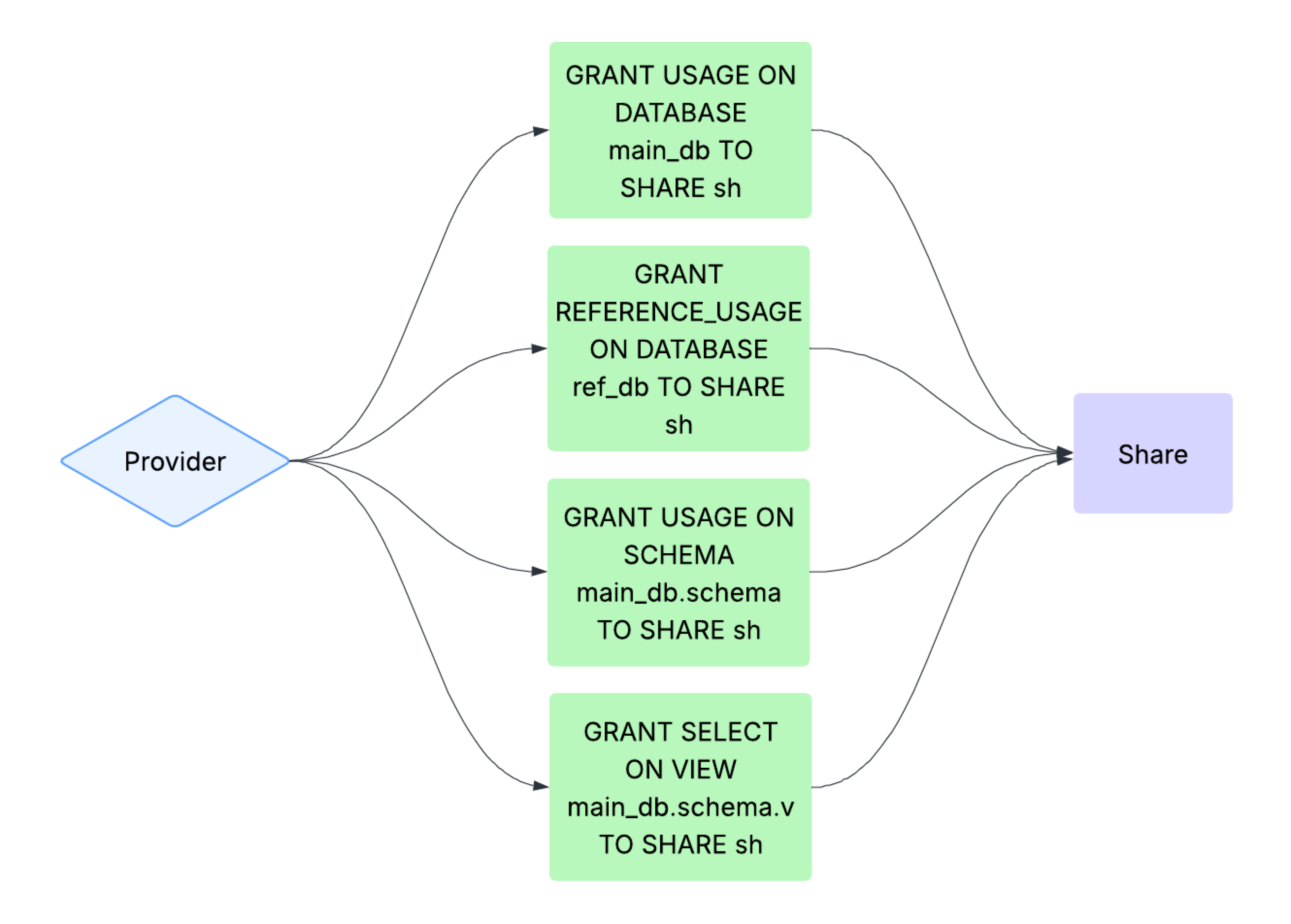
  3. Using GRANT <privilege> ... SHARE, the provider grants the following required privileges to the share:

    1. The provider grants the USAGE privilege on the main database that contains the view to the share.

    2. The provider grants the REFERENCE_USAGE privilege on the referenced database to the share.

    3. The provider grants the USAGE privilege on the schema that contains the view to the share.

    4. The provider grants the SELECT privilege on the view to the share.

    Diagram showing the privileges granted to a share for a listing that spans databases
  4. The provider creates a listing with the share and enables auto-fulfillment for cross-region cross-cloud consumers.

For more information, see 共享多个数据库中的数据.

Supported reference types

When REFERENCE_USAGE is granted on a database to a share, the following reference types are supported:

  • A view referencing a table or view in another database.

  • Tables or views with policies when these policies are stored in another database.

  • Tables or views with tags when these tags are stored in another database.

    备注

    A tag without an attached policy in a different database will only be replicated if reference usage is granted. Otherwise, replication will be skipped. See GRANT <privilege> ... SHARE for more information. If the tag is used in tag-based masking, then the share is treated as a table or view with row-access policies.

Limitations

Snowflake groups listings together when refreshing the data. Setting up listings that span multiple databases can change the way listings are grouped. As a result, the following might be affected:

  • The listing refresh history can be missing or incorrect after update the auto-fulfillment schedule.

  • Setting the refresh_schedule_override option may be required. When this option is missing, a resulting error message will include the list of listings that were affected by the change in the way listings were grouped.

Usage notes

When setting up auto-fulfillment, if the selected and referenced databases include existing listings, then the values in the Data product refresh section default to the existing refresh schedule. As a result, changes to the auto-fulfillment refresh schedule apply to all other listings associated with this database and with the referenced database.

Examples

For examples on how to create a secure view that references objects and other views in one or more databases, see the Share data from multiple databases examples.

After you create a secure view, you can create a listing that includes the secure view and set up auto-fulfillment on the listing. For examples on how to create listings on the Snowflake Marketplace, see Create and publish a listing.

语言: 中文