pandas on Snowflake
pandas on Snowflake lets you run your pandas code directly on your data in Snowflake. By simply changing the import statement and a few lines of code, you can get the familiar pandas experience to develop robust pipelines, while seamlessly benefiting from Snowflake's performance and scalability as your pipelines scale.
pandas on Snowflake 会智能判断 Pandas 代码是本地执行还是使用 Snowflake 引擎来扩展和提升性能,这一过程称为 混合执行。在处理 Snowflake 中的大型数据集时,它会通过转换为 SQL 的方式在 Snowflake 内部本地运行工作负载,从而充分利用并行计算能力,并获得 Snowflake 的数据治理和安全优势。
pandas on Snowflake 通过 Snowpark pandas API 提供,是 Snowpark Python 库 的一部分,使得 Python 代码可以在 Snowflake 平台上进行可扩展的数据处理。
使用 Pandas on Snowflake 的好处
Meeting Python developers where they are: pandas on Snowflake offers a familiar interface to Python developers by providing a pandas-compatible layer that can run natively in Snowflake.
Scalable distributed pandas: pandas on Snowflake bridges the convenience of pandas with the scalability of Snowflake by leveraging existing query optimization techniques in Snowflake. Minimal code rewrites are required, simplifying the migration journey, so you can seamlessly move from prototype to production.
No additional compute infrastructure to manage and tune: pandas on Snowflake leverages the Snowflake's powerful compute engine, so you do not need to set up or manage any additional compute infrastructure.
开始使用 Pandas on Snowflake
备注
关于如何使用 pandas on Snowflake 的实践示例,请参阅此 笔记本 (https://github.com/Snowflake-Labs/snowflake-python-recipes/blob/main/pandas%20on%20Snowflake%20101/pandas%20on%20Snowflake%20101.ipynb) 并观看此 视频 (link removed)
要安装 Pandas on Snowflake,您可以使用 conda 或 pip 来安装包。有关详细说明,请参阅 安装。
安装 Pandas on Snowflake 后,不要以 import pandas as pd 的方式导入 Pandas,而是使用以下两行:
Here is an example of how you can start using pandas on Snowflake through the pandas on Snowpark Python library with Modin:
read_snowflake 支持从 Snowflake 视图、动态表、Iceberg 表等读取数据。您也可以直接传入 SQL 查询,并返回一个 pandas on Snowflake DataFrame,实现 SQL 与 pandas on Snowflake 之间的无缝切换。
混合执行的工作原理
备注
从 Snowpark Python 1.40.0 版本开始,使用 pandas on Snowflake 时默认启用混合执行。
pandas on Snowflake 使用混合执行来判断 Pandas 代码是本地运行还是使用 Snowflake 引擎强化性能。这让您可以继续编写熟悉的 Pandas 代码构建稳健管道,而无需考虑最优和最高效的执行方式,同时无缝享受 Snowflake 的性能和可扩展性。
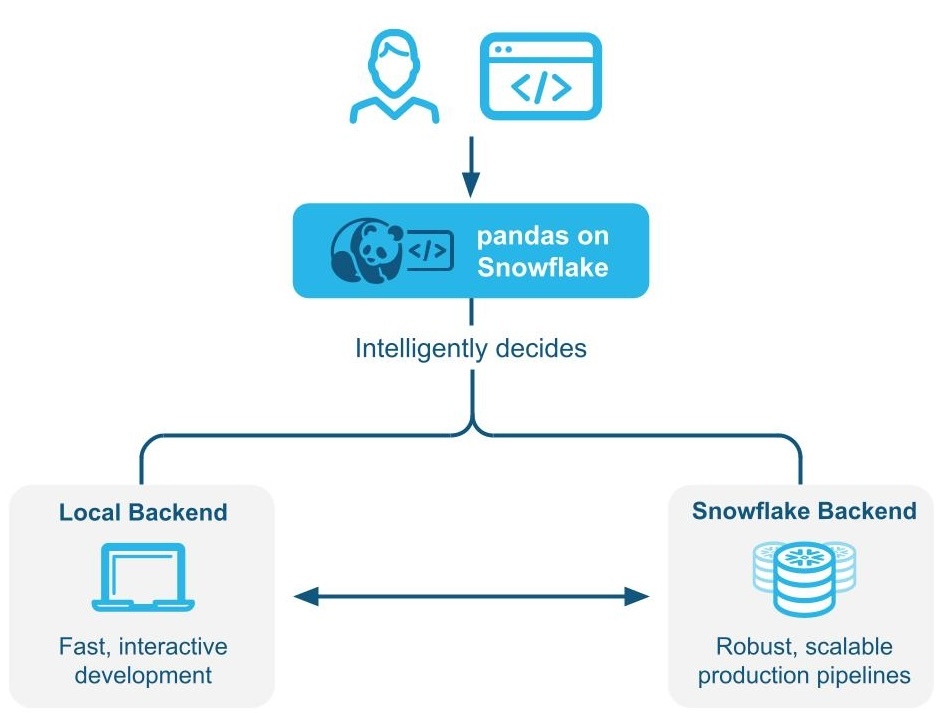
示例 1:直接在代码中创建一个小型的 11 行 DataFrame。使用混合执行时,Snowflake 会选择本地内存中的 Pandas 后端来执行操作:
示例 2:向表中插入 1000 万行事务数据
您会看到表使用 Snowflake 作为后端,因为这是一个驻留在 Snowflake 中的大表。
示例 3:筛选数据并进行 groupby 汇总,最终得到 7 行数据。
筛选数据时,Snowflake 会隐式识别从 Snowflake 到 Pandas 的引擎更改的后端选择,因为输出只有 7 行数据。
注意事项与限制
即使后端发生变化,DataFrame 类型始终为
modin.pandas.DataFrame/Series/etc,以确保与下游代码的互操作性和兼容性。为了确定使用哪个后端,Snowflake 有时会使用行大小的估算值,而不是在每一步计算 DataFrame 的精确长度。这意味着当数据集增大或减小时(例如筛选、汇总),Snowflake 可能不会在操作后立即切换到最优后端。
当有操作需要跨不同后端合并两个或更多 DataFrames 时,Snowflake 会根据最低数据传输成本决定数据的移动位置。
筛选操作可能不会导致数据移动,因为 Snowflake 可能无法估算底层过滤数据的大小。
任何由内存中 Python 数据组成的 DataFrames 都将使用 Pandas 后端,例如:
在有限操作集合中,DataFrames 会自动从 Snowflake 引擎移动到 Pandas 引擎。这些操作包括
df.apply、df.plot、df.iterrows、df.itertuples、series.items,以及在数据量较小时的聚合操作。并非所有操作都支持数据迁移。混合执行不会自动将 DataFrame 从 Pandas 引擎移动回 Snowflake,除非像
pd.concat等操作涉及多个 DataFrames。Snowflake 不会自动将 DataFrame 从 Pandas 引擎移动回 Snowflake,除非像
pd.concat等操作涉及多个 DataFrames。
When you should use pandas on Snowflake
如果满足以下任意条件,则您应使用 Pandas on Snowflake:
You are familiar with the pandas API and the broader PyData ecosystem.
You work on a team with others who are familiar with pandas and want to collaborate on the same codebase.
You have existing code written in pandas.
You prefer more accurate code completion from AI-based copilot tools.
有关更多信息,请参阅 Snowpark DataFrames 与 Snowpark Pandas DataFrame:我应该选择哪个?
将 Pandas on Snowflake 与 Snowpark DataFrames 结合使用
Pandas on Snowflake 和 DataFrame API 具有高度互操作性,因此您可以构建利用这两个 APIs 的管道。有关更多信息,请参阅 Snowpark DataFrames 与 Snowpark Pandas DataFrame:我应该选择哪个?。
您可以使用以下操作在 Snowpark DataFrames 和 Snowpark Pandas DataFrames 之间进行转换:
操作 |
输入 |
输出 |
|---|---|---|
Snowpark DataFrame |
Snowpark Pandas DataFrame |
|
Snowpark Pandas DataFrame 或 Snowpark Pandas Series |
Snowpark DataFrame |
Pandas on Snowflake 与原生 Pandas 的比较
pandas on Snowflake 和原生 pandas 在 DataFrame APIs 上具有相似性,方法签名一致,语义相似。pandas on Snowflake 提供与原生 Pandas 相同的 API 签名,并通过 Snowflake 提供可扩展计算能力。pandas on Snowflake 尽可能遵循原生 Pandas 文档中描述的语义,但使用 Snowflake 的计算和类型系统。Pandas on Snowflake 提供了与原生 Pandas (Pandas 2.2.1) 相同的 签名,并提供了使用 Snowflake 的可扩展计算。Pandas on Snowflake 尽可能遵循原生 Pandas 文档中描述的语义,但使用 Snowflake 计算和类型系统。但是,当原生 Pandas 在客户端机器上执行时,它使用 Python 计算和类型系统。有关 Pandas on Snowflake 和 Snowflake 之间的类型映射的信息,请参阅 数据类型。
从 Snowpark Python 1.40.0 开始,pandas on Snowflake 最适合用于已在 Snowflake 中的数据。要在原生 Pandas 和 pandas on Snowflake 类型之间转换,请使用以下操作:
操作 |
输入 |
输出 |
|---|---|---|
Snowpark Pandas DataFrame |
Native pandas DataFrame - Materialize all data to the local environment. If the dataset is large, this may result in an out-of-memory error. |
|
原生 Pandas DataFrame、原始数据、Snowpark Pandas 对象 |
Snowpark Pandas DataFrame |
执行环境
pandas:在单个机器上运行并处理内存中的数据。pandas on Snowflake:选择使用 时默认使用的角色和仓库。与 Snowflake 集成后,对于大规模数据集可以在机器集群上进行分布式计算;对于小规模数据集,则直接在内存中使用 Pandas 处理。请注意,使用 Snowpark Pandas API 需要连接到 Snowflake。
Lazy versus eager evaluation
pandas: Executes operations immediately and materializes results fully in memory after each operation. This eager evaluation of operations might lead to increased memory pressure because data must be moved extensively within a machine.pandas on Snowflake:提供与 Pandas 相同的 API 体验。它模仿 Pandas 的及早求值模型,但在内部构建了惰性求值的查询图,以实现跨操作的优化。通过查询图融合和转译操作为基础分布式 Snowflake 计算引擎提供了额外的优化机会,与直接在 Snowflake 中运行 Pandas 相比,这降低了成本和端到端管道运行时。
备注
I/O-related APIs and APIs whose return value is not a Snowpark pandas object (that is,
DataFrame,SeriesorIndex) always evaluate eagerly. For example:read_snowflaketo_snowflaketo_pandasto_dictto_list__repr__The dunder method,
__array__which can be called automatically by some third-party libraries such as scikit-learn. Calls to this method will materialize results to the local machine.
数据源和存储
pandas:支持 IO 工具(text、CSV、HDF5 ...)中 Pandas 文档中列出的各种读取器和写入器 (https://pandas.pydata.org/docs/user_guide/io.html)。pandas on Snowflake: Can read and write from Snowflake tables and read local or staged CSV, JSON, or Parquet files. For more information, see IO(读取和写入).
数据类型
pandas:具有丰富的数据类型集,例如整数、浮点数、字符串、datetime类型和分类类型。它还支持用户定义的数据类型。Pandas 中的数据类型通常派生自基础数据,并严格执行。pandas on Snowflake: Is constrained by Snowflake type system, which maps pandas objects to SQL by translating the pandas data types to the SQL types in Snowflake. A majority of pandas types have a natural equivalent in Snowflake, but the mapping is not always one to one. In some cases, multiple pandas types are mapped to the same SQL type.
下表列出了 Pandas 和 Snowflake SQL 之间的类型映射:
Pandas 类型 |
Snowflake 类型 |
|---|---|
所有带符号/无符号整数类型,包括 Pandas 扩展整数类型 |
NUMBER(38, 0) |
所有浮点类型,包括 Pandas 扩展的浮点数据类型 |
FLOAT |
|
BOOLEAN |
|
STRING |
|
TIME |
|
DATE |
所有 naive 时区 |
TIMESTAMP_NTZ |
所有 aware 时区 |
TIMESTAMP_TZ |
|
ARRAY |
|
MAP |
具有混合数据类型的对象列 |
VARIANT |
Timedelta64[ns] |
NUMBER(38, 0) |
备注
不支持分类、周期、间隔、稀疏和用户定义的数据类型。目前 Pandas on Snowpark 客户端仅支持 Timedelta。将 Timedelta 重新写入 Snowflake 时,它将被存储为 Number 类型。
下表提供了 Snowflake SQL 类型回到 Pandas on Snowflake 类型(使用 df.dtypes)的映射:
Snowflake 类型 |
Pandas on Snowflake 类型 ( |
|---|---|
NUMBER ( |
|
NUMBER ( |
|
BOOLEAN |
|
STRING、TEXT |
|
VARIANT、BINARY、GEOMETRY、GEOGRAPHY |
|
ARRAY |
|
OBJECT |
|
TIME |
|
TIMESTAMP、TIMESTAMP_NTZ、TIMESTAMP_LTZ、TIMESTAMP_TZ |
|
DATE |
|
When you convert from the Snowpark pandas DataFrame to the native pandas DataFrame with to_pandas(), the native pandas DataFrame will
have refined data types compared to the pandas on Snowflake types, which are compatible with the SQL-Python 数据类型映射 for
functions and procedures.
类型转换和类型推理
Null 值处理
pandas:在 Pandas 1.x 版本中,Pandas 在 处理缺失数据 (https://pandas.pydata.org/docs/user_guide/missing_data.html#values-considered-missing) 时非常灵活,因此它将所有 PythonNone、np.nan、pd.NaN、pd.NA和pd.NaT都视为缺失值。在 Pandas (2.2.x) 的更高版本中,这些值被视为不同的值。pandas on Snowflake:采用与Pandas 早期版本类似的方法,将上述所有值都视为缺失值。Snowpark 重复使用 Pandas 中的NaN、NA和NaT。但请注意,所有这些缺失值都可互换处理,并在 Snowflake 表中存储为 SQL NULL。
偏移/频率别名
pandas:版本 2.2.1 中更改了 Pandas 中的日期偏移。单字母别名'M'、'Q'、'Y'和其他别名已弃用,而改用双字母偏移。pandas on Snowflake:仅使用 Pandas 时间序列文档 (https://pandas.pydata.org/pandas-docs/stable/user_guide/timeseries.html#dateoffset-objects) 中描述的新偏移。
Install the pandas on Snowflake library
Prerequisites
The following package versions are required:
Python 3.9 (deprecated), 3.10, 3.11, 3.12 or 3.13
Modin version 0.32.0
pandas version 2.2.*
小技巧
要在 Snowflake Notebooks 中使用 Pandas on Snowflake,请参阅 笔记本中的 Pandas on Snowflake 中的设置说明。
要在开发环境中安装 pandas on Snowflake,请按以下步骤操作:
切换到您的项目目录并激活您的 Python 虚拟环境。
备注
The API is under active development, so we recommend installing it in a Python virtual environment instead of system-wide. This practice allows each project you create to use a specific version, which insulates you from changes in future versions.
You can create a Python virtual environment for a particular Python version by using tools like Anaconda (https://www.anaconda.com/), Miniconda (https://docs.conda.io/en/latest/miniconda.html), or virtualenv (https://docs.python.org/3/tutorial/venv.html).
For example, to use conda to create a Python 3.12 virtual environment, run these commands:
备注
如果您之前使用 Python 3.9 和 Pandas 1.5.3 在 Snowflake 上安装了旧版本的 Pandas on Snowflake,则需要如上所述升级 Python 和 Pandas 版本。按照步骤使用 Python 3.10 到 3.13 创建新环境。
Install the Snowpark Python library with Modin:
或
备注
Confirm that
snowflake-snowpark-pythonversion 1.17.0 or later is installed.
向 Snowflake 进行身份验证
Before using pandas on Snowflake, you must establish a session with the Snowflake database. You can use a config file to choose the connection parameters for your session, or you can enumerate them in your code. For more information, see Creating a Session for Snowpark Python. If a unique active Snowpark Python session exists, pandas on Snowflake will automatically use it. For example:
The pd.session is a Snowpark session, so you can do anything with it that you can do with any other Snowpark session. For example, you can use it to execute an arbitrary SQL query,
which results in a Snowpark DataFrame as per the Session API, but note that
the result is a Snowpark DataFrame, not a Snowpark pandas DataFrame.
Alternatively, you can configure your Snowpark connection parameters in a configuration file. This eliminates the need to enumerate connection parameters in your code, which allows you to write your pandas on Snowflake code almost as you would normally write pandas code.
Create a configuration file located at
~/.snowflake/connections.tomlthat looks something like this:To create a session using these credentials, use
snowflake.snowpark.Session.builder.create():
You can also create multiple Snowpark sessions, then assign one of them to pandas on Snowflake. pandas on Snowflake only uses one session, so you have to explicitly assign one
of the sessions to pandas on Snowflake with pd.session = pandas_session:
The following example shows that trying to use pandas on Snowflake when there is no active Snowpark session will raise a SnowparkSessionException with an
error like "pandas on Snowflake requires an active snowpark session, but there is none." After you create a session, you can use pandas on Snowflake. For example:
以下示例显示,当有多个活动的 Snowpark 会话时,尝试使用 Pandas on Snowflake 将导致 SnowparkSessionException,并显示以下消息:“There are multiple active snowpark sessions, but you need to choose one for pandas on Snowflake.”。
备注
您必须通过 modin.pandas.session 设置用于新 pandas on Snowflake DataFrame 或 Series 的会话。但是,不支持联接或合并使用不同会话创建的 DataFrames,因此您应该避免在工作流程中重复设置不同的会话并使用不同的会话创建 DataFrames。
API reference
请参阅 Pandas on Snowflake API 参考,了解当前实施的 APIs 和可用方法的完整列表。
有关支持的操作的完整列表,请参阅 Pandas on Snowflake 参考中的以下表格:
APIs 和混合执行的配置参数
混合执行使用数据集大小估计和应用于 DataFrame 的操作组合来确定后端的选择。一般来说,行数少于 10 万的数据集倾向于使用本地 Pandas;行数超过 10 万的数据集倾向于使用 Snowflake,除非数据集是从本地文件加载的。
配置传输成本
要将默认切换阈值更改为其他行数限制值,可以在初始化 DataFrame 之前修改环境变量:
设置此值将对从 Snowflake 转移行数据施加惩罚。
配置本地执行限制
一旦 DataFrame 在本地运行,它通常会保持本地状态,除非需要将其移动回 Snowflake 进行合并,但本地可处理数据的最大行数有上限。当前此上限为 1000 万行。
检查和设置后端
要检查当前选择的后端,可以使用 df.get_backend() 命令,该命令返回 Pandas 表示本地执行,返回 Snowflake 表示推送到 Snowflake 执行。
要使用 set_backend 或其别名 move_to 设置当前后端:
您也可以就地设置后端:
要检查并显示数据移动的 原因 信息:
通过固定后端手动替换后端选择
默认情况下,Snowflake 会自动为给定的 DataFrame 和操作选择最佳后端。如果您希望替换自动引擎选择,可以对对象及其产生的所有数据禁用自动切换,使用 pin_backend() 方法:
要重新启用自动后端切换,请调用 unpin_backend():
在 Snowflake 笔记本中使用 Snowpark Pandas
要在 Snowflake 笔记本中使用 Pandas on Snowflake,请参阅 :ref:` 笔记本中的 Pandas on Snowflake <label-notebooks_snowpark_pandas>`。
在 Python 工作表中使用 Snowpark Pandas
要使用 Snowpark Pandas,您需要在 Python 工作表环境中的 Packages 中选择 modin 来安装 Modin。
您可以在 Settings > Return type 下选择 Python 函数的 Return 类型。默认情况下,它被设置为 Snowpark 表。要将 Snowpark Pandas DataFrame 显示为结果,您可以通过调用 to_snowpark() 将 Snowpark Pandas DataFrame 转换为 Snowpark DataFrame。在此转换中不会产生 I/O 成本。
以下是在 Python 工作表中使用 Snowpark Pandas 的示例:
在存储过程中使用 Pandas on Snowflake
您可以在 存储过程 中使用 Pandas on Snowflake 来构建数据管道,并使用 任务 调度存储过程的执行。
以下是使用 SQL 创建存储过程的方法:
以下是使用 Snowflake Python API 创建存储过程的方法:
要调用存储过程,您可以在 Python 中运行 dt_pipeline_sproc() 或在 SQL 中运行 CALL run_data_transformation_pipeline_sp()。
在第三方库中使用 Pandas on Snowflake
对于可视化和机器学习应用程序,Pandas 通常与第三方库 APIs 一起使用。Pandas on Snowflake 可与其中大部分库互操作,因此它们无需明确转换为 Pandas DataFrames 即可使用。但请注意,除有限的用例外,大多数第三方库通常不支持分布式执行。因此,这可能会导致大型数据集的性能降低。
支持的第三方库
下面列出的库接受 Pandas on Snowflake DataFrames 作为输入,但并非所有方法都经过测试。要详细了解 API 级别的深度互操作性状态,请参阅 与第三方库的互操作性。
Plotly
Altair
Seaborn
Matplotlib
Numpy
Scikit-Learn
XGBoost
NLTK
Streamlit
pandas on Snowflake 目前对某些 NumPy (https://numpy.org/) 和 Matplotlib (https://matplotlib.org/) APIs 的兼容性有限,例如 np.where 的分布式实现以及与 df.plot 的互操作性。在使用这些第三方库时,通过 to_pandas() 转换 Snowpark Pandas DataFrames 将避免多次 I/O 调用。
下面是一个使用 Altair (https://altair-viz.github.io/) 进行可视化和使用 scikit-learn (https://scikit-learn.org/stable/) 进行机器学习的示例。

您还可以根据性别分析生存率。
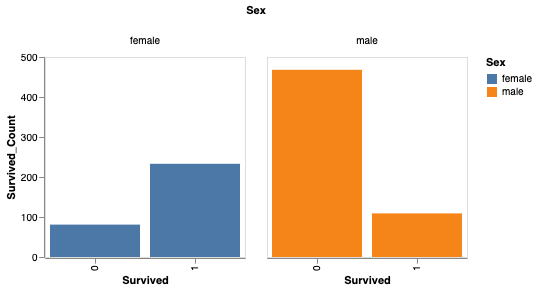
您现在可以使用 scikit-learn 来训练简单的模型。
备注
为获得更高的性能,我们建议通过 to_pandas() 转换为 Pandas DataFrames,尤其是使用机器学习库(例如 scikit-learn)时。但是,to_pandas() 函数收集所有行,因此最好首先使用 sample(frac=0.1) 或 head(10) 减少数据帧大小。
不支持的库
将不支持的第三方库与 Pandas on Snowflake DataFrame 结合使用时,我们建议通过调用 to_pandas() 将 Snowflake DataFrame 转换为 Pandas DataFrame,然后再将 DataFrame 传递到第三方库方法。
备注
调用 to_pandas() 会将数据从 Snowflake 中提取到内存中,因此对于大型数据集和敏感用例,请注意这一点。
将 Snowflake Cortex LLM 函数与 Snowpark Pandas 结合使用
您可以通过 Snowpark Pandas Apply 函数 使用 Snowflake Cortex LLM 函数。
您可以通过特殊的关键字实参应用该函数。当前,支持以下 Cortex 函数:
以下示例在 Snowpark Pandas DataFrame 中的多条记录中使用 TRANSLATE 函数:
输出:
以下示例在名为 reviews 的 Snowflake 表上使用 SENTIMENT (SNOWFLAKE.CORTEX) 函数:
以下示例使用 EXTRACT_ANSWER (SNOWFLAKE.CORTEX) 来回答问题:
输出:
备注
必须安装 snowflake-ml-python (https://pypi.org/project/snowflake-ml-python/) 包才能使用 Cortex LLM 函数。
限制
Pandas on Snowflake 有以下限制:
Pandas on Snowflake 不保证与 OSS 第三方库兼容。但是,从版本 1.14.0a1 开始,Snowpark Pandas 引入了对 NumPy 的有限兼容性,特别是针对
np.where使用。有关更多信息,请参阅 NumPy 互操作性。When you call third-party library APIs with a Snowpark pandas DataFrame, Snowflake recommends that you convert the Snowpark pandas DataFrame to a pandas DataFrame by calling
to_pandas()before passing the DataFrame to the third-party library call. For more information, see 在第三方库中使用 Pandas on Snowflake.pandas on Snowflake is not integrated with Snowpark ML. When you use Snowpark ML, we recommend that you convert the Snowpark pandas DataFrame to a Snowpark DataFrame using to_snowpark() before calling Snowpark ML.
不支持惰性
MultiIndex对象。使用MultiIndex时,它返回一个原生 PandasMultiIndex对象,这需要将所有数据拉取到客户端。Not all pandas APIs have a distributed implementation in pandas on Snowflake, although some are being added. For unsupported APIs,
NotImplementedErroris thrown. For information about supported APIs, see the API reference documentation.Pandas on Snowflake 与 Pandas 2.2 的任何补丁版本兼容。
Snowpark pandas cannot be referenced within Snowpark pandas
applyfunction. You can only use native pandas insideapply.示例如下:
故障排除
This section describes troubleshooting tips for using pandas on Snowflake.
When troubleshooting, try running the same operation on a native pandas DataFrame (or a sample) to see whether the same error persists. This approach might provide hints on how to fix your query. For example:
If you have a long-running notebook opened, note that by default Snowflake sessions time out after the session is idle for 240 minutes (4 hours). When the session expires, if you run additional pandas on Snowflake queries, the following message appears: "Authentication token has expired. The user must authenticate again." At this point, you must re-establish the connection to Snowflake. This might cause the loss of any unpersisted session variables. For more information about how to configure the session idle timeout parameter, see 会话策略.
最佳实践
本部分介绍在使用 pandas on Snowflake 时要遵循的最佳实践。
Avoid using iterative code patterns, such as
forloops,iterrows, anditeritems. Iterative code patterns quickly increase the generated query complexity. Let pandas on Snowflake, not the client code, perform the data distribution and computation parallelization. With regard to iterative code patterns, look for operations that can be performed on the whole DataFrame, and use the corresponding operations instead.
Avoid calling
apply,applymap, andtransform, which are eventually implemented with UDFs or UDTFs, which might not be as performant as regular SQL queries. If the function applied has an equivalent DataFrame or series operation, use that operation instead. For example, instead ofdf.groupby('col1').apply('sum'), directly calldf.groupby('col1').sum().将 DataFrame 或 Series 传递给第三方库调用之前,调用
to_pandas()。Pandas on Snowflake 不保证与第三方库兼容。Use a materialized regular Snowflake table to avoid extra I/O overhead. pandas on Snowflake works on top of a data snapshot that only works for regular tables. For other types, including external tables, views, and Apache Iceberg™ tables, a temporary table is created before the snapshot is taken, which introduces extra materialization overhead.
Pandas on Snowflake 在使用 DataFrames 从 Snowflake 表创建
read_snowflake时提供快速和零复制克隆功能。在进行其他操作之前仔细检查结果类型,如果需要,使用
astype进行显式类型转换。由于有限的类型推理功能,如果没有给出类型提示,
df.apply将返回对象(变量)类型的结果,即使结果包含所有整数值。如果其他操作要求dtype为int,则可以通过调用astype方法进行显式类型转换,以在继续之前更正列类型。Avoid calling APIs that require evaluation and materialization unless necessary.
未返回
Series或Dataframe的 APIs 需要及早求值和物化以产生正确类型的结果。绘制方法也是如此。减少对这些 APIs 的调用,以尽量减少不必要的求值和物化。避免在大型数据集上调用
np.where(<cond>, <scalar>, n)。<scalar>将广播到大小为<cond>的 DataFrame,这可能很慢。当使用迭代构建的查询时,
df.cache_result可用于物化中间结果,以减少重复求值,并改善延迟和降低整体查询的复杂性。例如:In the example above, the query to produce
df2is expensive to compute and is reused in the creation of bothdf3anddf4. Materializingdf2into a temporary table (making subsequent operations involvingdf2a table scan instead of a pivot) can reduce the overall latency of the code block:
示例
下面是使用 Pandas 操作的代码示例。我们从名为 pandas_test 的 Snowpark Pandas DataFrame 开始,其中包含三列:COL_STR、COL_FLOAT 和 COL_INT。要查看与以下示例相关的笔记本,请参阅 Snowflake-Labs 存储库中的 Pandas on Snowflake 示例 (https://github.com/Snowflake-Labs/sf-samples/blob/main/samples/snowpark-pandas/api-examples/api_examples.ipynb)。
We save the DataFrame as a Snowflake table named pandas_test, which we will use throughout our examples.
接下来,通过 Snowflake 表创建 DataFrame。删除列 COL_INT,然后使用名为 row_position 的列将结果保存回 Snowflake。
The result is a new table, pandas_test2, which looks like this:
IO(读取和写入)
有关更多信息,请参阅 输入/输出。
索引
缺少值
类型转换
二元运算
聚合
合并
分组
有关更多信息,请参阅 GroupBy。
透视
资源
快速入门:Pandas on Snowflake 入门 (https://quickstarts.snowflake.com/guide/getting_started_with_pandas_on_snowflake/index.html)
快速入门:使用 Snowpark Python 的数据工程管道 (https://quickstarts.snowflake.com/guide/data_engineering_pipelines_with_snowpark_pandas/#0)