Build a data processing pipeline using a directory table
Build a data processing pipeline by combining a directory table,
which tracks and stores file-level metadata on a stage, with other Snowflake objects
such as streams and tasks.
A stream records data manipulation language (DML) changes made to a directory table,
table, external table, or the underlying tables in a view. A task executes a single action,
which can be a SQL command or an extensive user-defined function (UDF).
You can schedule a task to run periodically, or run a task on demand.
Example: Create a simple pipeline to process PDFs
This example builds a simple data processing pipeline that does the following:
Detects PDF files added to a stage.
Extracts data from the files.
Inserts the data into a Snowflake table.
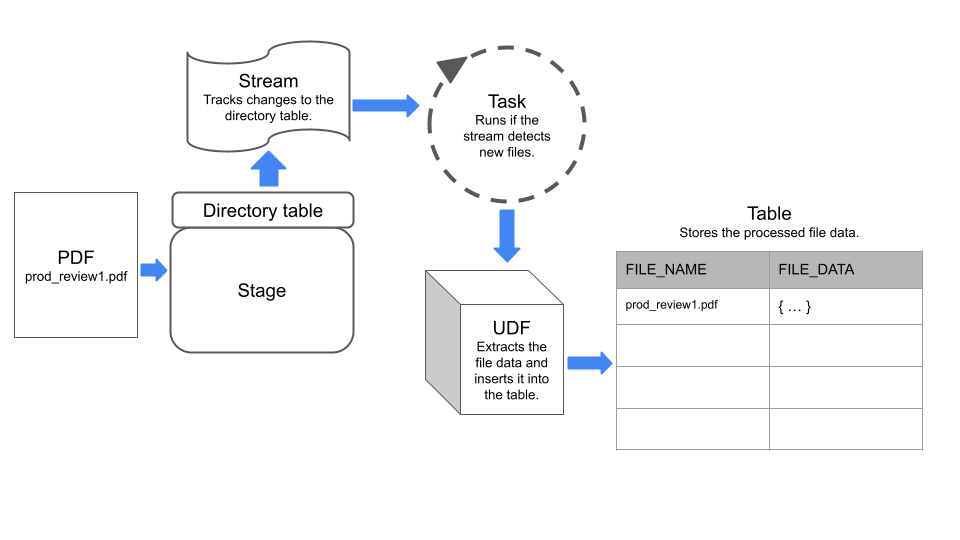
The pipeline uses a stream to detect changes to a directory table on the stage,
and a task that executes a UDF to extract data from the files.
The following diagram summarizes how the example pipeline works:
Step 1: Create a stage with a directory table enabled
Create a stream on the directory table by specifying the stage that the directory table belongs to.
The stream will track changes to the directory table. In step 5 of this example, we use this stream to construct a task.
CREATESTREAM my_pdf_stream ONSTAGE my_pdf_stage;
Step 3: Create a user-defined function to parse PDFs
Create a UDF that extracts data from PDF files. The task that you create in a later step will call this UDF to process
newly-added files on the stage.
The following example statement creates a Python UDF named PDF_PARSE that processes PDF files containing product review data.
The UDF extracts form field data using the PyPDF2 (https://pypi.org/project/PyPDF2/) library.
It returns a dictionary that contains the form names and values as key-value pairs.
CREATE OR REPLACEFUNCTIONPDF_PARSE(file_path string)RETURNSVARIANTLANGUAGEPYTHONRUNTIME_VERSION='3.8'HANDLER='parse_pdf_fields'PACKAGES=('typing-extensions','PyPDF2','snowflake-snowpark-python')AS
$$
from pathlib importPathimport PyPDF2 as pypdf
from io import BytesIO
fromsnowflake.snowpark.filesimport SnowflakeFile
def parse_pdf_fields(file_path):with SnowflakeFile.open(file_path,'rb')as f:
buffer = BytesIO(f.readall())reader= pypdf.PdfFileReader(buffer)fields=reader.getFields()
field_dict ={}for k, v infields.items():if"/V"in v.keys():
field_dict[v["/T"]]= v["/V"].replace("/","")if v["/V"].startswith("/")else v["/V"]return field_dict
$$;
Step 4: Create a table to store the file contents
Next, create a table where each row stores information about a file on the
stage in columns named file_name and file_data. The task that you create in a later step
will load data into this table.
CREATE OR REPLACETABLE prod_reviews (
file_name varchar,
file_data variant);
Create a scheduled task that checks the stream for new files on the stage and inserts the file data into the prod_reviews table.
The following statement creates a scheduled task using the stream created previously.
The task uses the SYSTEM$STREAM_HAS_DATA function
to check whether the stream contains change data capture (CDC) records.
CREATE OR REPLACETASK load_new_file_data
WAREHOUSE='MY_WAREHOUSE'SCHEDULE='1 minute'COMMENT='Process new files on the stage and insert their data into the prod_reviews table.'WHENSYSTEM$STREAM_HAS_DATA('my_pdf_stream')ASINSERTINTO prod_reviews (SELECTrelative_pathas file_name,PDF_PARSE(build_scoped_file_url('@my_pdf_stage',relative_path))as file_data
FROM my_pdf_stream
WHEREMETADATA$ACTION='INSERT');
To check that the pipeline works, you can add files to the stage, manually execute the task, and then query the product_reviews table.
Start by adding some PDF files to the my_pdf_stage stage, and then refresh the stage.
Note
This example uses PUT commands, which you can’t run from a worksheet in the Snowflake web interface.
To upload files with Snowsight, see Upload files onto a named internal stage.
You can query the stream to verify that it has recorded the two PDF files that we added to the stage.
SELECT*FROM my_pdf_stream;
Now, execute the task to process the PDF files and update the product_reviews table.
EXECUTETASK load_new_file_data;+----------------------------------------------------------+| status ||----------------------------------------------------------|| Task LOAD_NEW_FILE_DATA is scheduled to run immediately. |+----------------------------------------------------------+1Row(s) produced.Time Elapsed:0.178s
Query the product_reviews table to see that the task has added a row for each PDF file.
Finally, you can create a view that parses the objects in the FILE_DATA column into separate columns.
You can then query the view to analyze and work with the file contents.
CREATE OR REPLACEVIEW prod_review_info_v
ASWITH file_data
AS(SELECT
file_name
,parse_json(file_data)AS file_data
FROM prod_reviews
)SELECT
file_name
, file_data:FirstName::varcharASfirst_name, file_data:LastName::varcharASlast_name, file_data:"Middle Name"::varcharASmiddle_name, file_data:Product::varcharAS product
, file_data:"Purchase Date"::dateAS purchase_date
, file_data:Recommend::varcharAS recommended
,build_scoped_file_url(@my_pdf_stage, file_name)AS scoped_review_url
FROM file_data;SELECT*FROM prod_review_info_v;+------------------+------------+-----------+-------------+----------------+---------------+-------------+--------------------------------------------------------------------------------------------------------------------------------------------------------------------------------------------------------------------------------------------------------------------------------------------------------------------------------------------------------------------------------------------------------------------------------+| FILE_NAME | FIRST_NAME | LAST_NAME | MIDDLE_NAME | PRODUCT | PURCHASE_DATE | RECOMMENDED | SCOPED_REVIEW_URL ||------------------+------------+-----------+-------------+----------------+---------------+-------------+--------------------------------------------------------------------------------------------------------------------------------------------------------------------------------------------------------------------------------------------------------------------------------------------------------------------------------------------------------------------------------------------------------------------------------|| prod_review1.pdf | John | Johnson | Michael | Tennis Shoes | 2022-03-15 | Yes | https://mydeployment.us-west-2.aws.privatelink.snowflakecomputing.cn/api/files/01aefcdc-0000-6f92-0000-012900fdc73e/1275606224902/RZ4s%2bJLa6iHmLouHA79b94tg%2f3SDA%2bOQX01pAYo%2bl6gAxiLK8FGB%2bv8L2QSB51tWP%2fBemAbpFd%2btKfEgKibhCXN2QdMCNraOcC1uLdR7XV40JRIrB4gDYkpHxx3HpCSlKkqXeuBll%2fyZW9Dc6ZEtwF19GbnEBR9FwiUgyqWjqSf4KTmgWKv5gFCpxwqsQgofJs%2fqINOy%2bOaRPa%2b65gcnPpY2Dc1tGkJGC%2fT110Iw30cKuMGZ2HU%3d || prod_review2.pdf | Emily | Smith | Ann | Red Skateboard | 2023-01-10 | MayBe | https://mydeployment.us-west-2.aws.privatelink.snowflakecomputing.cn/api/files/01aefcdc-0000-6f92-0000-012900fdc73e/1275606224902/g3glgIbGik3VOmgcnltZxVNQed8%2fSBehlXbgdZBZqS1iAEsFPd8pkUNB1DSQEHoHfHcWLsaLblAdSpPIZm7wDwaHGvbeRbLit6nvE%2be2LHOsPR1UEJrNn83o%2fZyq4kVCIgKeSfMeGH2Gmrvi82JW%2fDOyZJITgCEZzpvWGC9Rmnr1A8vux47uZj9MYjdiN2Hho3uL9ExeFVo8FUtR%2fHkdCJKIzCRidD5oP55m9p2ml2yHOkDJW50%3d |+------------------+------------+-----------+-------------+----------------+---------------+-------------+--------------------------------------------------------------------------------------------------------------------------------------------------------------------------------------------------------------------------------------------------------------------------------------------------------------------------------------------------------------------------------------------------------------------------------+