Vector Embeddings
An embedding refers to the reduction of high-dimensional data, such as unstructured text, to a representation with fewer dimensions, such as a vector. Modern deep learning techniques can create vector embeddings, which are structured numerical representations, from unstructured data such as text and images, while preserving semantic notions of similarity and dissimilarity in the geometry of the vectors they produce.
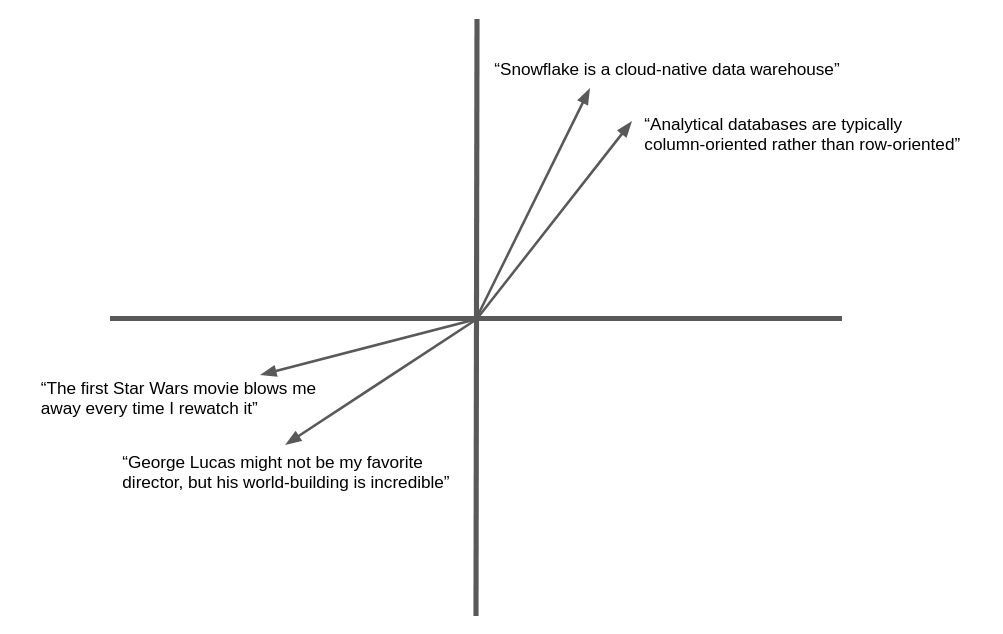
The following illustration is a simplified example of the vector embedding and geometric similarity of natural language text. In practice, neural networks produce embedding vectors with hundreds or even thousands of dimensions, not two as shown here, but the concept is the same. Semantically similar text yields vectors that “point” in the same general direction.
Many applications can benefit from the ability to find text or images similar to a target. For example, when a new support case is logged at a help desk, the support team can benefit from the ability to find similar cases that have already been resolved. The advantage of using embedding vectors in this application is that it goes beyond keyword matching to semantic similarity, so related records can be found even if they don’t contain exactly the same words.
Snowflake Cortex offers the EMBED_TEXT_768 and EMBED_TEXT_1024 functions and several Vector functions to compare them for various applications.
Text embedding models
Snowflake offers the following text embedding models. See below for more details.
| Model name | Output dimensions | Context window | Language support |
|---|---|---|---|
| snowflake-arctic-embed-m-v1.5 | 768 | 512 | English-only |
| snowflake-arctic-embed-m | 768 | 512 | English-only |
| snowflake-arctic-embed-l-v2.0 | 1024 | 512 | Multilingual |
Supported models might have different costs.
About vector similarity functions
The measurement of similarity between vectors is a fundamental operation in semantic comparison. Snowflake Cortex provides four vector similarity functions: VECTOR_INNER_PRODUCT, VECTOR_L1_distance, VECTOR_L2_DISTANCE, and VECTOR_COSINE_SIMILARITY. To learn more about these functions, see Vector functions.
For syntax and usage details, see the reference page for each function:
Examples
The following examples use the vector similarity functions.
This SQL example uses the VECTOR_INNER_PRODUCT function to determine which vectors in the table
are closest to each other between columns a and b:
This SQL example calls the VECTOR_COSINE_SIMILARITY function to find the vector closest to [1,2,3]:
Snowflake Python Connector
These examples show how to use the VECTOR data type and vector similarity functions with the Python Connector.
Note
Support for the VECTOR type was introduced in version 3.6 of the Snowflake Python Connector.
Snowpark Python
These examples show how to use the VECTOR data type and vector similarity functions with the Snowpark Python Library.
Note
- Support for the VECTOR type was introduced in version 1.11 of Snowpark Python.
- The Snowpark Python library does not support the VECTOR_COSINE_SIMILARITY function.
Create vector embeddings from text
To create a vector embedding from a piece of text, use the AI_EMBED function. This function returns the vector embedding for a given text. This vector can be used with the vector comparison functions to determine the semantic similarity of two documents.
Tip
You can use other embedding models through Snowpark Container Services. For more information, see Embed Text Container Service (https://github.com/Snowflake-Labs/sfguide-text-embedding-snowpark-container-service).
Important
AI_EMBED is a Cortex AI Function, so its usage is governed by the same access controls as the other Cortex AI Functions. For instructions on accessing this function, see the Cortex LLM Functions Required Privileges.
Example use cases
This section shows how to use embeddings, the vector similarity functions, and VECTOR data type to implement popular use cases such as vector similarity search and retrieval-augmented generation (RAG).
Vector similarity search
To implement a search for semantically similar documents, first store the embeddings for the documents to be searched. Keep the embeddings up to date when documents are added or edited.
In this example, the documents are call center issues logged by support representatives. The issue is stored in a column
called issue_text in the table issues. The following SQL creates a new vector column to hold the
embeddings of the issues.
To perform a search, create an embedding of the search term or target document, and then use a vector similarity function to locate documents with similar embeddings. Use ORDER BY and LIMIT clauses to select the top k matching documents, and optionally use a WHERE condition to specify a minimum similarity.
Generally, the call to the vector similarity function should appear in the SELECT clause, not in the WHERE clause. This way, the function is called only for the rows specified by the WHERE clause, which may restrict the query based on some other criteria, instead of operating over all rows in the table. To test a similarity value in the WHERE clause, define a column alias for the VECTOR_COSINE_SIMILARITY call in the SELECT clause, and use that alias in a condition in the WHERE clause.
This example finds up to five issues matching the search term from the last 90 days, assuming the cosine similarity with the search term is at least 0.7.
Cost considerations
Snowflake Cortex LLM Functions, including EMBED_TEXT_768 and EMBED_TEXT_1024, incur compute cost based on the number of tokens processed.
Note
A token is the smallest unit of text processed by Snowflake Cortex LLM Functions, approximately equal to four characters of text. The equivalence of raw input or output text to tokens can vary by model.
- For the EMBED_TEXT_768 and EMBED_TEXT_1024 functions, only input tokens are counted towards the billable total.
- Vector similarity functions do not incur token-based costs.
For more information about billing of Cortex LLM Functions, see Cortex LLM Functions Cost Considerations. For general information about compute costs, see Understanding compute cost.