Pipeline Builder
Pipeline Builder is a visual designer in Workspaces for orchestrating Snowflake Notebooks, Python files, ML Jobs, and SQL as a graph of
tasks. Instead of writing CREATE TASK statements by hand, you add tasks to a canvas, connect them to set the
order they run in, configure schedules and compute, and deploy.
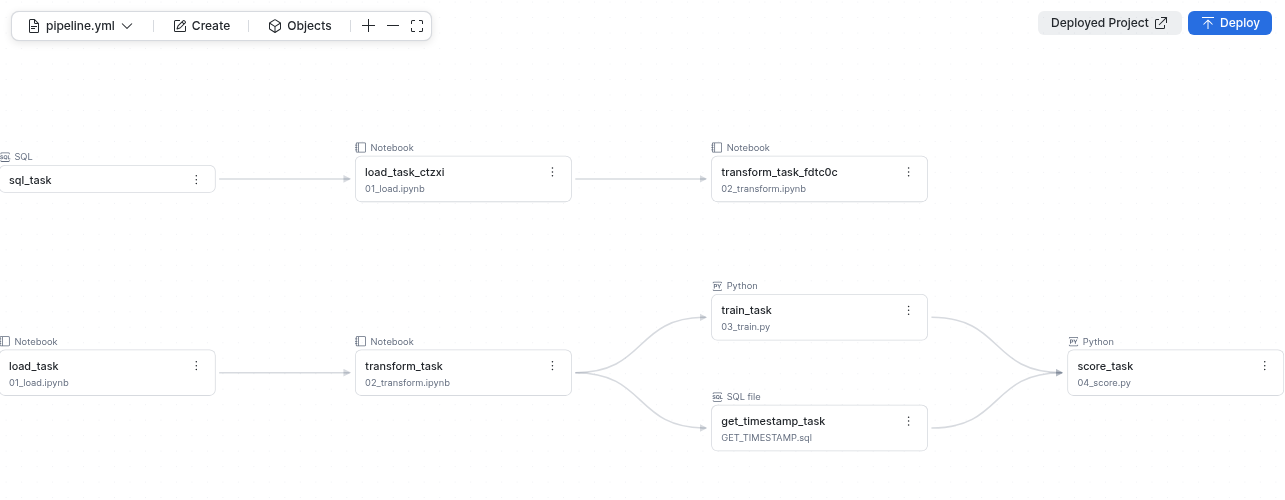
How Pipeline Builder works
You choose the notebooks, Python files, and SQL that you want to run, and drag them onto the canvas. To set the order they run in, connect them. Pipeline Builder does the rest.
Pipeline Builder manages these objects for you:
- Tasks: Each card on the canvas is a task. A task runs a notebook or Python file, an ML Job, a SQL statement, or a
.sqlfile. - Code Bundles: When you add a
.pyor.ipynbfile from your project to the canvas, Pipeline Builder creates a Code Bundle that packages the project’s code, or reuses one that already includes the file. The Code Bundle lets Snowflake run the code on a warehouse or compute pool. You don’t deploy the files yourself. - Task graphs: When you connect two or more tasks, Pipeline Builder creates a task graph: a first-class object that holds the graph’s schedule, run policies, and the defaults its tasks inherit. You can schedule and run the graph as a unit, and edit it while it’s running.
- DCM project: Each pipeline is a DCM project. When you deploy, DCM shows you every change before it lands in your account, and then creates, alters, or drops the objects in the right order. You can deploy the same pipeline to development and production targets. For more information, see Deploy, run, and monitor pipelines.
When to use Pipeline Builder
Use Pipeline Builder when you want to:
- Chain notebooks, Python files, ML Jobs, or SQL so that each step runs after the steps it depends on.
- Build and review an orchestration graph visually before you deploy it.
- Manage a pipeline’s lifecycle alongside related database objects, such as roles and grants, in one DCM project.
Prerequisites
Before you build a pipeline, you need:
- Access to Workspaces.
- A database and schema for the pipeline’s objects. The objects can already exist in your account, or the same DCM project can define them.
- A warehouse to run SQL tasks, and a compute pool if your notebooks or Python files run on Container Runtime for ML. These can also be defined in the project.
- The notebooks, Python files, ML Jobs, or SQL you want to orchestrate. Files must live inside the pipeline’s project folder.
Access control requirements
The role you use to deploy a pipeline needs the following privileges:
| Privilege | Object | Notes |
|---|---|---|
| CREATE DCM PROJECT | Schema | Required the first time you deploy, when Pipeline Builder creates the DCM project object. |
| CREATE TASK | Schema | Required to create tasks and task graphs. |
| CREATE CODE BUNDLE | Schema | Required when a task runs a notebook or Python file from the project. |
| EXECUTE TASK | Account | Required to run tasks and task graphs. |
| EXECUTE MANAGED TASK | Account | Required only if a task uses serverless compute. |
| USAGE | Database, schema | Required on the database and schema that contain the pipeline’s objects. |
| USAGE | Warehouse, compute pool | Required for the compute that your tasks use. |
| USAGE | Integration | Required on any notification integration that a task graph uses for error or success notifications. |
| OWNERSHIP | Task | All tasks in a task graph must be owned by the role that owns the graph. |
For more information about DCM project roles, see Create a DCM project. For task privileges, see Introduction to tasks.
Limitations
- Pipeline Builder orchestrates tasks that run notebooks, Python files, ML Jobs, SQL, and
.sqlfiles. To run other Snowflake objects, such as stored procedures, add a SQL task to the canvas and have it run that object. - Pipeline Builder doesn’t build data transformations such as dynamic tables or views. You can define those objects in the same DCM project by editing its definition files.
- All tasks in a task graph must be in the same schema, defined in the same DCM project, and owned by the same role.
- Task and object names must be fully qualified (
database.schema.name). - Code Bundles that the project defines must use files in the project as their source. Stage sources aren’t supported. A task can still
run an existing Code Bundle that’s defined outside the project, and SQL file tasks can still read a
.sqlfile from a stage.