Scoping agentic implementations: from ‘talk to your data’ to a testable agent spec
A workshop method for turning a broad agent idea into personas, a question taxonomy, a registered evaluation dataset, and a phased delivery plan.
| Stage | Scope, Evaluate |
| Topics | Cortex Agents, AI Observability, Cortex AI Functions |
| Status | GA |
| Time to complete | 75min |
| Edition | Enterprise |
| Regions | Any region with Cortex AI functions and Cortex Agent evaluations; claude-sonnet-4-6 directly or through cross-region inference |
| Privileges | ACCOUNTADMIN for sql/01_setup.sql and sql/99_teardown.sql; the lab runs as COOKBOOK_SCOPING_AGENTIC_IMPLEMENTATIONS_ROLE. 04 needs MONITOR on your agent and READ UNREDACTED AI OBSERVABILITY EVENTS TABLE, granted by an account administrator |
| Related skills | agent-studio (bundled with Cortex Code), cortex-ai-function-studio (bundled with Cortex Code), check-agent-access (Snowflake-Labs/coco-skills (https://github.com/Snowflake-Labs/coco-skills)) |
| Last verified | 2026-10-04 |
| Authors | Parker Erickson, Bala Krishnamoorthy |
| Code | View all files or download scoping-agentic-implementations.zip, which includes this page as README.md. Teardown: sql/99_teardown.sql |
This recipe is a reference implementation: review the code and adapt it to your environment before production use.
Most agent projects stall on scope, not technology. “Talk to your data” is not a requirement anyone can build or test. This recipe is a workshop method that starts with a one-page view of the platform and turns a broad idea into a scoped agent specification: who the agent serves, what they will ask, which Snowflake primitive answers each kind of question, what the agent must refuse, and how you will know it works. The output is a written spec plus a registered Cortex Agent evaluation dataset, so the first build of the agent can be measured on day one. A small SQL lab supports the workshop: it expands a seed question taxonomy with AI_COMPLETE, turns it into an evaluation dataset, and, after launch, classifies real user questions back into the taxonomy.
When to use this
- A first architecture conversation about Cortex Agents, before anyone has picked a use case: answering “what do we build and what does Snowflake give us?” and reviewing data movement with a security team.
- Kicking off an agent project with a business owner, an analytics engineer, and a technical lead in the room.
- An agent pilot exists but nobody can say whether it is good enough to expand.
- You need an evaluation dataset before the agent exists, so that the first build has a baseline.
When not to use it:
- The agent is already scoped and has an evaluation dataset. Go to agent evaluations and agent CI/CD with dbt.
- You need a production multi-tenant access model. This recipe scopes the requirement; multi-tenant agents implements it.
How it works

Key ideas:
- Scope by persona, then by question. One persona and two or three question categories are enough for Phase 1. Everything else is a later phase with its own exit criteria.
- Every question category maps to exactly one primitive. Lookup and aggregation go to Cortex Analyst over a semantic view, policy questions go to Cortex Search, and out-of-scope questions go to the agent’s instructions as explicit refusals. A category with no primitive is a blocker to record, not a feature to promise.
- The evaluation dataset comes before the agent. Writing ground truth forces the team to agree on what a correct answer is. Where the answer is a known number, state the literal value. Where it is not, write a rubric of what the answer must and must not contain.
- Absolute dates only. “Last month” drifts every day and breaks ground truth. “Between July 1 and September 30, 2024” does not.
- Production questions feed the next iteration. After launch, classify what users actually ask into the same taxonomy. Categories users ask about that you did not scope become new evaluation rows or a new phase.
- Fix instructions and data models before changing architecture. Start with one agent and attach the semantic views and tools its users need. When answers are wrong, tighten the instructions and put business rules (which org counts as “Sales”, which statuses count) in the semantic view. Add an agent only when a team must own separate instructions. See multi-agent orchestration.
The platform on one page
Open the workshop with the architecture, before anyone picks a persona. It separates what Snowflake provides from what the team builds and shows which calls leave Snowflake, so governance and cost are part of the scope from the first conversation rather than after the pilot.
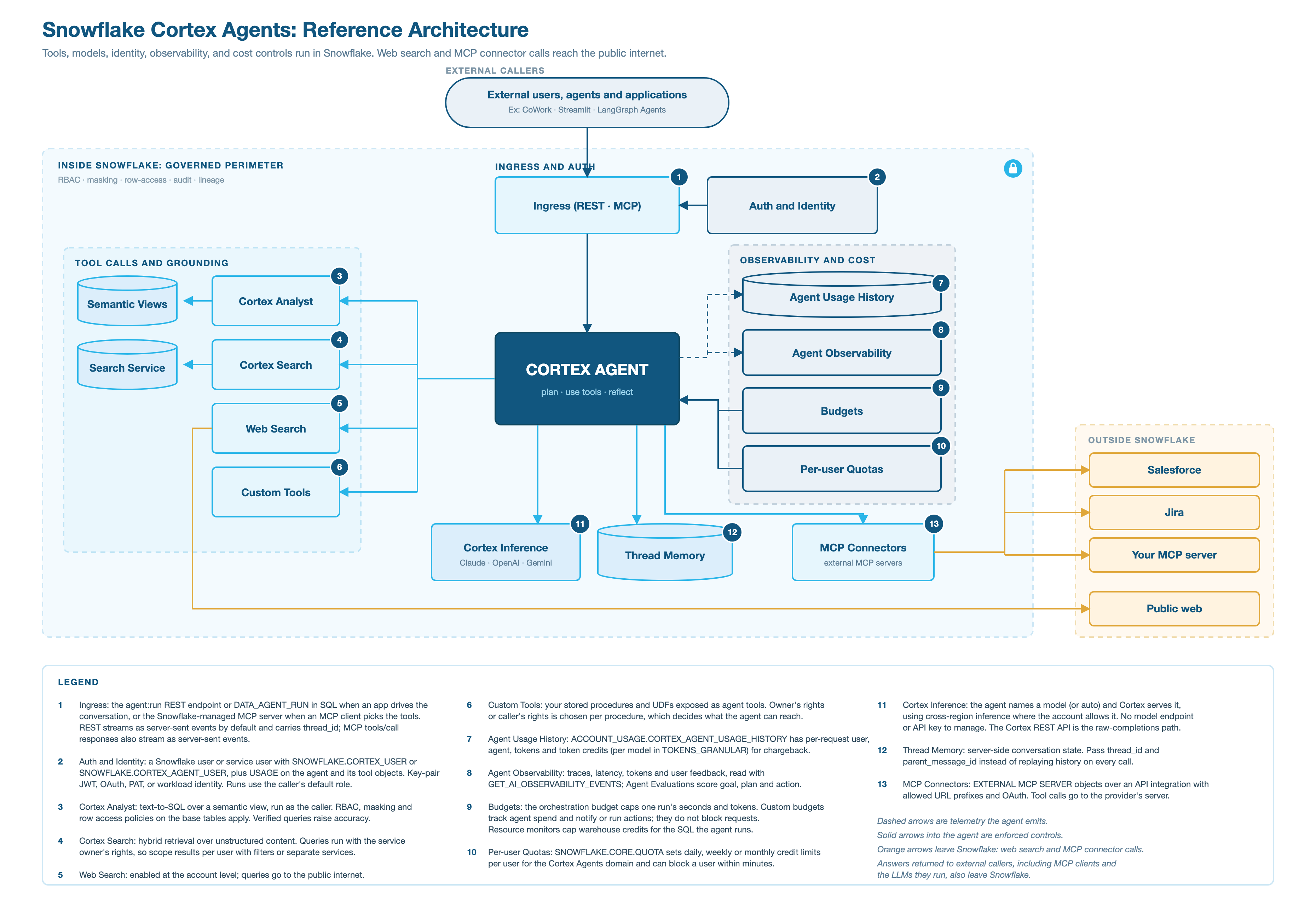
Source: diagrams/cortex-agents-reference-architecture.svg (1860 x 1270). The PNG is a 2x render.
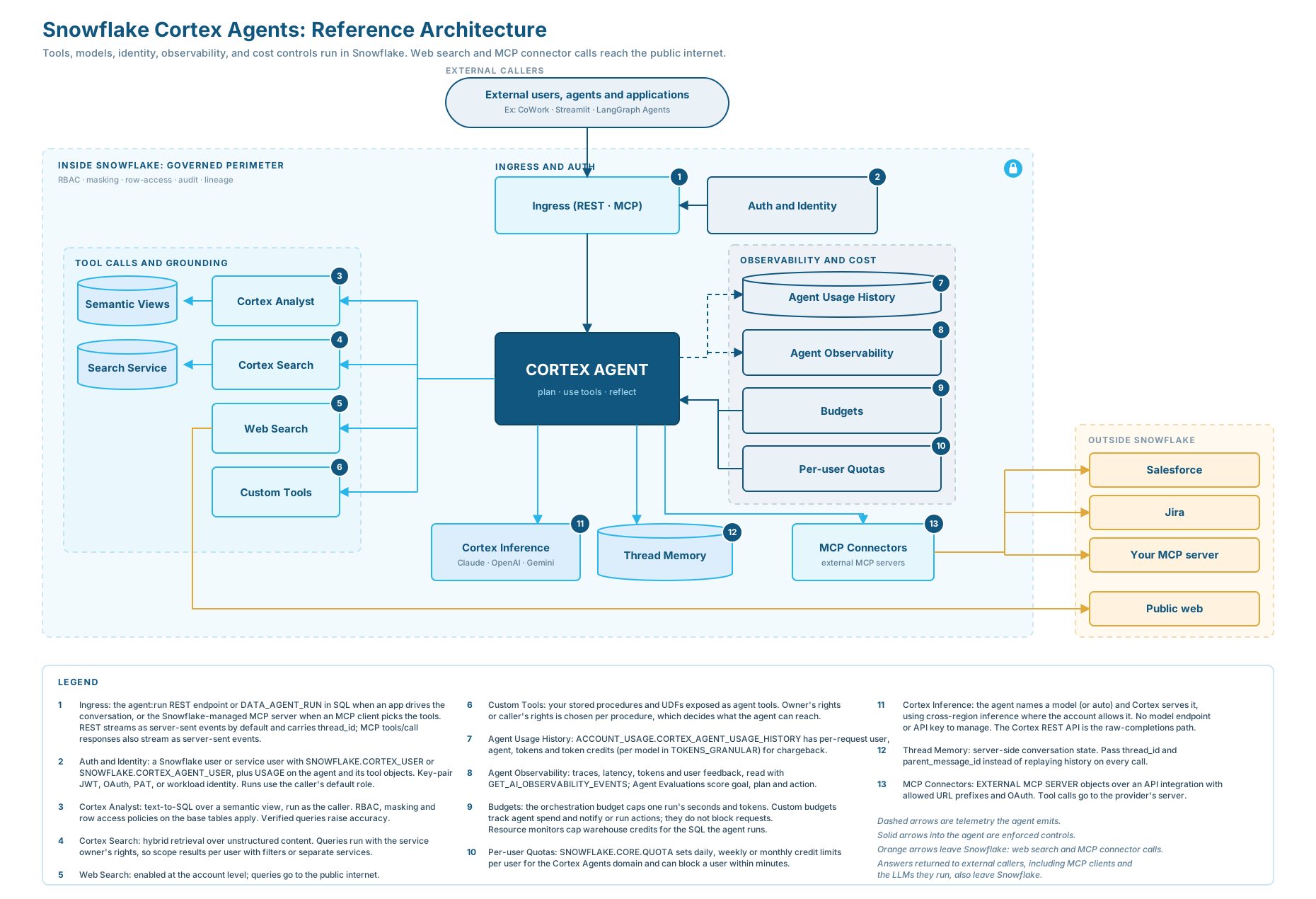
The diagram is hub and spoke, with the agent object at the center. Solid arrows into the agent are enforced controls, dashed arrows are telemetry the agent emits, and orange arrows leave Snowflake.
- The agent is a schema-level object. It bundles the orchestration model, instructions, and tool configuration, carries grants like any other object, and has versions and aliases, so callers never wire models, retrieval, or SQL execution themselves.
- There are three ways in. The REST
agent:runendpoint serves an application that drives the conversation,SNOWFLAKE.CORTEX.DATA_AGENT_RUNserves SQL, tasks, and procedures, and the Snowflake-managed MCP server serves an MCP client that discovers and calls tools itself; MCP or the Agents REST API covers the choice. - Identity is the caller’s. A run uses the calling user’s default role (the REST API can override it with a header), and every tool runs with that role’s privileges unless the tool is defined to run with its owner’s rights. The caller needs the
SNOWFLAKE.CORTEX_USERorSNOWFLAKE.CORTEX_AGENT_USERdatabase role, USAGE on the agent, and privileges on every object its tools use. - Tools decide what the agent can reach. Semantic views, search services, and procedures are the grounding, and an agent with no tools answers only from the model’s general knowledge. Cortex Search queries run with the service owner’s rights, so any role with USAGE on the service sees what the owner indexed.
- Cortex serves the model and holds the conversation. The agent names a model, or
auto, which Cortex serves with cross-region inference where the account’sCORTEX_ENABLED_CROSS_REGIONsetting allows, with no model endpoint or API key to manage. Threads hold conversation state server-side, so callers passthread_idandparent_message_idinstead of replaying history. - Two built-in tool types reach the public internet: web search and MCP connectors. Everything else, including model inference, runs within Snowflake unless you give a custom tool an external access integration, and an answer returned to a caller outside Snowflake leaves with the response.
- Cost and behavior are observable and bounded per run, per agent, and per user. The usage view and monitoring events show what happened, the orchestration budget caps one run, custom budgets track spend without blocking requests, and per-user quotas set credit limits with optional blocking. AI usage and cost attribution turns the usage view into chargeback.
What you build versus what Snowflake provides
| Snowflake provides | You build |
|---|---|
| The orchestration loop, model serving, threads, streaming | The agent specification: instructions, tool descriptions, model choice |
| Cortex Analyst, Cortex Search, web search, code execution | Semantic views with good descriptions, search services over your content |
| Grants, masking, row access policies, owner’s and caller’s rights | The role design and the policies themselves |
| Usage views, monitoring events, evaluations, budgets, quotas | Evaluation datasets, thresholds, and the alerting you act on |
| The managed MCP server and MCP connector objects | The client application, or the external MCP server you connect |
Data movement
| Path | Leaves Snowflake? |
|---|---|
| Model inference for orchestration and tools | No. Served by Cortex; cross-region inference can process the request in another Snowflake region if enabled |
| Cortex Analyst SQL, Cortex Search, custom tools without external access | No |
| Web search | Yes: queries go to the public internet |
| MCP connector tool calls | Yes: arguments go to the provider’s MCP server |
| The answer to any external caller (REST client, MCP client, and any LLM that client runs) | Yes: the response leaves with whatever data it contains |
Govern the last row at the source: what the calling role can read is what can end up in an answer.
Prerequisites
| Requirement | Notes |
|---|---|
| Snowflake Enterprise account | With Cortex AI functions and Cortex Agent evaluations |
| Model access | The lab uses claude-sonnet-4-6 for AI_COMPLETE (set in each script’s SET model); enable cross-region inference if your region does not host it |
| ACCOUNTADMIN, once | For sql/01_setup.sql (role, warehouse, database, CORTEX_USER and USAGE_VIEWER grants, and EXECUTE TASK ON ACCOUNT for the baseline evaluation) and for sql/99_teardown.sql |
| Grants on your own agent, after launch | For sql/04_observability.sql, an account administrator grants the lab role MONITOR on the Phase 1 agent and READ UNREDACTED AI OBSERVABILITY EVENTS TABLE on the account. Without the account privilege the question text in the agent’s monitoring events is redacted, and 04 stops with an error that says so. |
| Snowflake CLI or Snowsight | To run the SQL and upload config/eval_config.yaml |
| The right people | A business owner or PM, an analyst or analytics engineer, a technical lead, and ideally one or two target users |
Quickstart
-
Run
sql/01_setup.sqlas ACCOUNTADMIN. It createsCOOKBOOK_SCOPING_AGENTIC_IMPLEMENTATIONSand grants the lab role to you. -
Run the workshop activities (personas, question brainstorm) using the templates in the Walkthrough.
-
Put your seed questions into
sql/02_question_taxonomy.sqland run it to expand them withAI_COMPLETE. -
Run
sql/03_eval_dataset.sqlto buildEVAL_QUESTIONSand registerSCOPING_EVAL_DATASET. Review every row markedneeds_review. -
When your Phase 1 agent exists, edit
config/eval_config.yamland upload it:--rolematters when your default role is not the lab role: without it the upload runs as the default role, which cannot see the lab database.Then start a baseline run (see Walkthrough).
-
After launch, have an account administrator run the two grants in the header of
sql/04_observability.sql, set itsagent_*variables, and run it to compare real questions with your taxonomy.
Walkthrough
Activity 1: Personas (10 minutes)
Fill one card per persona and pick exactly one for Phase 1.
| Attribute | Example |
|---|---|
| Role | Regional sales manager |
| Decisions they make | Territory allocation, quota adjustments |
| Data literacy | Reads dashboards, does not write SQL |
| Current workflow | Asks the analytics team; answers take about two days |
| Frequency | 5 to 10 questions a week |
| Cost of a wrong answer | A misallocated quota for a quarter |
| Success signal | “I got the answer without filing a ticket” |
Activity 2: Question taxonomy (15 minutes)
Brainstorm 15 to 20 questions the Phase 1 persona would actually type, then tag each one.
| Category | What it is | Primitive | Example |
|---|---|---|---|
| lookup | One fact from structured data | Cortex Analyst | “What was closed-won revenue for the West region between April 1 and June 30, 2024?” |
| aggregation | Comparison or trend across dimensions | Cortex Analyst | “Compare closed-won revenue by product line for July 1 to September 30, 2024.” |
| reasoning | Multi-step, needs interpretation | Cortex Analyst, often with Search | “Why did the Northeast region lose both of its deals between July and September 2024?” |
| policy | Answer lives in documents | Cortex Search | “What is our discount approval process for Enterprise deals?” |
| out_of_scope | The agent must decline | Instructions | “Write a cold outreach email for Woodgrove Bank.” |
The platform on one page shows what each primitive provides, what the team builds for it, and whether its calls leave Snowflake.
Push back on vague questions (“How is business?”) by asking what the person would type on Monday morning. Push back on tool-first thinking by asking which question needs the tool.
Activity 3: Expand the taxonomy with AI_
sql/02_question_taxonomy.sql stores the seeds in SEED_QUESTIONS, then makes one AI_COMPLETE call per category and one per Phase 1 lookup or aggregation question. A JSON schema keeps every response parseable and constrains risk to three values:
The prompt includes the category’s existing examples, so generated questions stay inside the scoped taxonomy. The ALL_QUESTIONS view combines seeds and synthetic questions for the team to review. With the sample seeds, one run produced 11 manual, 15 new, and 12 rephrased questions.
Activity 4: Build and register the evaluation dataset
A Cortex Agent evaluation dataset has two columns: INPUT_QUERY (VARCHAR) and GROUND_TRUTH (VARIANT). Answer correctness reads the ground_truth_output key; other keys are ignored by the system metrics but visible to custom metrics, so sql/03_eval_dataset.sql also stores category, expected_tool, and needs_review.
Where the answer is a known number, the script computes it from the data, so ground truth cannot drift from the table:
For the other Phase 1 questions it drafts a rubric with AI_COMPLETE (what a correct answer must and must not contain, no invented numbers) and sets needs_review = TRUE. Do not gate on drafted rows until a person has read them and, where possible, replaced them with literal values.
The script then registers the dataset. SYSTEM$CREATE_EVALUATION_DATASET uses expected_tools as the mapping key for the ground truth column (the YAML dataset: block uses ground_truth):
The config template config/eval_config.yaml references that dataset, pins a committed agent version, and pins metric versions to v3. The stage that holds it uses a CSV file format with FIELD_DELIMITER = NONE, which evaluations require. Once your agent exists, start a baseline from the LAB schema (evaluations run in the session’s schema):
The role that runs it also needs EXECUTE TASK on the account, which 01_setup.sql grants to the lab role, CREATE TASK and CREATE FILE FORMAT on the schema, which the lab role has as the schema owner, and USAGE and MONITOR on the agent; see the evaluation access requirements in References. The agent CI/CD with dbt recipe turns this baseline into a gate.
Activity 5: Scope multi-tenancy (10 minutes)
Answer these before Phase 1, even if the answer is “single tenant”:
| Question | Why it matters |
|---|---|
| Will more than one group share the agent? | Decides whether row-level filtering is in Phase 1 |
| Do users have Snowflake identities, or only application identities? | Snowflake roles versus application-supplied session attributes |
| Which tables hold tenant-specific rows, and on which column? | The row access policy’s argument |
| Which columns are sensitive? | Masking policies |
| Does the agent use Cortex Search? | A search service queries with its owner’s rights, so the caller’s row access policies do not filter its results; plan per-tenant services or search filters |
The lab’s ENTITLEMENTS table maps an application user to regions without a Snowflake user per person. The application sets an immutable session attribute, and a row access policy reads it with SYS_CONTEXT('SNOWFLAKE$SESSION_ATTRIBUTES', ...). The policy must fail closed: with no attribute, no rows.
Record in the spec that agent evaluations cannot pass session attributes, so a tenant-filtered agent needs a separate test plan. Multi-tenant agents covers the full pattern, including the REST variables payload.
Snowflake CoWork profiles
Profiles are in preview and not yet generally available. A profile is a Cortex Agent that defines what CoWork users see. Like any agent, it can hold semantic views, search services, and tools itself, or route questions to other agents linked to it.
Start with one profile for everyone, with the semantic views, search services, and tools its users need attached directly. Add only what a trigger requires:
| Add | When |
|---|---|
| A linked agent | Another team must own its data, definitions, or instructions; its data must be kept separate; or several profiles share it |
| Another profile | A group of users needs different instructions, skills, or agents, which can’t vary by role; map each user to one profile |
| Neither | Users differ only in data access; use RBAC |
With linked agents, keep their scopes from overlapping, keep views that are joined together in one agent, put generic tools (charting, web search, connectors) on the profile and never the same skill or connector on both layers, and test routing with real questions for each agent before rollout.
The agent spec
Synthesize the activities into one document. Treat it as the contract between the business goal and the build.
A phased plan keeps Phase 1 small:
| Phase | Scope | Exit criteria |
|---|---|---|
| 1. Prove value | One persona, one agent, lookup and aggregation, explicit refusals | Baseline and target scores met on a reviewed dataset; pilot users active |
| 2. Expand coverage | Add policy (Cortex Search) and reasoning | Scores hold on the expanded dataset |
| 3. More personas and tenancy | Add personas, row access policies, masking | Per-tenant test plan passes |
| 4. Harden | Budgets and quotas, CI/CD gate, alerting | Gate in place; spend within budget for a full cycle |
Post-launch: compare real questions with the taxonomy
sql/04_observability.sql does three things for a deployed agent:
-
Summarizes requests and credits by user and surface from
SNOWFLAKE.ACCOUNT_USAGE.CORTEX_AGENT_USAGE_HISTORY(USER_NAME,TOKEN_CREDITS,TOKENS,METADATA:interaction_interface). Rows can take up to about an hour to appear. -
Reads the questions users asked from the agent’s monitoring events. Each turn has one
record_rootspan whoseai.observability.record_root.inputattribute is the user’s message; evaluation runs write the same spans with a run name, so the script keeps only spans without one:The message text is conversation content, so a role sees it only with the
READ UNREDACTED AI OBSERVABILITY EVENTS TABLEaccount privilege. Without it the span is returned with the input attribute removed, so every question is NULL. The script checks for that case and stops with an error instead of reporting 0% real usage for every category. The privilege exposes every conversation the role can monitor, so grant it only to people who may read them. -
Classifies those questions into the taxonomy with
AI_CLASSIFY, using the categories fromSEED_QUESTIONS, and shows the share of each category in the evaluation set next to its share of real usage.
A category that is common in real usage but thin in the evaluation set needs more rows. A category that is out of scope but common is a candidate for the next phase.
Verify
After sql/03_eval_dataset.sql:
The literal rows read, for example, “Closed-won revenue for the West region between April 1 and June 30, 2024 is $4,200,000.00.”
After uploading the config, SELECT $1 FROM @COOKBOOK_SCOPING_AGENTIC_IMPLEMENTATIONS.LAB.EVAL_CONFIGS/eval_config.yaml returns the file one line per row, which confirms the stage format.
Against a deployed agent, sql/04_observability.sql reports how many real-usage turns it found and how many have readable question text, then ends with a table of category, pct_of_eval_set, and pct_of_real_usage.
Gotchas
| Symptom | Cause | Fix |
|---|---|---|
| Ground truth that was right last week is wrong today | Relative dates (“last month”, “this quarter”) | Scope every question to absolute dates |
| The evaluation config cannot be read | The stage has no file format, or a JSON or default CSV format | Use CSV with FIELD_DELIMITER = NONE, as in 01_setup.sql, and keep the YAML uncompressed |
File format 'YAML_FILE_FORMAT' does not exist when reading the stage from another schema | The stage references the format by an unqualified name | Qualify the format name in CREATE STAGE |
START fails because the dataset already exists | The YAML has a dataset: block, which is recreated on every run | Register the dataset once with SYSTEM$CREATE_EVALUATION_DATASET and reference it in source_metadata |
| A v1 metric run fails in a newer account | The v1 judge model is legacy and unavailable to accounts that never used it | Pin version: "v3" for every system metric |
| Scores look good but users are unhappy | Drafted ground truth was never reviewed, or the eval set does not match real usage | Review needs_review rows; compare categories with 04_observability.sql |
| A tenant-filtered agent scores differently from what users see | Evaluations do not pass session attributes | Test tenant filtering separately; keep evaluation to unfiltered data |
04_observability.sql returns no questions | The lab role lacks MONITOR on the agent, there has been no real usage yet, or event attribute names changed | Grant MONITOR; wait for traffic; inspect OBJECT_KEYS(RECORD_ATTRIBUTES) on record_root spans |
04_observability.sql stops with “question text is redacted” | The lab role can read the agent’s monitoring events but not their content | An account administrator grants READ UNREDACTED AI OBSERVABILITY EVENTS TABLE ON ACCOUNT to the lab role, as in the script header |
START fails with “Ensure your role has CREATE TASK ON SCHEMA and EXECUTE TASK ON ACCOUNT” | Evaluation runs are managed by tasks | Run as the lab role, which 01_setup.sql grants EXECUTE TASK ON ACCOUNT and which owns the LAB schema |
| The platform diagram shows an orchestration model the account cannot use | Model availability depends on the account’s cross-region inference scope (CORTEX_ENABLED_CROSS_REGION) | Before the workshop, check which orchestration models the account’s cross-region scope allows |
| A tool you presented turns out to be in preview | Preview status changes; for example, analytical search and the tool selection and execution evaluation metrics are in Public Preview | Check the current status of every tool you plan to mention against the docs before the conversation |
| A customer’s MCP client that parses responses itself mishandles the managed MCP server’s output | tools/call responses stream as server-sent events (since August 20, 2026) | Re-check the current streaming behavior in the MCP docs and test the client against it; see MCP or the Agents REST API |
Teardown
Run sql/99_teardown.sql as ACCOUNTADMIN. It drops the lab database (tables, stage, file format, and dataset), the warehouse, and the role. Dropping the role also removes its EXECUTE TASK grant and any MONITOR or READ UNREDACTED AI OBSERVABILITY EVENTS TABLE grant you gave it.
Adapt this recipe
Keep these, so a customized version keeps the recipe’s security model:
- Least privilege:
ACCOUNTADMINonly for the scripts listed under Privileges; everything else runs as the recipe’s own role. - No grants to
PUBLIC. - Credentials: create keys, tokens, and secrets yourself, in a separate terminal, and read them from environment variables. Never put them in a script or give them to an agent.
- Dynamic SQL, if you add any, uses bind variables or an allowlist of identifiers, never text concatenated from user or model input.
Change these to fit your use case:
- Object names. Rename them in every script, including teardown, then check that teardown still removes everything.
- Roles, personas, and users: map them to your own, each granted no more than the recipe grants.
- Data: point the scripts at your tables instead of the sample data, then run Verify again.
- Models and warehouse sizes.
To have a coding agent adapt it:
Run it with a coding agent
Related skills
agent-studio(bundled): curating an evaluation dataset from production questions, running evaluations, and investigating and optimizing an agent from the results. Use it once the Phase 1 agent exists.cortex-ai-function-studio(bundled): authoring and tuning theAI_COMPLETEandAI_CLASSIFYcalls used in the lab, including custom AI functions if the built-in classification is not accurate enough for your taxonomy.check-agent-access(Snowflake-Labs/coco-skills (https://github.com/Snowflake-Labs/coco-skills)): reads each agent’s live specification, lists every object its tools depend on, and reports which privileges a given role is missing. Use it to check the identity point of The platform on one page against a real agent.
References
- Cortex Agents
- Cortex Agent evaluations
- SYSTEM$CREATE_EVALUATION_DATASET
- EXECUTE_AI_EVALUATION
- AI_COMPLETE structured outputs
- Monitor Cortex Agent requests
- Query a Cortex Search Service
- Cortex Agent versioning
- CREATE AGENT
- Snowflake-managed MCP server
- MCP: Streaming responses for tool calls
- MCP connectors
- Per-user quotas
- Workload identity federation