Online Feature Store (Preview)
This page documents preview features for the Snowflake Online Feature Store, including Postgres-backed online serving, real-time feature views, feature groups, secondary key aggregation, and the REST ingest and query APIs.
Overview of preview features
The following capabilities are available in preview:
| Feature | Description |
|---|---|
| Low latency feature serving | Low-latency online feature serving (10-15ms p50). |
| Real-time feature views | Ingest events in real time and serve updated features with end-to-end freshness of less than two seconds. Includes stream sources, transformations, and backfill. |
| Feature groups | Logically group related features for organization, versioning, and shared lifecycle management. |
approx_count_distinct aggregation | Approximate count of distinct values in a time window, computed efficiently using HyperLogLog. |
| Secondary key aggregation | Query time-windowed aggregations by a primary entity key and get results grouped by a secondary dimension (for example, query by user and get per-offer click counts) in a single request. |
| REST ingest and query API | HTTP endpoints for streaming data ingestion and online feature retrieval. |
snow feature CLI | Declarative workflow for defining and deploying feature store resources for CI/CD. See Feature Development Lifecycle. |
Resources
For a hands-on walkthrough that covers all the features on this page, including code examples, see Online Feature Store quickstart notebook (https://github.com/snowflake-labs/sf-samples/blob/main/samples/ml/feature_store/online_feature_store_postgres_quickstart.ipynb).
Prerequisites
Before using preview features, ensure the following:
-
Install the Snowflake ML Python package:
-
Set up authentication for online feature serving using either a Programmatic Access Token (PAT) or key pair authentication. For details on both methods, see Base URL and authentication. If using a PAT, set it as an environment variable:
Getting started
Follow these steps to set up the Online Feature Store, register feature views, and start serving features.
Initialize the Feature Store
Create the online service
The online service is a managed service that backs online Postgres-based feature views. It provisions a Postgres-backed serving layer for low-latency online reads. You must create it once per Feature Store before registering feature views with online serving enabled.
The create_online_service method takes two arguments: the names of the Snowflake
database roles that act as the producer and consumer for the feature store.
- The producer role can create and operate on feature views. This role needs privileges such as CREATE DYNAMIC TABLE, CREATE VIEW, and OPERATE on objects in the feature store schema.
- The consumer role can read feature views and entities. This role needs privileges such as USAGE on the feature store database and schema, and SELECT on the dynamic tables and views.
These are the same roles you set up when configuring access control for the feature store. For the full list of required privileges and instructions for creating these roles, see Feature Store access control.
The role calling create_online_service must have the CREATE SCHEMA privilege on the Feature
Store database. If your role doesn’t have this privilege, your account administrator can grant it:
The online service takes several minutes to provision on first creation. Poll the status
until it reaches RUNNING:
Note
Tri-Secret Secure accounts: If your account has Tri-Secret Secure enabled, you must
configure Postgres CMK (Customer-Managed Key) before creating the online service. Without
this, you’ll receive the error: SnowparkSQLException: (1304): Postgres CMK setup required for Tri-Secret Secure accounts.
To resolve this, follow the steps in Snowflake Postgres Tri-Secret Secure
to register and activate your CMK, then retry creating the online service.
Batch online feature views
By default, the online store uses a hybrid table. To use Postgres-backed online serving
instead, pass an OnlineConfig with store_type=OnlineStoreType.POSTGRES when
defining the feature view.
The following example creates a batch feature view that passes columns from the source table to the online store. The online store serves the latest row per entity key.
Stream feature views
Stream feature views allow you to ingest events in real time and serve updated
features with near-zero latency. They use a StreamSource to define the event schema
and a StreamConfig to specify the transformation logic and historical backfill data.
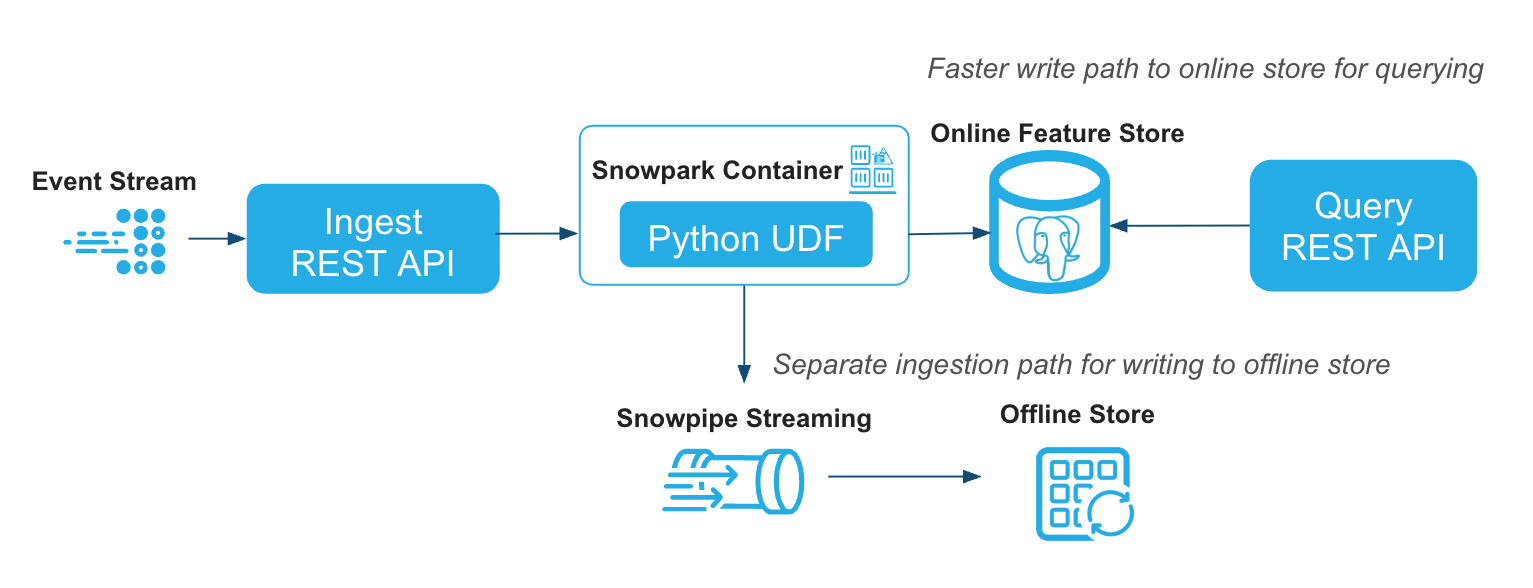
Register a stream source
A StreamSource defines the schema for events that will be ingested in real time.
The column names and types must exactly match what is sent through the REST API.
You can manage stream sources with:
fs.list_stream_sources(): List all registered stream sourcesfs.delete_stream_source(name): Delete a stream sourcefs.ingest(name, records): Ingest a list of records (dicts) into a named stream source
Create a stream feature view
A stream feature view uses a StreamConfig to link a stream source to an optional
transformation function and historical backfill data. The online store serves the
latest row per entity key.
Stream feature view with time-windowed aggregation
You can combine stream ingestion with time-windowed aggregation to compute rolling metrics (such as total spend over 48 hours) that update continuously as new events arrive. For details on defining time-windowed aggregation features, see Time-windowed aggregation features.
To get fresher online features, you can further enable continuous aggregation by setting the feature aggregation method as
FeatureAggregationMethod.CONTINUOUS. This instructs the online service to maintain running aggregates as events arrive
through the Ingest API, rather than periodically re-tiling from the offline store.
Secondary key aggregation
Secondary key aggregation uses an additional column to break down your time-windowed
aggregations into finer-grained groups without changing the entity key you query by.
You can use aggregation_secondary_keys with any feature view that uses time-windowed
aggregation, whether it’s a batch feature view or a stream feature view.
By default, time-windowed aggregations produce a single value per entity key. For
example, a feature view keyed by USER_ID might compute CLICK_COUNT_24H, giving
one click count per user across all activity.
But what if you need those aggregations broken down by a second dimension that you
don’t know ahead of time? Consider a retailer who tracks user clicks on product
offers. They want to know how many times each user clicked on each offer in the past
24 hours. The entity key is USER_ID, and the breakdown column is OFFER_ID.
Without secondary keys, the retailer would need to look up every OFFER_ID
associated with a user and make a separate feature request for each
(USER_ID, OFFER_ID) pair, which is impractical when the set of offer IDs
is large or unknown at request time. The aggregation_secondary_keys
parameter solves this by letting you query with
just the entity key (USER_ID) and get back aggregations grouped by the secondary key
(OFFER_ID) in a single response.
When you set aggregation_secondary_keys, the Feature Store computes each aggregation
independently for every distinct value of the secondary key within the time window.
At query time, you request features using only the entity key, and the response
contains the aggregated values broken down by the secondary key.
For example, querying USER_ID=1234 returns:
| USER_ID | OFFER_ID | CLICK_COUNT_24H |
|---|---|---|
| 1234 | offer_A | 5 |
| 1234 | offer_B | 12 |
| 1234 | offer_C | 1 |
Define a feature view with a secondary key
The entity for the feature view is the primary key you’ll query by (USER_ID). The
aggregation_secondary_keys column (OFFER_ID) must be present in the source
schema but isn’t part of the entity definition. The following example uses a stream
feature view, but the same parameter works with batch feature views that use
time-windowed aggregation.
At query time, a single request for USER_ID=1234 returns one row per OFFER_ID
with the aggregated click counts, without needing to know the offer IDs in advance.
Ingest events with stream ingest
Push new events through the Python SDK. Events are validated against the stream source schema and fanned out to all consuming feature views. You can also ingest events through the REST ingest API.
Query the online store
Use read_feature_view with store_type="online" to look up features for specific
entity keys from the Postgres online store. You can also query features through the
REST query API.
Note
Online reads require authentication (a SNOWFLAKE_PAT environment variable or a
key-pair JWT) and network connectivity to the online service. For details on URL
routing, PrivateLink, and network rules, see
Base URL and authentication.
Retrieval latency performance and benchmarking
The Postgres-backed online store is optimized for low-latency point lookups. You can expect 10-15ms p50 query latency for single-entity key lookups through the REST query API.
Actual latency depends on factors such as the number of features per entity, the number of entity keys per request, network distance between the caller and the online service, and the payload size.
To measure latency in your own environment, we have released a Online Feature Store Benchmark Kit (https://github.com/Snowflake-Labs/snowflake-feature-store-online-benchmark-kit), which provides scripts and instructions for running reproducible latency benchmarks against your online service.
Real-time feature views
Many ML features can’t be precomputed because they depend on information that only exists at the time of request. For example, a fraud model needs the current transaction amount to compare against historical averages. A pricing model needs the live exchange rate to convert a stored balance. A recommendation model needs the user’s current location to weight nearby offers.
Real-time feature views solve this by running a Python function (compute_fn) at
query time rather than precomputing and storing results. When you call
read_feature_view, the online service evaluates the function against the latest
values from upstream feature views together with per-request inputs you provide,
and returns the computed result in the same call.
Common use cases include:
- Features from request-time data: Incorporate values that are only available at inference time, such as the current transaction amount, user GPS coordinates, or device context.
- Derived features from upstream feature views: Combine or transform values from one or more precomputed feature views into new features, such as a risk score that multiplies a transaction amount by a stored fraud probability.
- Post-processing on the fly: Apply null imputation, normalization, unit conversion, or other cleanup to stored feature values before they reach the model.
Author the compute function
The compute function receives pandas DataFrames as input and returns a pandas
DataFrame. The first parameter receives the per-request data (from the
RequestSource), and each subsequent parameter receives the latest feature
values from one of the source feature views. The returned DataFrame must
contain the columns declared in output_schema.
The framework aligns input rows by position: row 0 of every input DataFrame corresponds to the same entity key. You don’t need to handle join keys in the function; they’re added to the output automatically.
The function must be a named function defined at module level or in a notebook
cell. Lambdas and callable classes aren’t supported. The number of parameters
must match the number of entries in RealtimeConfig.sources.
Inside the function, you can use pandas, numpy, re, copy, and Python
built-ins. Other imports aren’t supported and cause an error at registration
time.
Define and register
Wrap the compute function in a RealtimeConfig together with its sources and
the output schema, then attach it to a FeatureView.
The sources list begins with an optional RequestSource (for per-request
input), followed by one or more registered feature views or feature view
slices. Don’t include entity join keys in RequestSource.schema; the server
adds them automatically. Feature groups can’t be used as sources for a
real-time feature view.
Read online
When reading a real-time feature view, pass a request_context DataFrame
with one row per entity key. Each row provides the per-request inputs for
the corresponding key.
Two row-alignment rules apply:
request_contextmust have exactly as many rows as there are entity keys.- Row i of
request_contextis paired withkeys[i], and the result preserves that order.
If a source feature view has no stored value for a requested entity key, the
corresponding DataFrame passed to compute_fn omits that row. Handle
missing values inside the function (for example, with .fillna(0.0)) to
ensure deterministic output.
Real-time feature views don’t have offline storage at the feature view level;
read_feature_view always reads through the online service. To generate a
training set that combines batch and real-time features, see
Feature groups.
Feature groups
Feature Group groups together one or more Feature Views to create a reusable bundle of features that can be used for training and serving. This concept is also known as Feature Service in other feature store platforms.
In production, a model rarely consumes features from a single feature view.
A fraud model might need user profile features from a batch view, recent
transaction aggregations from a stream view, and a derived score from a
real-time view. A feature group bundles these sources into a single
deployable unit that you can use for both training and
serving. Instead of querying each feature view separately, a single read_feature_group
call returns features from all sources in one round-trip. For training,
generate_training_set accepts a feature group so the same set of
features used in production is reproduced exactly in your training
pipeline, reducing training-serving skew.
Note
Feature groups currently require online serving to be enabled with
store_type=OnlineStoreType.POSTGRES on all source feature views.
The output primary key is the union of join keys from all source feature views. When source feature views have different join key granularities (for example, per-user features combined with per-user-per-session features), the coarser source’s values are repeated across the finer-grained keys.
Define and register a feature group
Source feature views must already be registered with online serving enabled and store type set as
OnlineStoreType.POSTGRES. If two source feature views share a
join key column name, both must use the same Snowpark data type for that column.
These constraints are validated at registration time.
The features list accepts full feature views, sliced feature views
(.slice([cols])), or aliased slices (.slice([cols]).with_name(prefix)).
With auto_prefix=True (default), each source feature view’s columns
are prefixed with <fv_name>_<fv_version>_ to avoid name collisions. Set
auto_prefix=False and use .with_name(prefix) per source for shorter,
more readable column names. Each source feature view can appear only once
(by name and version) in a feature group. To include different subsets of
columns from the same feature view, combine them into a single .slice()
call.
Include real-time feature views in a feature group
A feature group can include real-time feature views alongside batch and stream
feature views. When at least one source has a RequestSource, you must pass
a request_context DataFrame at read time.
If two or more real-time feature views in the same group use a request column
with the same name (matched case-insensitively), the columns must have the
same Snowpark data type. The feature group’s request_context schema is the
union of all RequestSource schemas from its real-time sources.
Read a feature group online
Once registered, you can retrieve features from the entire group in a single
call using read_feature_group. The result is a pandas DataFrame with
primary-key columns first, followed by the features from each source view.
For a feature group that contains a real-time feature view with a
RequestSource, supply request_context:
request_context is required if and only if at least one source feature view
is a real-time feature view that declares a RequestSource. The same
row-alignment rules apply as for
Real-time feature views. Feature names that collide with
primary-key columns are removed from the output.
Generate training sets from feature groups
Feature groups can also be used for training, not just online serving. Pass a
feature group to generate_training_set through the feature_group parameter
to reproduce the exact same set of features offline that your model consumes in
production.
If the feature group includes real-time feature views, the spine
DataFrame must contain both the entity join key columns and the columns declared
in each real-time feature view’s RequestSource. The framework evaluates each
compute_fn against the offline source tables and joins the results onto the
spine.
Manage feature groups
Use the FeatureStore methods to manage feature groups:
fs.list_feature_groups(): List all registered feature groups.fs.get_feature_group(name, version): Retrieve a registered feature group.fs.delete_feature_group(name, version): Delete a feature group. You must delete the feature group before deleting any of its source feature views.
approx_count_distinct aggregation
The approx_count_distinct aggregation computes the approximate number of
distinct values within a time window. It uses
HyperLogLog, a probabilistic
algorithm that estimates cardinality with minimal memory overhead. This makes
it well suited for high-cardinality columns (such as user IDs or product IDs)
where maintaining exact distinct counts in real time would be too expensive.
Use the precision parameter to control the trade-off between accuracy and
performance. Higher precision uses more memory but produces more accurate
estimates; lower precision uses less memory and runs faster. Valid values
range from 4 to 21. The default is 8.
The following table shows the
Relative Standard Error
(RSE) for each precision setting. RSE is the typical percentage by which the
estimate deviates from the true distinct count. For example, with the default
precision of 8, the estimate is typically within about 6.5% of the true
value.
| Precision | 4 | 5 | 6 | 7 | 8 | 9 | 10 | 11 | 12 | 13 | 14 | 15 | 16 | 17 | 18 | 19 | 20 | 21 |
|---|---|---|---|---|---|---|---|---|---|---|---|---|---|---|---|---|---|---|
| RSE | 25.7% | 18.2% | 23.0% | 9.16% | 6.49% | 4.59% | 3.24% | 2.30% | 1.62% | 1.15% | 0.81% | 0.57% | 0.41% | 0.29% | 0.20% | 0.14% | 0.10% | 0.07% |
REST API
In addition to the Python SDK, the online service exposes REST endpoints for streaming data ingestion and online feature retrieval. These endpoints enable integration with non-Python applications.
For the complete API specifications, see:
Base URL and authentication
Each online service has ingest and query endpoint URLs. Retrieve them from the online service status:
PrivateLink URL configuration
By default, endpoint_url returns the PrivateLink URL when the account has
PrivateLink enabled. If the account doesn’t have a PrivateLink URL, it uses
SPCS-internal URLs when running inside SPCS, or falls back to the public URL
otherwise. For information about setting up private connectivity, see
Snowpark Container Services private connectivity.
To list all available endpoints (public, PrivateLink, and internal), run:
To override the default URL routing, pass online_service_access when
initializing the Feature Store:
Valid values:
OnlineServiceAccess.PUBLIC: Force the public REST API URL.OnlineServiceAccess.PRIVATELINK: Force the PrivateLink REST API URL.OnlineServiceAccess.INTERNAL: Force the SPCS-internal REST API URL.
All REST requests must include an Authorization header and set
Content-Type: application/json. You can authenticate with either a PAT or
a key pair JWT.
Using a PAT
Ingest API
Send events to one or more stream sources. Each source’s records are validated, then fanned out to all consuming feature views.
Endpoint: POST <ingest_url>/api/v1/ingest
Example:
| Field | Required | Description |
|---|---|---|
records | Yes | A map of stream source name to an array of event records. Each record must match the schema registered for that stream source. |
dry_run | No | When |
include_diagnostics | No | When |
The HTTP response status code indicates whether records were ingested successfully.
Events don’t need to be sent in any particular order. The Ingest API automatically deduplicates records based on the combination of entity key columns and the timestamp column, so sending the same event more than once won’t create duplicate entries in the online store.
Query API
Query features from a feature view. The query endpoint always reads from the online store.
Endpoint: POST <query_url>/api/v1/query
Simple lookup: Retrieve features for one or more entity keys:
| Field | Required | Description |
|---|---|---|
name | Yes | Name of the feature view. |
version | Yes | Version of the feature view. |
object_type | Yes | Must be "feature_view". |
request_rows | Yes | Array of objects, each with an |
features | No | List of feature names to return. If omitted, all features are returned. |
include_diagnostics | No | When true, includes diagnostic information in the response. Default: false. |
Declarative feature management snow feature CLI
The snow feature CLI brings a declarative, infrastructure-as-code workflow to the
Feature Store. Define entities, feature views, and online services in a YAML
manifest, then use snow feature plan and snow feature apply to preview
and deploy changes, similar to tools like Terraform or dbt. Because feature
definitions are plain files, you can check them into version control, review
changes through pull requests, and integrate them into CI/CD pipelines for
automated testing and promotion across environments.
For details on setting up a project, defining features declaratively, and the full command reference, see Feature Development Lifecycle.
Troubleshooting
This section covers common errors you might encounter when working with the Online Feature Store.
Object already exists error on online service creation
If you receive the following error when calling create_online_service():
This indicates a previous online service creation was interrupted or left in a partial state. To resolve, drop the existing online service and recreate it: